---
title: "Capacitor Live Updates: The Complete OTA Guide"
description: The complete guide to Capacitor Live Updates — how OTA updates work, update strategies, code signing, best practices, and a real-world end-to-end example.
date:
created: 2026-05-16
updated: 2026-07-17
authors:
- robingenz
categories:
- Capacitor
- Guides
- SDKs
links:
- Live Update: sdks/capacitor/live-update.md
faq: true
---
# Capacitor Live Updates: The Complete OTA Guide
Shipping a fix used to mean a bundled binary, an app store review, and a few days of hoping users would tap "update". With Capacitor Live Updates that loop shrinks to minutes. You push a new web bundle, devices pick it up on the next launch, and the next version of your app is already in users' hands.
This guide is the long version. We'll walk through how live updates work under the hood, the three choices every team has to make, the security model, the production best practices that keep you out of trouble, and a complete end-to-end example based on a real-world app. Whether you're evaluating live updates for the first time or already shipping them, you should leave with a clear picture of the recommended path and the tradeoffs behind it.
## What Are Capacitor Live Updates?
A Capacitor app has two layers. The native layer is the compiled binary that's installed from the App Store or Google Play. It contains the WebView, the native plugins, and the platform glue. The web layer is everything that runs inside that WebView: your HTML, CSS, JavaScript, and static assets.
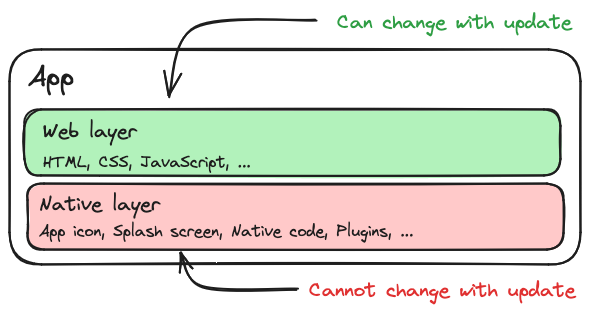
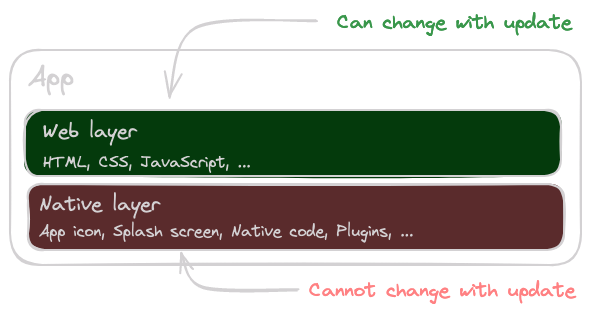
Capacitor App Layers
A live update is an Over-the-Air (OTA) update of the web layer only. The native binary stays untouched. Instead of pushing a new build to the stores, you upload a new web bundle to a delivery service, and the [Capacitor Live Update plugin](../../sdks/capacitor/live-update.md) in your app downloads it, swaps it in, and reloads.
That's the whole idea. Because nothing native changes, you don't need an app store review and you don't need users to take any action.
### Why Use Live Updates?
A few reasons teams reach for them:
- **[Hotfixes in minutes, not days](https://capawesome.io/solutions/hotfixes/){:target="_blank"}.** A critical bug (broken login, wrong API URL, regression in checkout) can be patched before most users notice.
- **Faster feature iteration.** Ship small improvements as soon as they're ready instead of batching them into a monthly native release.
- **Staged rollouts and A/B testing.** Roll a new bundle out to 5% of users, watch the dashboards, then expand. Run different bundles on different channels for beta testers, internal builds, or geographic segments.
- **Smaller user friction.** Users don't have to manually tap "update" in the store, and you're not waiting on whoever postpones store updates for weeks.
### Binary-Compatible vs. Non-Binary-Compatible Changes
You can only update what already exists in the native binary. Changes that don't touch native code are called *binary-compatible*. Anything else needs a real app store release.
| Change | Binary-compatible? | Where it ships |
| ------------------------------------------------- | ------------------ | -------------- |
| HTML, CSS, JavaScript | Yes | Live update |
| Images, fonts, JSON, web-only assets | Yes | Live update |
| Web framework upgrade (Angular, React, Vue, etc.) | Yes | Live update |
| Capacitor or Cordova plugin added or removed | No | App store |
| Capacitor or Cordova plugin major version bump | Usually no | App store |
| Native code (Java/Kotlin/Swift/Objective-C) | No | App store |
| `AndroidManifest.xml`, `Info.plist`, entitlements | No | App store |
| App icon, splash screen | No | App store |
A useful mental model: if your change only modifies files inside your web project (your `src/`, your build output) and doesn't add, remove, or upgrade a Capacitor plugin or any native code or config, it's binary-compatible. We'll come back to this when we talk about versioning, because the most common production bug with live updates is delivering a bundle that depends on a native feature the installed binary doesn't have yet.
### How It Works Under the Hood
The Capacitor WebView doesn't load your HTML from `https://example.com`. It loads it from a local path on disk. Capacitor calls this the *server base path*. By default, that path points to the `public/` folder bundled inside the native app, which is exactly the output of `npm run build` at the time you shipped the binary.
A live update swaps that path:
1. The plugin downloads a new bundle and writes it to a local directory inside the app's sandbox.
2. It updates two values that Capacitor reads: the *current* server path (the one the WebView is using right now) and the *next* server path (the one Capacitor will use on the next app start).
3. On the next launch (or immediately, if you call `reload()`), the WebView loads from the new path instead of the bundled `public/` folder.
On Android, the *next* path lives in `SharedPreferences` under the `CapWebViewSettings` group. On iOS, it's stored in `UserDefaults` via Capacitor's `KeyValueStore` class, with one quirk: only paths under `/Library/NoCloud/ionic_built_snapshots` are valid, and only the last path component matters.
If you want the full deep dive, including how the plugin uses the Capacitor Bridge's `setServerBasePath()` to swap paths at runtime, see [How Live Updates for Capacitor Work Under the Hood](./how-live-updates-for-capacitor-work.md).
### Are Live Updates Compliant With App Store Policies?
Yes. Both Apple and Google explicitly allow downloading and executing code inside a WebView or scripting runtime, which is exactly what live updates do.
**Apple's App Store Review Guidelines** (section 3.3.2) allow downloading interpreted code as long as it (a) doesn't change the primary purpose of the app, (b) doesn't create a store or storefront for other code, and (c) doesn't bypass the system's signing, sandbox, or security features. Web code running in a `WKWebView` checks all three boxes.
**Google Play's Device and Network Abuse policy** forbids apps from modifying or replacing themselves outside of Play, with an explicit exception for "code that is interpreted in a virtual machine or runtime (like JavaScript in a webview or browser)."
App stores draw the line at *native* self-modification. Live updates only touch the web layer, so both policies allow them.
## Wiring It Up
Before any choices, the SDK needs to be installed and connected to Capawesome Cloud. Install the plugin, create a Cloud app, and add it to your Capacitor config.
!!! tip "AI-Assisted Setup"
For a more guided experience, add the [Capawesome skills](../../ai/skills/index.md) to your project with `npx skills add capawesome-team/skills --skill capawesome-cloud` and use the following prompt with your preferred AI coding assistant:
```
Use the `capawesome-cloud` skill from `capawesome-team/skills` to help me set up live updates in my Capacitor app.
```
If you'd rather do it by hand, install the plugin and sync the native projects:
```bash
npm install @capawesome/capacitor-live-update
npx cap sync
```
Then create an app in Capawesome Cloud. The CLI prompts for the organization and app name, and prints the resulting app ID:
```bash
npx @capawesome/cli apps:create
```
Finally, add the plugin to your Capacitor config with the app ID you just got back:
```typescript title="capacitor.config.ts"
const config: CapacitorConfig = {
plugins: {
LiveUpdate: {
appId: '00000000-0000-0000-0000-000000000000',
autoUpdateStrategy: 'background',
autoBlockRolledBackBundles: true,
readyTimeout: 10000
}
}
};
```
For full setup instructions including the Capacitor 6 and 7 variants, see the [Live Updates setup guide](../../cloud/live-updates/setup.md).
## Three Choices to Make
With the SDK installed, three choices shape how live updates behave in your app. Pick a default for each, and you have a production setup.
### Decision 1: Update Strategy
The *strategy* decides when an update is downloaded, when it's applied, and whether the user is involved. It's as much a UX decision as a technical one. Each option trades freshness against friction differently, and the right choice depends on how important it is that users are on the latest code versus how much you're willing to interrupt them to get them there.
The plugin supports four patterns, ranging from "set it once and forget about it" to "fire an update across the install base on demand":
| Strategy | User-visible delay | Network behavior | Use case |
| --------------------------------- | ------------------------- | ---------------------- | ------------------------------------------ |
| **Background** | Next cold start | Lazy, opportunistic | Silent updates between sessions |
| **Always Latest** _(recommended)_ | One prompt after download | Lazy, opportunistic | User is informed and chooses when to apply |
| **Force Update** | Blocks app start | Eager, on every launch | Apps where stale code is genuinely unsafe |
| **Instant** | Fires on push | Reactive, on demand | Critical hotfixes for a live incident |
The sections below walk through each one in turn, with the config and code to wire it up.
#### Background
The simplest option, with zero app-side code. You set it once in your config:
```typescript title="capacitor.config.ts"
plugins: {
LiveUpdate: {
appId: '...',
autoUpdateStrategy: 'background'
}
}
```
The plugin automatically checks for updates on app start and on resume, downloads new bundles in the background, and applies them the next time the app launches. Users get the new version on their next cold start, with no prompts and no waiting. There's a built-in 15-minute minimum between checks so the plugin can't be accidentally turned into a polling loop that drains the battery.
The tradeoff is that the update is invisible. Users won't know a new version exists until the app silently behaves differently on their next session, which can be confusing if something visibly changed. Reach for this strategy when the update doesn't need user attention.
#### Always Latest (Recommended)
Our recommended strategy. You still get the *background* strategy's silent download, but instead of making the user wait for the next cold start, you prompt them to apply the update as soon as it's ready. Users find out when something new is available, and they decide whether to apply it now or keep working with the current version.
You opt in by listening for the `nextBundleSet` event:
```typescript
import { LiveUpdate } from '@capawesome/capacitor-live-update';
LiveUpdate.addListener('nextBundleSet', async ({ bundleId }) => {
if (!bundleId) {
return;
}
const shouldReload = confirm('A new version is available. Install it now?');
if (shouldReload) {
await LiveUpdate.reload();
}
});
```
The download still happens in the background, so the prompt only appears once the bundle is fully on disk. There's no waiting on a network call when the user taps "install". This is the strategy the real-world example later in this guide uses.
#### Force Update
The "user must be on the latest version before they can use the app" strategy. First, disable the Splash Screen's auto-hide so it stays visible while the update check runs:
```typescript title="capacitor.config.ts"
plugins: {
SplashScreen: {
launchAutoHide: false
},
LiveUpdate: {
appId: '...',
autoUpdateStrategy: 'none'
}
}
```
Then on app start, sync, and either reload (if there's a new bundle) or hide the splash (if there isn't):
```typescript
import { LiveUpdate } from '@capawesome/capacitor-live-update';
import { SplashScreen } from '@capacitor/splash-screen';
const { nextBundleId } = await LiveUpdate.sync();
if (nextBundleId) {
await LiveUpdate.reload();
} else {
await SplashScreen.hide();
}
```
This guarantees freshness, but it costs you. Every cold start on a slow connection means the user stares at the splash screen while a multi-megabyte bundle downloads. Reserve it for cases where running a stale version is genuinely unsafe (e.g. some kinds of regulated apps). Always set `autoUpdateStrategy: 'none'` to avoid two update mechanisms running at once.
#### Instant
For genuinely critical updates (a bad bug already in production, a security patch), the fastest path is a silent push notification that tells the app "go check for an update *now*":
```typescript
import { FirebaseMessaging } from '@capacitor-firebase/messaging';
import { LiveUpdate } from '@capawesome/capacitor-live-update';
FirebaseMessaging.addListener('notificationReceived', async ({ data }) => {
if (data?.type !== 'live-update') {
return;
}
const { nextBundleId } = await LiveUpdate.sync();
if (nextBundleId) {
const shouldReload = confirm('Critical update available. Install now?');
if (shouldReload) {
await LiveUpdate.reload();
}
}
});
```
This requires push infrastructure (typically [Capacitor Firebase Cloud Messaging plugin](../../sdks/capacitor/firebase/cloud-messaging.md)) and is meant for the long tail of "someone has the broken bundle open right now, and we need to fix it before they touch checkout." Set `autoUpdateStrategy: 'none'` and don't use this as your default strategy. It's a *break-glass* tool, not an everyday flow.
### Decision 2: Versioning Strategy
This is the decision that prevents the most common production failure: shipping a web bundle that doesn't match the installed native binary.
Picture a user with version 5 of your native app. You ship a new web bundle that calls a method on a plugin you only added in version 6. If that bundle reaches the v5 user, their app crashes on launch, and the only way out is reinstalling from the store.
You prevent this by binding each web bundle to the range of native versions it's compatible with. There are two ways to do it.
#### Versioned Bundles
You attach min/max/equals version ranges to each upload:
```bash
npx @capawesome/cli apps:liveupdates:upload \
--android-min 10 --android-max 12 \
--ios-min 10 --ios-max 12
```
The Cloud only serves the bundle to devices inside the range. Simple, but error-prone: you have to remember the right flags on every upload, and rollouts get awkward because the rollout percentage is calculated over *all* devices in the channel, including ones that can't install the bundle.
#### Versioned Channels (Recommended)
A cleaner pattern: one channel per native version. Bundle uploaded to `production-10` only reaches devices on native version 10, and so on.
The cleanest way to wire this up is at build time, in the native configuration. Then your app code doesn't have to know anything about channels, because Capacitor reads the channel directly from the platform config.
On Android, add a resource value in `android/app/build.gradle`:
```groovy
android {
defaultConfig {
versionCode 60003
resValue "string", "capawesome_live_update_default_channel",
"production-" + defaultConfig.versionCode
}
}
```
On iOS, add a key to `ios/App/App/Info.plist`:
```xml
CapawesomeLiveUpdateDefaultChannelproduction-$(CURRENT_PROJECT_VERSION)
```
Every native release ships pinned to its own channel. Bumping the native version automatically opens a fresh channel for compatible web bundles. No JavaScript-side state to manage.
If you can't use the native config (e.g. you want to switch channels at runtime based on something other than the version code), you can pass the channel inline on every sync. Pass it directly to `sync()` or `fetchLatestBundle()` rather than calling `setChannel()` separately, so the channel selection is always explicit at the call site:
```typescript
import { LiveUpdate } from '@capawesome/capacitor-live-update';
const { versionCode } = await LiveUpdate.getVersionCode();
await LiveUpdate.sync({ channel: `production-${versionCode}` });
```
The real win is safety. Every deployment is addressed to a specific native version by name, so it's much harder to accidentally ship a bundle to a binary that can't run it. There are no version-range flags to remember on each upload, and no way for a typo to push a bundle to devices outside the intended set. For most teams, channels are the right answer.
For the long version, see [How to Restrict Capacitor Live Updates to Native Versions](./how-to-restrict-capacitor-live-updates-to-native-versions.md).
### Decision 3: Update Delivery Method
How is the bundle packaged for transport?
#### Zip (Recommended)
The whole web folder is compressed into a single `.zip` and uploaded:
```bash
npx @capawesome/cli apps:liveupdates:upload --artifact-type zip
```
The device downloads one compressed file and extracts it. This is the default and almost always the right choice. Compression typically halves the size, the download is a single HTTP request, and it works regardless of how your build tool names files.
#### Manifest (Delta Updates)
The alternative is a per-file manifest: each file is uploaded individually, and the device only downloads files whose hash changed since its current bundle.
In theory, this is great for apps that mostly change one or two files between releases. In practice, modern bundlers (Vite, Angular CLI, Webpack 5+, Nuxt, Next-to-static) all use *content-hashed filenames* such as `main.7f3a91c2.js` and `chunk-3a7f2b.js`. The whole point of content hashing is that filenames change whenever content changes, which defeats delta comparison: every file looks new, so every file gets downloaded, and you lose the single-zip compression on top.
We've seen this in the wild. One team's bundle was 20 MB on `manifest` and 9 MB on `zip` for the exact same web output, because the manifest mode couldn't take advantage of compression while their content-hashed filenames defeated the delta comparison. Another team got from 48 MB to 9 MB by switching to zip and dropping source maps. The data is consistent: start on zip, and only consider manifest if you have specific, stable-named, large static assets you know don't change between builds.
For the full breakdown, see [How to Reduce the Bundle Size of Capacitor Live Updates](./how-to-reduce-the-bundle-size-of-capacitor-live-updates.md).
## Security: Code Signing
Live updates run on the same trust model as your native binary: whatever code you ship will execute in your app's context. If someone can replace a bundle in transit (say, on a hostile Wi-Fi network with a forged certificate, or by compromising your delivery server), they get code execution inside your app. Even though the Cloud uses HTTPS, defense in depth matters here.
For the full threat model (what HTTPS already protects, what signing guarantees, and where bundle encryption fits in), read [Capacitor Live Updates: Signing vs Encryption](./capacitor-live-updates-end-to-end-encryption.md).
Code signing closes that gap with two guarantees:
- **Authenticity**: the bundle was produced by someone holding your signing key.
- **Integrity**: the bundle wasn't modified between upload and install.
The mechanism is a standard RSA keypair. You generate a private key and a public key. The private key is used to sign each bundle when you upload it. The public key is embedded in your app config and used to verify the signature of every downloaded bundle before it's applied. If the signature doesn't match, the bundle is rejected.
Generate the keypair with the CLI:
```bash
npx @capawesome/cli apps:liveupdates:generatesigningkey
```
This produces `private.pem` and `public.pem`. Add `private.pem` to your `.gitignore`. Sign every upload by passing the private key:
```bash
npx @capawesome/cli apps:liveupdates:upload --private-key private.pem
```
And add the public key to your Capacitor config (the CLI prints it preformatted, with the line breaks stripped, so you can paste it directly):
```json
{
"plugins": {
"LiveUpdate": {
"publicKey": "-----BEGIN PUBLIC KEY-----MIGfMA0GCSqGSIb3DQEBAQUAA4G...IDAQAB-----END PUBLIC KEY-----"
}
}
}
```
From that point on, your app verifies every downloaded bundle and refuses to apply anything that isn't signed by your private key. We strongly recommend enabling code signing in production, especially if you operate multiple channels or self-host your bundles. For the full setup including key rotation considerations, see [Code Signing](../../cloud/live-updates/code-signing.md).
## Best Practices
Four patterns worth adopting before you ship live updates to production.
### Automatic Rollbacks
Tell the plugin to fall back to the built-in bundle that shipped with the installed native app version if the new one fails to start, and tell it not to retry a bundle that's already failed once.
Two config options do the work:
```json
{
"plugins": {
"LiveUpdate": {
"readyTimeout": 10000,
"autoBlockRolledBackBundles": true
}
}
}
```
`readyTimeout` is the deadline: if your app doesn't call `LiveUpdate.ready()` within this many milliseconds of starting, the plugin assumes the new bundle is broken and reverts to the built-in bundle that shipped with the installed native app version on the next launch. `autoBlockRolledBackBundles` prevents the rollback loop where a broken bundle keeps getting re-downloaded. Once a bundle has triggered a rollback, the device blocks it from ever installing again.
On the app side, call `ready()` as early as you can, typically in your root component's initialization. This is the "I started successfully" signal:
```typescript
import { LiveUpdate } from '@capawesome/capacitor-live-update';
await LiveUpdate.ready();
```
You don't need to wait until your app is fully hydrated. As soon as your bootstrap code has executed without crashing, call `ready()`. The whole mechanism only works if you do.
### Bundle Size Optimization
Bundle size is a user-experience problem: every megabyte is bandwidth on someone's mobile plan and seconds of waiting. It's also a deliverability problem. The bigger the bundle, the more updates fail on flaky connections.
Three optimizations cover most of the wins:
1. **Drop source maps.** They're often 75% of bundle size and they don't belong in production downloads. In Vite, set `build.sourcemap: false`. In Angular, `--source-map=false`. If you need source maps for error tracking, upload them to Sentry or your APM separately instead of shipping them to devices.
2. **Stick with `zip`.** Unless you have specific evidence that delta updates will work for your bundle layout (see Decision 3), zip is smaller in practice.
3. **Move heavy static assets out of the bundle.** Anything large that doesn't *have* to live in the bundle, such as hero images, marketing media, or downloadable PDFs, should be served from a CDN and loaded on demand.
Tree-shaking and minification matter too, but most modern build tools handle them by default. Audit with `rollup-plugin-visualizer` or `webpack-bundle-analyzer` if your bundle is mysteriously large.
For a real-world case study going from 48 MB to 9 MB, see [How to Reduce the Bundle Size of Capacitor Live Updates](./how-to-reduce-the-bundle-size-of-capacitor-live-updates.md).
### Reasonable Update Checks
A pattern we see often:
```typescript
// Don't do this.
setInterval(() => {
LiveUpdate.sync();
}, 60_000);
```
There's no reason to poll. The built-in `autoUpdateStrategy: 'background'` already checks on app start and on resume, with a 15-minute minimum between checks. That's enough freshness for almost every app, and it doesn't burn battery, data, or rate limit.
If you genuinely need to push out an update faster than that, use the Instant strategy with a silent push notification instead of polling.
### Gradual Rollouts
You don't have to release to 100% of users at once. The plugin supports rollouts at the channel level:
```bash
npx @capawesome/cli apps:liveupdates:upload --rollout-percentage 10
```
That bundle reaches 10% of devices on the channel. You watch your error tracking, your crash dashboards, your support inbox (no crash reporting wired up yet? [Crash Reporting in a Capacitor App with Crashlytics](./capacitor-firebase-crashlytics-guide.md) walks through the setup). If things look good, you bump it up:
```bash
npx @capawesome/cli apps:liveupdates:rollout --channel production --percentage 50
```
For high-stakes releases, an even safer pattern is multi-channel rollouts: a dedicated `production-rollout` channel for the new bundle, with the app checking the rollout channel first and falling back to the stable channel:
```typescript
import { LiveUpdate } from '@capawesome/capacitor-live-update';
const { versionCode } = await LiveUpdate.getVersionCode();
const rolloutResult = await LiveUpdate.sync({
channel: `production-rollout-${versionCode}`
});
if (rolloutResult.nextBundleId) {
return;
}
await LiveUpdate.sync({ channel: `production-${versionCode}` });
```
As confidence grows, you copy the same bundle to the stable channel. The plugin recognizes it's the same bundle ID and doesn't re-download anything.
For the deeper dive, see [How to Gradually Roll Out Capacitor Live Updates](./how-to-gradually-roll-out-capacitor-live-updates.md).
## End-to-End Example: A Real-World Setup
Let's put all of this together with a real example. The [DHBW VS app](https://github.com/dhbw-vs/app){:target="_blank"} is the official student app for a German university, a Capacitor app shipping to thousands of students across iOS and Android, maintained by a small team. It uses the full recommended stack:
- **Strategy:** Always Latest, with a background download plus a confirm prompt before applying.
- **Versioning:** Versioned channels via native config, no JS-side state.
- **Delivery:** Zip.
- **Synchronized version codes:** [`commit-and-tag-version`](https://www.npmjs.com/package/commit-and-tag-version){:target="_blank"} bumps `package.json` from conventional commits, and [Capver](./introducing-capver.md) mirrors that version into Android and iOS.
- **Safety:** `autoBlockRolledBackBundles: true`, `readyTimeout: 10000`, `ready()` called at app start.
- **CI/CD:** Two GitHub Actions workflows, one for native releases and one for live updates, both triggered manually via `workflow_dispatch` to keep release timing in the team's hands.
If Capver is new to you, it's a [small open-source CLI from Capawesome](./introducing-capver.md) that mirrors a single semantic version into iOS, Android, and `package.json` so they stay aligned across every release. The mapping is the slightly opaque part: a release tagged `6.0.3` becomes Android `versionCode 60003` and iOS `CURRENT_PROJECT_VERSION 60003`, three two-digit groups for major, minor, and patch. That deterministic mapping is what makes the build-time channel pinning below work without any manual bookkeeping.
The patterns below are excerpts from that codebase. They'd look nearly identical in any other framework. The Angular wrapper is incidental.
### Capacitor Config
The plugin is configured in `capacitor.config.json` with the app ID, the update strategy, and the automatic rollback settings:
```json title="capacitor.config.json"
{
"appId": "de.dhbw.vs.standortapp",
"appName": "DHBW VS",
"webDir": "www",
"plugins": {
"LiveUpdate": {
"appId": "70922e93-0944-48cc-a560-61135ab291ad",
"autoBlockRolledBackBundles": true,
"autoUpdateStrategy": "background",
"readyTimeout": 10000
}
}
}
```
`autoUpdateStrategy: 'background'` sets the update behavior. `autoBlockRolledBackBundles: true` and `readyTimeout: 10000` together implement automatic rollback. There is no `defaultChannel` here, because the channel is set natively, per platform.
### Android
On Android, the channel name is baked into a string resource at build time, derived from the `versionCode`:
```groovy title="android/app/build.gradle"
android {
defaultConfig {
versionCode 60003
versionName "6.0.3"
resValue "string", "capawesome_live_update_default_channel",
"production-" + defaultConfig.versionCode
// ...
}
}
```
Every Android build pins itself to `production-60003`. When `capver` bumps the version code to `60004`, the channel name changes automatically, with no JS code to update.
### iOS
On iOS, the equivalent is a single `Info.plist` key that interpolates the project version:
```xml title="ios/App/App/Info.plist"
CapawesomeLiveUpdateDefaultChannelproduction-$(CURRENT_PROJECT_VERSION)
```
`$(CURRENT_PROJECT_VERSION)` is the iOS equivalent of `versionCode`, and `capver` keeps it in sync with the Android version on every release.
### App Initialization
At startup, the root component calls `ready()` immediately and registers a listener for `nextBundleSet` to prompt the user when a new bundle has been staged. In Angular this lives in the root component's constructor; in React it would be a `useEffect`, in Vue an `onMounted`:
```typescript title="app.component.ts"
private initializeLiveUpdate(): void {
if (!Capacitor.isNativePlatform()) {
return;
}
void LiveUpdate.ready();
LiveUpdate.addListener('nextBundleSet', async event => {
if (!event.bundleId) {
return;
}
const confirmed = confirm('A new version is available. Install it now?');
if (confirmed) {
await LiveUpdate.reload();
}
});
}
```
Two things to notice. First, `ready()` is called unconditionally on app start, before anything else can fail, which is what makes automatic rollback work. Second, the prompt only fires when `event.bundleId` is non-null, which happens once the bundle has been fully downloaded and staged. The user never waits for a network call.
### GitHub Actions
The live update workflow is intentionally minimal. It takes one input, the channel name, and runs one job that builds the web bundle in the cloud and deploys it to that channel.
```yaml title=".github/workflows/live-update.yml"
on:
workflow_dispatch:
inputs:
channel:
description: "Channel name"
required: true
type: string
env:
CAPAWESOME_CLI_VERSION: 4.9.3
CAPAWESOME_CLOUD_APP_ID: 00000000-0000-0000-0000-000000000000
NODE_VERSION: 24
jobs:
deploy-live-update:
name: Deploy Live Update
runs-on: ubuntu-latest
steps:
- uses: actions/setup-node@v4
with:
node-version: ${{ env.NODE_VERSION }}
- name: Authenticate with Capawesome Cloud
run: npx @capawesome/cli@${{ env.CAPAWESOME_CLI_VERSION }} login --token ${{ secrets.CAPAWESOME_CLOUD_TOKEN }}
- name: Create channel
env:
CHANNEL: ${{ inputs.channel }}
run: |
npx @capawesome/cli@${{ env.CAPAWESOME_CLI_VERSION }} apps:channels:create \
--app-id ${{ env.CAPAWESOME_CLOUD_APP_ID }} \
--name "$CHANNEL" \
--ignore-errors
- name: Build and deploy live update
env:
CHANNEL: ${{ inputs.channel }}
run: |
npx @capawesome/cli@${{ env.CAPAWESOME_CLI_VERSION }} apps:builds:create \
--app-id ${{ env.CAPAWESOME_CLOUD_APP_ID }} \
--platform web \
--channel "$CHANNEL" \
--git-ref ${{ github.sha }} \
--yes
```
A few details about this workflow:
- **`workflow_dispatch` instead of auto-on-merge.** Live updates ship when a human says they do. Merging to `main` doesn't trigger a release. The team triggers the workflow when they're ready, with the channel name they want to deploy to. The same dispatch model is used for native releases.
- **`apps:channels:create --ignore-errors` is idempotent.** First deploy to a brand-new native version creates the channel; every deploy after that is a no-op. No conditional logic needed, and unused channels get cleaned up automatically by Capawesome Cloud, so there's nothing to garbage-collect on your side.
- **`apps:builds:create --platform web` builds in the cloud, not on the runner.** The web bundle is built inside Capawesome Cloud, so every deploy uses the same environment, the same Node version, and the same secrets. Local builds and CI builds can't drift apart.
- **Pinning the CLI version.** `@capawesome/cli@4.9.3` is pinned. Workflows are reproducible, and CLI upgrades happen on purpose, not silently.
To deploy a live update for native version 60003, the team triggers the workflow with `production-60003` as the channel. The Cloud builds the bundle from the current `main`, uploads it, and devices on native version 60003 pick it up on their next launch.
For the matching native release workflow (which builds and submits binaries to TestFlight and the Play Store), the [`release.yml`](https://github.com/dhbw-vs/app/blob/main/.github/workflows/release.yml){:target="_blank"} in the same repo is a good companion read.
## Bonus: Video Walkthrough
If you'd rather see the full Capawesome Cloud setup walked through end-to-end, this companion video covers the first deployment, channel setup, and runtime behavior in a real Capacitor project:
## Get Started
You have two paths.
**With an AI agent.** Add the [Capawesome agent skills](./announcing-open-source-ai-agent-skills-for-capacitor.md) to your project and ask Claude Code or Cursor to set up live updates. The `capawesome-cloud` skill walks the agent through everything: creating the Cloud app, installing the SDK, wiring up channels, generating signing keys, and integrating with CI/CD.
**By hand.** Follow the [Live Updates setup guide](../../cloud/live-updates/setup.md). Start with `autoUpdateStrategy: 'background'` plus a `nextBundleSet` listener for the "Always Latest" prompt, versioned channels in your native config, and the rollback options on. That's a production-ready setup in under an hour.
[Try Capawesome Cloud Free](https://capawesome.io){ .md-button .md-button--primary }
## FAQ
### Will Apple or Google reject my app for using live updates?
No, as long as you stay within the web layer. Apple's App Store Review Guidelines (section 3.3.2) explicitly allow downloading interpreted code that doesn't change the app's primary purpose, doesn't create a storefront for other code, and doesn't bypass the system's signing or sandbox. Google Play's Device and Network Abuse policy has an explicit exception for code interpreted in a runtime like a WebView. Live updates only touch HTML, CSS, and JavaScript and never modify native code, so they stay on the compliant side of both policies.
### What actually happens if I ship a web bundle that depends on a native plugin the installed app doesn't have?
The app crashes on launch for anyone on that older native version, and the only fix for an affected user is reinstalling from the store, because the app itself can't start to check for a corrective update. This is why versioned channels exist: pinning each web bundle to the native version range it's compatible with prevents this failure mode entirely, rather than relying on you remembering to add version flags on every upload.
### Which update strategy should I default to if I'm not sure?
Always Latest, per this guide's own recommendation. It downloads updates silently in the background (like the simpler Background strategy) but prompts the user once the bundle is ready, rather than silently applying it on their next cold start. That balance of informed but not disruptive is why it's the default suggested for the real-world example covered later in the guide, and it should cover most apps unless you have a specific reason to reach for Force Update or Instant.
### Should I use delta (manifest) updates to make my bundles smaller?
Usually not, if your build tool uses content-hashed filenames, which Vite, Angular CLI, Webpack 5+, and most modern bundlers do by default. Delta updates only save bandwidth when unchanged files keep the same filename across releases; content hashing means nearly every filename changes on every build, so manifest mode ends up re-downloading everything anyway while losing the compression benefit of a single zip. Start with zip delivery, and only consider manifest if you have large, stable-named static assets that genuinely don't change between releases.
### Is code signing required, or just recommended?
It's not required for live updates to function, but it's strongly recommended for anything in production. Without it, whoever can intercept or replace a bundle in transit (a hostile network, a compromised delivery server) can get arbitrary code running inside your app's context, even over HTTPS. Code signing adds a second, independent guarantee: the app verifies the bundle was signed by your private key before applying it. That matters most if you run multiple channels or self-host bundles.
## Conclusion
Start with the defaults and only deviate when you have a reason to: the Always Latest strategy, versioned channels configured natively, zip delivery, automatic rollback turned on, and code signing before your first production deployment. Rollouts, force updates, push-driven hotfixes and self-hosting are each answers to a specific problem. Adopt one when you hit that problem, not before.
If you want to go deeper from here:
- [Exploring the Capacitor Live Update API](./exploring-the-capacitor-live-update-api.md). A tour of every method the plugin exposes, with code samples for each.
- [How Live Updates for Capacitor Work Under the Hood](./how-live-updates-for-capacitor-work.md). The internals: server paths, platform-specific storage, code signing mechanics, and the App Store compliance story in detail.
- [How to Reduce the Bundle Size of Capacitor Live Updates](./how-to-reduce-the-bundle-size-of-capacitor-live-updates.md). The optimization playbook with a real before-and-after.
- [Capacitor App Updates: The Complete Guide](./capacitor-app-update-guide.md). Pairing live updates with native app store updates for a complete update strategy.
- [From Web App to App Store: The Complete Guide](./11-steps-to-get-your-web-app-on-the-app-store.md). Haven't shipped your app yet? This covers every step from Capacitor setup to store submission and Live Updates setup in one place.
- [Best Live Update Tools for Capacitor](./best-ota-update-tools-for-capacitor.md). Still picking a provider? Capawesome Cloud, [Capgo](https://capawesome.io/alternatives/capgo/){:target="_blank"}, OtaKit, and Appflow compared side by side.
- [Capawesome vs. Capgo: Which Is More Reliable?](./capawesome-cloud-vs-capgo-reliability.md). SLA coverage, status pages, incident history, and what teams report after switching.
Questions, feedback, or war stories from your own live update rollout? Drop into the [Capawesome Discord server](https://discord.gg/VCXxSVjefW){:target="_blank"}. We're always happy to chat. And if you'd like the next deep-dive in your inbox, subscribe to the [Capawesome newsletter](https://capawesome.io/newsletter/){:target="_blank"}.
