---
description: Override the Live Update channel on individual devices with forced channel assignments, now available in the Capawesome Cloud Console and CLI.
title: Forced Channel Assignments for Capawesome Cloud Devices - Capawesome
image: https://capawesome.io/docs/assets/images/social/blog/capawesome-cloud-forced-channel-assignments.png
---

[ Skip to content](#forced-channel-assignments-for-capawesome-cloud-devices) 

[ 🔐 Introducing the **Capacitor Vault** plugin — store secrets behind biometrics or a device passcode.](/blog/announcing-the-capacitor-vault-plugin/) 

* [  SDKs ](/docs/sdks/)
* [  Formbricks ](/docs/sdks/capacitor/formbricks/)
* [  Geocoder ](/docs/sdks/capacitor/geocoder/)
* [  Google Sign-In ](/docs/sdks/capacitor/google-sign-in/)
* [  Grafana Faro ](/docs/sdks/capacitor/grafana-faro/)
* [  libSQL ](/docs/sdks/capacitor/libsql/)
* [  Live Update ](/docs/sdks/capacitor/live-update/)
* [  Managed Configurations ](/docs/sdks/capacitor/managed-configurations/)
* [  Media Session ](/docs/sdks/capacitor/media-session/)
* [  ML Kit ](/docs/sdks/capacitor/mlkit/)
* [  Navigation Bar ](/docs/sdks/capacitor/navigation-bar/)
* [  NFC ](/docs/sdks/capacitor/nfc/)
* [  OAuth ](/docs/sdks/capacitor/oauth/)
* [  Pedometer ](/docs/sdks/capacitor/pedometer/)
* [  Photo Editor ](/docs/sdks/capacitor/photo-editor/)
* [  PostHog ](/docs/sdks/capacitor/posthog/)
* [  Printer ](/docs/sdks/capacitor/printer/)
* [  Purchases ](/docs/sdks/capacitor/purchases/)
* [  RealtimeKit ](/docs/sdks/capacitor/realtimekit/)
* [  Screen Orientation ](/docs/sdks/capacitor/screen-orientation/)
* [  Screenshot ](/docs/sdks/capacitor/screenshot/)
* [  Secure Preferences ](/docs/sdks/capacitor/secure-preferences/)
* [  Speech Recognition ](/docs/sdks/capacitor/speech-recognition/)
* [  Speech Synthesis ](/docs/sdks/capacitor/speech-synthesis/)
* [  Share Target ](/docs/sdks/capacitor/share-target/)
* [  Square Mobile Payments ](/docs/sdks/capacitor/square-mobile-payments/)
* [  SQLite ](/docs/sdks/capacitor/sqlite/)
* [  Superwall ](/docs/sdks/capacitor/superwall/)
* [  Torch ](/docs/sdks/capacitor/torch/)
* [  Vault ](/docs/sdks/capacitor/vault/)
* [  Wifi ](/docs/sdks/capacitor/wifi/)
* [  Zip ](/docs/sdks/capacitor/zip/)
* [  Cordova ](/docs/sdks/cordova/)
* [  Cloud ](/docs/cloud/)
* [  Integrations ](/docs/cloud/live-updates/integrations/)
* Concepts
* Reference
* [  Troubleshooting ](/docs/cloud/live-updates/troubleshooting/)
* [  FAQ ](/docs/cloud/live-updates/faq/)
* [  Native Builds ](/docs/cloud/native-builds/)
* [  Set Up Environments ](/docs/cloud/native-builds/environments/)
* [  Overwrite Native Configurations ](/docs/cloud/native-builds/native-configurations/)
* [  Auto-Increment Build Numbers ](/docs/cloud/native-builds/auto-incrementing-build-numbers/)
* [  Configure the Web Build Script ](/docs/cloud/native-builds/web-build-script/)
* [  Build from a Monorepo ](/docs/cloud/native-builds/monorepo/)
* [  Use pnpm or Yarn ](/docs/cloud/native-builds/package-managers/)
* [  Install Private npm Packages ](/docs/cloud/native-builds/npm-private-registry/)
* [  Override the Java Version ](/docs/cloud/native-builds/override-java-version/)
* [  Custom iOS Provisioning Profiles ](/docs/cloud/native-builds/custom-ios-provisioning-profiles/)
* [  Build without Git ](/docs/cloud/native-builds/build-without-git/)
* [  Access Git Behind a Firewall ](/docs/cloud/native-builds/firewall-access/)
* [  Integrations ](/docs/cloud/native-builds/integrations/)
* Reference
* [  Troubleshooting ](/docs/cloud/native-builds/troubleshooting/)
* [  FAQ ](/docs/cloud/native-builds/faq/)
* [  App Store Publishing ](/docs/cloud/app-store-publishing/)
* [  Submit a Build ](/docs/cloud/app-store-publishing/submit-a-build/)
* [  Submit Automatically After a Build ](/docs/cloud/app-store-publishing/submit-automatically/)
* [  Troubleshooting ](/docs/cloud/app-store-publishing/troubleshooting/)
* [  FAQ ](/docs/cloud/app-store-publishing/faq/)
* [  Automations ](/docs/cloud/automations/)
* [  Reference ](/docs/cloud/automations/reference/)
* [  Troubleshooting ](/docs/cloud/automations/troubleshooting/)
* [  FAQ ](/docs/cloud/automations/faq/)
* [  Assist ](/docs/cloud/assist/)
* [  CLI ](/docs/cloud/cli/)
* APIs and SDKs
* [  Webhooks ](/docs/cloud/webhooks/)
* [  Integrations ](/docs/cloud/integrations/)
* Account
* [  Organization ](/docs/cloud/organizations/)
* [  Two-Factor Enforcement ](/docs/cloud/organizations/two-factor-authentication/)
* [  Audit Logs ](/docs/cloud/organizations/audit-logs/)
* [  Billing ](/docs/cloud/organizations/billing/)
* [  License Keys ](/docs/cloud/license-keys/)
* [  AI ](/docs/ai/)
* [  Insiders ](/docs/insiders/)
* [  Billing & Plans ](/docs/insiders/billing-and-plans/)
* [  FAQ ](/docs/insiders/faq/)
* [  License ](https://capawesome.io/legal/eula/)
* [  Support ](/docs/support/)
* [  Contributing ](/docs/contributing/)
* Contributing code
* [  Code of Conduct ](/docs/contributing/code-of-conduct/)
* [  Questions ](https://docs.github.com/en/discussions/collaborating-with-your-community-using-discussions/participating-in-a-discussion#creating-a-discussion)
* [  Blog ](/blog/)
* Categories

# Forced Channel Assignments for Capawesome Cloud Devices[¶](#forced-channel-assignments-for-capawesome-cloud-devices "Permanent link")

Sometimes you need direct control over which Live Update channel a specific device uses. With forced channel assignments, you can now override the SDK-selected channel on any device — whether you're debugging an issue, testing a new release, or managing a customer's device manually.

[ ![Build and deploy your Capacitor app with Capawesome Cloud](../../assets/external/cloud.capawesome.io/assets/banners/cloud-build-and-deploy-capacitor-apps.69628c3f.png) ](/) 

## What's New[¶](#whats-new "Permanent link")

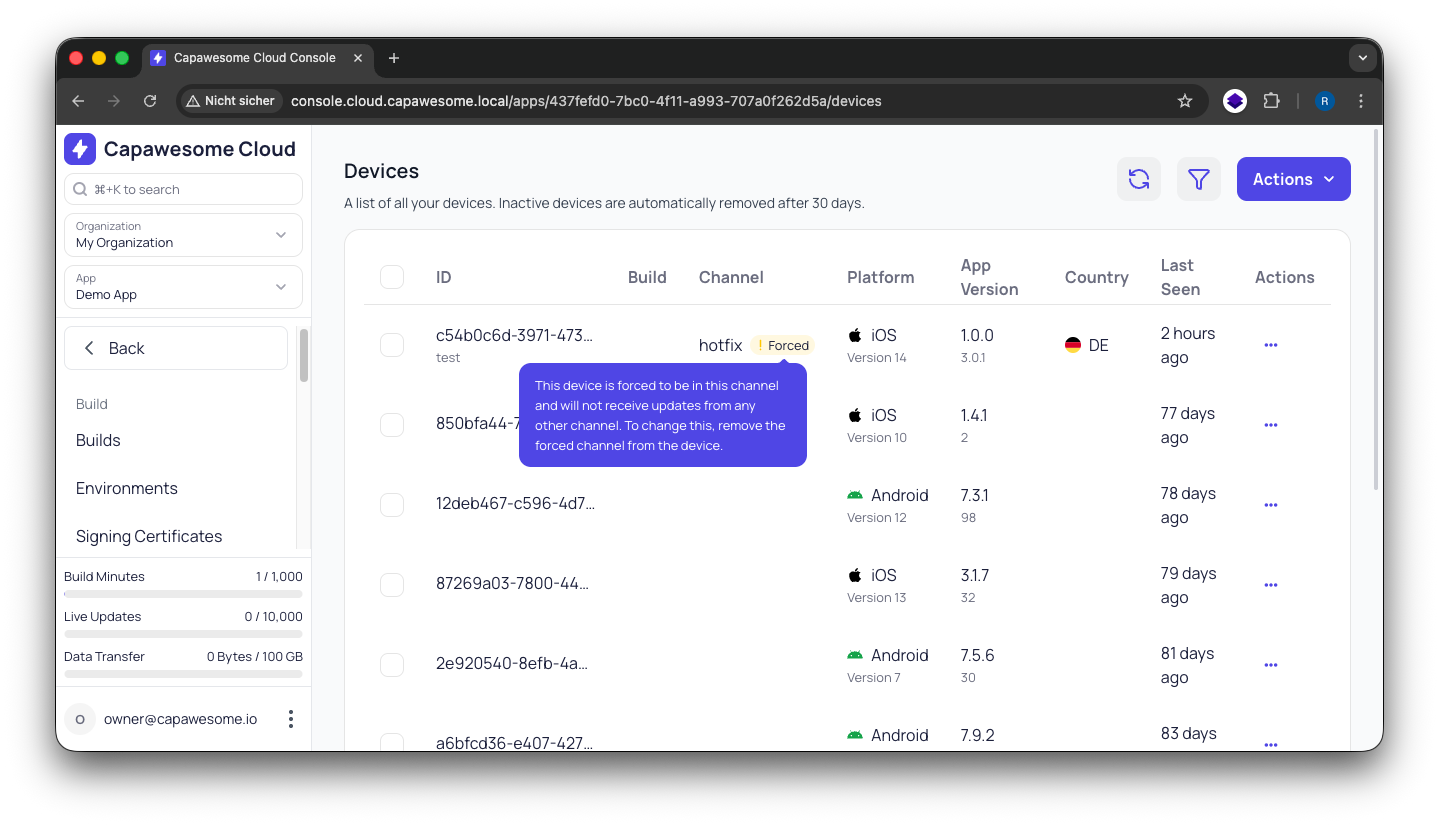
You can now force a specific Live Update channel on individual devices directly from the [Capawesome Cloud Console](https://console.cloud.capawesome.io/) or via the [Capawesome CLI](/docs/cloud/cli/). When a channel is forced on a device, the channel set by the Live Update SDK is ignored and the device receives updates exclusively from the forced channel instead.

You can remove the forced channel at any time to return the device to its normal SDK-driven behavior.
![Capawesome Cloud Devices with Forced Channel](/docs/assets/images/screenshots/cloud-app-devices-forced-channel.png)

## When to Use It[¶](#when-to-use-it "Permanent link")

Forced channel assignments are useful in several scenarios:

* **Debugging and development**: Push a specific device to a `dev` or `beta` channel to test a new bundle before rolling it out to all users.
* **Customer support**: Assign a customer's device to a hotfix channel to deliver a targeted fix without affecting other devices.
* **Manual management**: Take full control over which channel a device uses, independent of what the app itself selects via the SDK.

## How It Works[¶](#how-it-works "Permanent link")

Normally, the Live Update SDK on each device determines which channel to use — either through the default configuration or by calling [setChannel(...)](/docs/sdks/capacitor/live-update/#setchannel) at runtime. When you force a channel on a device, this SDK selection is completely bypassed. The device will only receive updates from the forced channel until you explicitly remove the override.

This means you don't need to make any changes to your app code or deploy a new build. Everything is controlled server-side through Capawesome Cloud.

## Using the CLI[¶](#using-the-cli "Permanent link")

Force a device to use a specific channel:

`[](#%5F%5Fcodelineno-0-1)npx @capawesome/cli apps:devices:forcechannel \
[](#%5F%5Fcodelineno-0-2)    --app-id <app-id> \
[](#%5F%5Fcodelineno-0-3)    --device-id <device-id> \
[](#%5F%5Fcodelineno-0-4)    --channel <channel-name>
`

Remove the forced channel to return to normal SDK behavior:

`[](#%5F%5Fcodelineno-1-1)npx @capawesome/cli apps:devices:unforcechannel \
[](#%5F%5Fcodelineno-1-2)    --app-id <app-id> \
[](#%5F%5Fcodelineno-1-3)    --device-id <device-id>
`

You can find the device ID in the [Capawesome Cloud Console](https://console.cloud.capawesome.io/) on the **Devices** page of your app.

## Get Started[¶](#get-started "Permanent link")

Forced channel assignments are available now for all Capawesome Cloud users. Check out the [Devices](/docs/cloud/live-updates/devices/) documentation for detailed instructions, or try it out in the [Capawesome Cloud Console](https://console.cloud.capawesome.io/) right away.

[Book a Capawesome Cloud Demo](https://cal.com/team/capawesome/cloud-demo)

## Conclusion[¶](#conclusion "Permanent link")

Forced channel assignments give you precise, per-device control over Live Update delivery — without touching your app code. Whether you're debugging on a test device, helping a customer, or simply want to manage channels manually, this feature makes it straightforward.

For more on managing Live Update channels, check out the [Channel Surfing](/blog/capawesome-cloud-channel-surfing/) guide. If you have any questions, feel free to reach out on the [Capawesome Discord server](https://discord.gg/VCXxSVjefW). For the latest updates, subscribe to the [Capawesome newsletter](/newsletter/).

June 8, 2026 

 Back to top 