---
title: "Cordova Live Updates: A Complete Guide to OTA Updates"
description: The complete guide to Cordova Live Updates — how OTA updates work, update strategies, code signing, best practices, and a real-world end-to-end example.
date:
created: 2026-06-09
updated: 2026-09-22
authors:
- robingenz
categories:
- Cordova
- Guides
- SDKs
links:
- Live Update: sdks/cordova/live-update.md
faq: true
---
# Cordova Live Updates: A Complete Guide to OTA Updates
For most Cordova apps, the day-to-day changes (a copy fix, a styling tweak, a bug in the JavaScript) live entirely in the web assets. Shipping one has traditionally meant rebuilding the native binary, resubmitting to the App Store and Google Play, and waiting out review before anyone sees it. Cordova Live Updates skip that round trip. You publish a new web bundle, and devices download and apply it on their next launch, usually within minutes, without a store submission in the loop.
This guide covers the whole picture: how an over-the-air update moves through a Cordova app, the three decisions that shape your setup, how code signing protects the bundle in transit, the practices that keep production rollouts boring, and a working example you can clone today. It assumes you're either replacing Appflow's live updates or adding OTA delivery to a Cordova app for the first time.
## What Are Live Updates?
A Cordova app has two layers. The native layer is the compiled binary that's installed from the App Store or Google Play. It contains the WebView, the Cordova plugins, and the platform glue. The web layer is everything that runs inside that WebView: your HTML, CSS, JavaScript, and static assets.
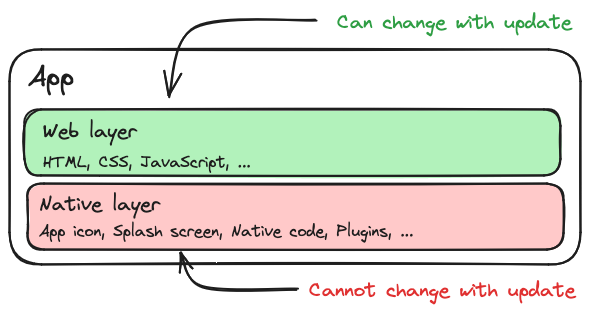
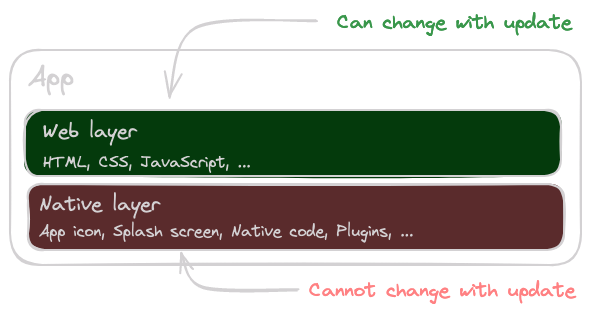
Cordova App Layers
A live update is an Over-the-Air (OTA) update of the web layer only. The native binary stays untouched. Instead of pushing a new build to the stores, you upload a new web bundle to a delivery service, and the [Cordova Live Update plugin](../../sdks/cordova/live-update.md) in your app downloads it, swaps it in, and reloads.
Because nothing native changes, you don't need an app store review and you don't need users to take any action.
### Why Use Live Updates?
Over-the-air updates earn their place in a Cordova workflow for a handful of concrete reasons:
- **Patch production without an app review.** Fixes for a broken login, a wrong endpoint, or a checkout regression reach users in minutes instead of sitting in a review queue for days.
- **Release on your own cadence.** Ship a small improvement the moment it's ready rather than bundling it into the next native submission.
- **Roll out gradually and experiment.** Send a bundle to a slice of your install base first, watch your dashboards, then widen it. You can also run separate bundles for beta, internal, and regional audiences.
- **Skip the manual-update gap.** You're no longer waiting on users who leave store updates switched off for weeks before they see your latest code.
### Binary-Compatible vs. Non-Binary-Compatible Changes
You can only update what already exists in the native binary. Changes that don't touch native code are called *binary-compatible*. Anything else needs a real app store release.
| Change | Binary-compatible? | Where it ships |
| ------------------------------------------------- | ------------------ | -------------- |
| HTML, CSS, JavaScript | Yes | Live update |
| Images, fonts, JSON, web-only assets | Yes | Live update |
| Web framework upgrade (Angular, React, Vue, etc.) | Yes | Live update |
| Cordova plugin added or removed | No | App store |
| Cordova plugin major version bump | Usually no | App store |
| Native code (Java/Kotlin/Swift/Objective-C) | No | App store |
| `AndroidManifest.xml`, `Info.plist`, entitlements | No | App store |
| App icon, splash screen | No | App store |
A useful mental model: if your change only modifies files inside your web project (your `www/` output) and doesn't add, remove, or upgrade a Cordova plugin or any native code or config, it's binary-compatible. We'll come back to this when we talk about versioning, because the most common production bug with live updates is delivering a bundle that depends on a native feature the installed binary doesn't have yet.
### How Do Cordova Live Updates Work Under the Hood?
A Cordova WebView doesn't load your app from `https://example.com`. It loads it from a local origin served out of the app bundle: `https://localhost/` on Android (via `WebViewAssetLoader`) and `app://localhost/` on iOS (via `WKURLSchemeHandler`). By default, that content is the `www/` folder bundled inside the native app, which is exactly the output of your web build at the time you shipped the binary.
A live update swaps the folder those requests are served from:
1. The plugin downloads a new bundle and writes it to a local directory inside the app's sandbox.
2. It records that bundle as the *next* bundle to use.
3. On the next launch, or immediately if you call `reload()`, the WebView serves your app from the new bundle instead of the built-in `www/` folder.
The plugin works with the stock Cordova WebView. Unlike Appflow's live update plugin, it does not require `cordova-plugin-ionic-webview`. It hooks into Cordova's official scheme handlers on `cordova-android` 10+ and `cordova-ios` 6+, so there's nothing extra to install on the native side. The one thing to avoid is forcing the legacy file scheme. Setting `AndroidInsecureFileModeEnabled` to `true` or `Scheme` to `file` bypasses the handlers the plugin relies on, and updates won't apply.
[Ionic officially recommends Capawesome](https://ionic.io/blog/%f0%9f%9a%80-announcing-a-partnership-with-capawesome){:target="_blank"} as its preferred migration partner for Appflow. Read [Announcing Our Official Partnership with Ionic](./announcing-partnership-with-ionic.md) for the details.
### Are Live Updates Compliant With App Store Policies?
Yes. The reason is built into how both stores define the rule. Each one explicitly carves out interpreted code running inside a WebView, which is precisely what a live update ships.
On the Apple side, App Store Review Guideline 3.3.2 permits downloading interpreted code provided it doesn't change the app's primary purpose, doesn't turn the app into a storefront for other code, and doesn't work around the platform's sandbox or signing. JavaScript executing in a `WKWebView` clears all three conditions.
Google is just as explicit. Its Device and Network Abuse policy bans apps that replace or modify themselves outside of Google Play, then names an exception for "code that is interpreted in a virtual machine or runtime (like JavaScript in a webview or browser)."
Both stores object to *native* self-modification, not to refreshing web content. A live update never touches the native binary, so it stays well inside the rules.
## Wiring It Up
Before any choices, the plugin needs to be installed and connected to Capawesome Cloud. First, create an app in Capawesome Cloud. The CLI prompts for the organization and app name, and prints the resulting app ID:
```bash
npx @capawesome/cli apps:create --type cordova
```
Then install the plugin, passing the app ID you just got back as a variable:
```bash
cordova plugin add @capawesome/cordova-live-update --variable APP_ID=00000000-0000-0000-0000-000000000000
```
You configure the rest of the plugin through preferences in your `config.xml`. The `background` strategy checks for updates on launch and resume and applies them on the next start, while `READY_TIMEOUT` together with `AUTO_BLOCK_ROLLED_BACK_BUNDLES` enables automatic rollback:
```xml
```
For full setup instructions, including the self-hosting and runtime configuration options, see the [Live Updates setup guide](../../cloud/live-updates/setup.md).
## Three Choices to Make
With the plugin installed, three choices shape how live updates behave in your app. Pick a default for each, and you have a production setup.
### Decision 1: Update Strategy
The *strategy* decides when an update is downloaded, when it's applied, and whether the user is involved. It's as much a UX decision as a technical one. Each option trades freshness against friction differently, and the right choice depends on how important it is that users are on the latest code versus how much you're willing to interrupt them to get them there.
The `AUTO_UPDATE_STRATEGY` preference has two values, `background` and `none`. Around those two, you can build four patterns ranging from "set it once and forget about it" to "fire an update across the install base on demand":
| Pattern | User-visible delay | Network behavior | Use case |
| --------------------------------- | ------------------------- | ---------------------- | ------------------------------------------ |
| **Background** | Next cold start | Lazy, opportunistic | Silent updates between sessions |
| **Always Latest** _(recommended)_ | One prompt after download | Lazy, opportunistic | User is informed and chooses when to apply |
| **Force Update** | Blocks app start | Eager, on every launch | Apps where stale code is genuinely unsafe |
| **Instant** | Fires on push | Reactive, on demand | Critical hotfixes for a live incident |
The sections below walk through each one in turn, with the config and code to wire it up.
#### Background
The simplest option, with zero app-side code. You set it once in `config.xml`:
```xml
```
With this preference set, the plugin automatically checks for updates on app start and on resume, downloads new bundles in the background, and applies them the next time the app launches. Users get the new version on their next cold start, with no prompts and no waiting. There's a built-in 15-minute minimum between checks so the plugin can't be accidentally turned into a polling loop that drains the battery.
The tradeoff is that the update is invisible. Users won't know a new version exists until the app silently behaves differently on their next session, which can be confusing if something visibly changed. Reach for this pattern when the update doesn't need user attention.
#### Always Latest (Recommended)
Our recommended pattern. You keep the `background` strategy's silent download, but instead of making the user wait for the next cold start, you prompt them to apply the update as soon as it's ready. Users find out when something new is available, and they decide whether to apply it now or keep working with the current version.
You opt in by listening for the `nextBundleSet` event once Cordova is ready:
```javascript
document.addEventListener("deviceready", () => {
cordova.plugins.LiveUpdate.addListener("nextBundleSet", async ({ bundleId }) => {
if (!bundleId) {
return;
}
const shouldReload = confirm("A new version is available. Install it now?");
if (shouldReload) {
await cordova.plugins.LiveUpdate.reload();
}
});
});
```
The download still happens in the background, so the prompt only appears once the bundle is fully on disk. There's no waiting on a network call when the user taps "install". This is the pattern the end-to-end example later in this guide uses.
#### Force Update
The "user must be on the latest version before they can use the app" pattern. First, stop the splash screen from auto-hiding so it stays visible while the update check runs, and turn off the automatic strategy so you're in full control:
```xml
```
Then on `deviceready`, sync and either reload (if there's a new bundle) or hide the splash screen (if there isn't):
```javascript
document.addEventListener("deviceready", async () => {
const { nextBundleId } = await cordova.plugins.LiveUpdate.sync();
if (nextBundleId) {
await cordova.plugins.LiveUpdate.reload();
} else {
navigator.splashscreen.hide();
}
});
```
This guarantees freshness, but it costs you. Every cold start on a slow connection means the user stares at the splash screen while a multi-megabyte bundle downloads. Reserve it for cases where running a stale version is genuinely unsafe (e.g. some kinds of regulated apps). Always set `AUTO_UPDATE_STRATEGY` to `none` here to avoid two update mechanisms running at once.
#### Instant
For genuinely critical updates (a bad bug already in production, a security patch), the fastest path is a silent push notification that tells the app "go check for an update *now*". With a push plugin such as `cordova-plugin-firebasex` wired up, the handler is small:
```javascript
push.on("notification", async (data) => {
if (data.additionalData?.type !== "live-update") {
return;
}
const { nextBundleId } = await cordova.plugins.LiveUpdate.sync();
if (nextBundleId) {
const shouldReload = confirm("Critical update available. Install now?");
if (shouldReload) {
await cordova.plugins.LiveUpdate.reload();
}
}
});
```
This requires push infrastructure and is meant for the long tail of "someone has the broken bundle open right now, and we need to fix it before they touch checkout." Set `AUTO_UPDATE_STRATEGY` to `none` and don't use this as your default pattern. It's a *break-glass* tool, not an everyday flow.
### Decision 2: Versioning Strategy
This decision prevents the most common production failure: shipping a web bundle that doesn't match the installed native binary.
Picture a user with version 5 of your native app. You ship a new web bundle that calls a method on a Cordova plugin you only added in version 6. If that bundle reaches the v5 user, their app breaks on launch, and the only way out is reinstalling from the store.
You prevent this by binding each web bundle to the range of native versions it's compatible with. There are two ways to do it.
#### Versioned Bundles
You attach min/max version ranges to each upload:
```bash
npx @capawesome/cli apps:liveupdates:upload \
--android-min 10 --android-max 12 \
--ios-min 10 --ios-max 12
```
The Cloud only serves the bundle to devices inside the range. Simple, but error-prone: you have to remember the right flags on every upload, and rollouts get awkward because the rollout percentage is calculated over *all* devices in the channel, including ones that can't install the bundle.
#### Versioned Channels (Recommended)
A cleaner pattern: one channel per native version. A bundle uploaded to `production-10` only reaches devices on native version 10, and so on. Every native release ships pinned to its own channel, so bumping the native version automatically opens a fresh channel for compatible web bundles.
For the simplest single-channel case, you can set a fixed channel in `config.xml`:
```xml
```
To pin each native version to its own channel, read the version code at runtime and pass the `channel` to `sync()` rather than calling `setChannel()` separately, so the channel selection is always explicit at the call site:
```javascript
const { versionCode } = await cordova.plugins.LiveUpdate.getVersionCode();
await cordova.plugins.LiveUpdate.sync({ channel: `production-${versionCode}` });
```
Every deployment is addressed to a specific native version by name, so it's much harder to accidentally ship a bundle to a binary that can't run it. There are no version-range flags to remember on each upload, and no way for a typo to push a bundle to devices outside the intended set. For most teams, channels are the right answer.
### Decision 3: Update Delivery Method
How is the bundle packaged for transport?
#### Zip (Recommended)
The whole web folder is compressed into a single `.zip` and uploaded:
```bash
npx @capawesome/cli apps:liveupdates:upload --artifact-type zip
```
The device downloads one compressed file and extracts it. This is the default and almost always the right choice. Compression typically halves the size, the download is a single HTTP request, and it works regardless of how your build tool names files.
#### Manifest (Delta Updates)
The alternative is a per-file manifest: each file is uploaded individually, and the device only downloads files whose hash changed since its current bundle.
In theory, this is great for apps that mostly change one or two files between releases. In practice, modern bundlers (Vite, Angular CLI, Webpack 5+) all use *content-hashed filenames* like `main.7f3a91c2.js`, `chunk-3a7f2b.js`, and so on. The whole point of content hashing is that filenames change whenever content changes, which defeats delta comparison: every file looks new, so every file gets downloaded, and you lose the single-zip compression on top.
Start on zip, and only consider manifest if you have specific, stable-named, large static assets you know don't change between builds.
## Security: Code Signing
Live updates run on the same trust model as your native binary: whatever code you ship will execute in your app's context. If someone can replace a bundle in transit (say, on a hostile Wi-Fi network with a forged certificate, or by compromising your delivery server), they get code execution inside your app. Even though the Cloud uses HTTPS, defense in depth matters here.
Code signing closes that gap with two guarantees:
- **Authenticity.** The bundle was produced by someone holding your signing key.
- **Integrity.** The bundle wasn't modified between upload and install.
The mechanism is a standard RSA keypair. You generate a private key and a public key. The private key signs each bundle when you upload it. The public key is embedded in your app config and used to verify the signature of every downloaded bundle before it's applied. If the signature doesn't match, the bundle is rejected.
Generate the keypair with the CLI:
```bash
npx @capawesome/cli apps:liveupdates:generatesigningkey
```
This produces `private.pem` and `public.pem`. Add `private.pem` to your `.gitignore`, then sign every upload by passing the private key:
```bash
npx @capawesome/cli apps:liveupdates:upload --private-key private.pem
```
Finally, add the public key to your `config.xml` via the `PUBLIC_KEY` preference (the CLI prints it preformatted, with the line breaks stripped, so you can paste it directly):
```xml
```
From that point on, your app verifies every downloaded bundle and refuses to apply anything that isn't signed by your private key. We strongly recommend enabling code signing in production, especially if you operate multiple channels or self-host your bundles. For the full setup including key rotation considerations, see [Code Signing](../../cloud/live-updates/code-signing.md).
## Best Practices
Four patterns worth adopting before you ship live updates to production.
### Automatic Rollbacks
Tell the plugin to fall back to the built-in bundle that shipped with the installed native app version if the new one fails to start, and tell it not to retry a bundle that's already failed once.
Two preferences do the work:
```xml
```
`READY_TIMEOUT` is the deadline: if your app doesn't call `ready()` within this many milliseconds of starting, the plugin assumes the new bundle is broken and reverts to the built-in bundle that shipped with the installed native app version on the next launch. `AUTO_BLOCK_ROLLED_BACK_BUNDLES` prevents the rollback loop where a broken bundle keeps getting re-downloaded. Once a bundle has triggered a rollback, the device blocks it from ever installing again. Note that `AUTO_BLOCK_ROLLED_BACK_BUNDLES` has no effect unless `READY_TIMEOUT` is greater than `0`.
On the app side, call `ready()` as early as you can, right after `deviceready` fires. This is the "I started successfully" signal:
```javascript
document.addEventListener("deviceready", async () => {
await cordova.plugins.LiveUpdate.ready();
});
```
You don't need to wait until your app is fully hydrated. As soon as your bootstrap code has executed without crashing, call `ready()`. The whole mechanism only works if you do.
### Bundle Size Optimization
Bundle size is a user-experience problem: every megabyte is bandwidth on someone's mobile plan and seconds of waiting. It's also a deliverability problem. The bigger the bundle, the more updates fail on flaky connections.
Three optimizations cover most of the wins:
1. **Drop source maps.** They're often the majority of bundle size and they don't belong in production downloads. If you need source maps for error tracking, upload them to your error-tracking service separately instead of shipping them to devices.
2. **Stick with `zip`.** Unless you have specific evidence that delta updates will work for your bundle layout (see Decision 3), zip is smaller in practice.
3. **Move heavy static assets out of the bundle.** Anything large that doesn't *have* to live in the bundle (hero images, marketing media, downloadable PDFs) should be served from a CDN and loaded on demand.
Tree-shaking and minification matter too, but most modern build tools handle them by default. Audit with a bundle visualizer if your output is mysteriously large.
### Reasonable Update Checks
A pattern we see often:
```javascript
// Don't do this.
setInterval(() => {
cordova.plugins.LiveUpdate.sync();
}, 60_000);
```
There's no reason to poll. The built-in `background` strategy already checks on app start and on resume, with a 15-minute minimum between checks. That's enough freshness for almost every app, and it doesn't burn battery, data, or rate limit.
If you genuinely need to push out an update faster than that, use the Instant pattern with a silent push notification.
### Gradual Rollouts
You don't have to release to 100% of users at once. The plugin supports rollouts at the channel level:
```bash
npx @capawesome/cli apps:liveupdates:upload --rollout-percentage 10
```
That bundle reaches 10% of devices on the channel. You watch your error tracking, your crash dashboards, and your support inbox. If things look good, you bump it up:
```bash
npx @capawesome/cli apps:liveupdates:rollout --channel production --percentage 50
```
As confidence grows, you take it to 100%. If something looks wrong at any point, you stop the rollout before it reaches most of your users.
## End-to-End Example: A Real-World Setup
Let's put all of this together. The official [Cordova Live Update Demo app](https://github.com/capawesome-team/cordova-live-update-demo){:target="_blank"} is a small, dependency-free Cordova app that shows the plugin downloading and applying an over-the-air bundle on a real device. You can clone it, point it at your own Capawesome Cloud app, and watch a live update land. The patterns below are the recommended production setup, drawn from that demo.
### config.xml
The plugin is configured through preferences with the app ID, the update strategy, and the automatic rollback settings:
```xml
```
`AUTO_UPDATE_STRATEGY` set to `background` checks for updates on app start and on resume. `AUTO_BLOCK_ROLLED_BACK_BUNDLES` and `READY_TIMEOUT` together implement automatic rollback.
### App Initialization
At startup, the app waits for `deviceready`, calls `ready()` immediately, and registers a listener for `nextBundleSet` to prompt the user when a new bundle has been staged:
```javascript
document.addEventListener("deviceready", async () => {
const LiveUpdate = cordova.plugins.LiveUpdate;
await LiveUpdate.ready();
LiveUpdate.addListener("nextBundleSet", async ({ bundleId }) => {
if (!bundleId) {
return;
}
const shouldReload = confirm("A new version is available. Install it now?");
if (shouldReload) {
await LiveUpdate.reload();
}
});
});
```
Two things to notice. First, `ready()` is called unconditionally right after `deviceready`, before anything else can fail. That is what makes automatic rollback work. Second, the prompt only fires when `bundleId` is non-null, which happens once the bundle has been fully downloaded and staged. The user never waits for a network call.
### Inspecting the Current State
The plugin also exposes everything you need to show the current state in your UI, which is handy for a settings or "about" screen. The demo reads the version name, current bundle, channel, and device ID in one pass:
```javascript
const [version, bundle, channel, device] = await Promise.all([
LiveUpdate.getVersionName(),
LiveUpdate.getCurrentBundle(),
LiveUpdate.getChannel(),
LiveUpdate.getDeviceId(),
]);
```
`getCurrentBundle()` returns a `bundleId` of `null` when the app is running the built-in `www/` bundle, so a simple `bundle.bundleId ?? "Built-in"` tells you at a glance whether a live update is active.
### Shipping an Update
Once the app is wired up, shipping an update is two commands. Build your web assets, then upload them as a bundle to the channel your devices are listening on:
```bash
npm run build
npx @capawesome/cli apps:liveupdates:upload --channel production
```
Devices on that channel pick the bundle up on their next launch, download it in the background, and prompt the user to apply it.
## Get Started
You have two paths.
**By hand.** Follow the [Live Updates setup guide](../../cloud/live-updates/setup.md). Start with `AUTO_UPDATE_STRATEGY` set to `background` plus a `nextBundleSet` listener for the "Always Latest" prompt, versioned channels passed to `sync()`, and the rollback preferences on. That's a production-ready setup in under an hour.
**By example.** Clone the [Cordova Live Update Demo app](https://github.com/capawesome-team/cordova-live-update-demo){:target="_blank"}, point it at your own Capawesome Cloud app, and watch an over-the-air update land on a real device before you wire up anything in your own codebase.
Prefer to watch? Here's a quick overview of Cordova support in Capawesome Cloud, including the Live Updates Demo.
## FAQ
### Why don't live updates apply if I set `Scheme` to `file` or enable `AndroidInsecureFileModeEnabled`?
Because the plugin relies on Cordova's official scheme handlers (`WebViewAssetLoader` on Android and `WKURLSchemeHandler` on iOS) to serve content from the swapped-in bundle directory. Forcing the legacy file scheme bypasses those handlers entirely, so the plugin has no mechanism left to redirect the WebView to the new bundle, and updates silently fail to apply.
### Do I need `cordova-plugin-ionic-webview` for this to work?
No. Unlike Appflow's live update plugin, the Cordova Live Update plugin works with the stock Cordova WebView on `cordova-android` 10+ and `cordova-ios` 6+. There's nothing extra to install on the native side, even if your [Cordova app](https://capawesome.io/integrations/cordova/){:target="_blank"} doesn't use Ionic Framework at all.
### Does `AUTO_BLOCK_ROLLED_BACK_BUNDLES` do anything if I haven't set `READY_TIMEOUT`?
No — `AUTO_BLOCK_ROLLED_BACK_BUNDLES` has no effect unless `READY_TIMEOUT` is set to a value greater than `0`. Automatic rollback depends on the timeout to detect a failed bundle in the first place; without it, there's no rollback event for the blocking preference to react to.
### What if a user is on a native version where I never added a plugin the new bundle needs?
That's exactly the failure versioned channels prevent. If a web bundle calls a Cordova plugin method that only exists in native version 6, and it reaches a device still on version 5, the app breaks on launch with no live-update path to recover — the fix has to come from a store reinstall. Pinning each native version to its own channel (`production-${versionCode}`) means that bundle is never served to version 5 devices in the first place.
### Can I tell from within the app whether it's running a live update or the built-in bundle?
Yes, using `getCurrentBundle()`. It returns a `bundleId` of `null` when the app is running the bundle that shipped inside the native binary, and a real ID once a live update has been applied — useful for showing update status on a settings or "about" screen, as shown in the demo app's pattern of `bundle.bundleId ?? "Built-in"`.
## Related Posts
- [How to Build a Cordova iOS App Without a Mac](./build-cordova-ios-app-without-a-mac.md)
- [The Modern CI/CD Solution for Cordova Apps in 2026](./ci-cd-for-cordova-apps.md)
- [The Best CI/CD Platforms for Cordova Apps in 2026](./comparing-ci-cd-platforms-for-cordova-apps.md)
## Conclusion
Start with the default stack and deviate only when you have a reason to: the Always Latest pattern, versioned channels passed to `sync()`, zip delivery, `READY_TIMEOUT` together with `AUTO_BLOCK_ROLLED_BACK_BUNDLES`, and code signing before your first production upload. Add force updates, push-triggered hotfixes, gradual rollouts, or self-hosting later, once you hit a case that needs them.
If you're coming from Appflow, the concepts map almost one to one, and [Migrating from Ionic Appflow](../../cloud/migrations/ionic-appflow.md) walks through live updates, native builds, and app store publishing side by side. If you're replacing a deprecated OTA plugin, [Cordova Hot Code Push Alternative for OTA Updates](./cordova-hot-code-push-alternative.md) covers the move off `cordova-hot-code-push` and CodePush. For the bigger picture on what else Cordova teams get from Capawesome Cloud, see [Announcing Cordova Support in Capawesome Cloud](./announcing-cordova-support-in-capawesome-cloud.md).
Questions or feedback from your own live update rollout? Drop into the [Capawesome Discord server](https://discord.gg/VCXxSVjefW){:target="_blank"}. And if you'd like the next deep-dive in your inbox, subscribe to the [Capawesome newsletter](https://capawesome.io/newsletter/){:target="_blank"}.
