---
title: How to Distribute iOS and Android Apps to Testers
description: Learn how to distribute iOS and Android test builds to testers and stakeholders without TestFlight or the Play Store.
date:
created: 2026-03-28
updated: 2026-07-14
authors:
- robingenz
categories:
- Guides
faq: true
---
# How to Distribute iOS and Android Apps to Testers
Getting a test build onto a tester's phone should be simple. If you've ever dealt with TestFlight review delays, Firebase profile installations, or setting up OTA manifest files by hand, you know it's anything but. In this guide, we'll walk through how to [distribute iOS and Android builds to testers](https://capawesome.io/solutions/beta-testing/){:target="_blank"} and stakeholders with just a link or QR code, no app store submission required.
## Video Tutorial
This tutorial shows how to configure automatic Android app deployment to Google Play, a common next step once internal tester distribution is in place.
For iOS release distribution, see [Upload iOS Builds to TestFlight Automatically](https://www.youtube.com/watch?v=6DY6kY8mUb8){:target="_blank"}.
## The Problem with Test Build Distribution
Distributing test builds is a common task for any mobile development team, yet the process is often more complex than it needs to be.
**TestFlight** is Apple's official beta testing tool, but external testing requires a Beta App Review that can take anywhere from a few hours to several days. Internal testing is limited to 100 users who need App Store Connect roles, and every tester must install the TestFlight app first.
**Firebase App Distribution** supports both platforms but still relies on ad-hoc distribution for iOS, which means the same 100-device limit and UDID requirements apply. Testers also need to install a Firebase device profile before they can download builds, which adds friction.
Platforms like [Diawi](https://capawesome.io/alternatives/diawi/){:target="_blank"} and Loadly make it easy to share a quick download link, but they typically lack CI/CD integration, version tracking, and team management features.
And with Microsoft App Center having shut down in March 2025, many teams are looking for a reliable replacement.
Most teams want to build the app, share a link, and let the tester install it with a single tap.
## Over-the-Air Installation with Capawesome Cloud
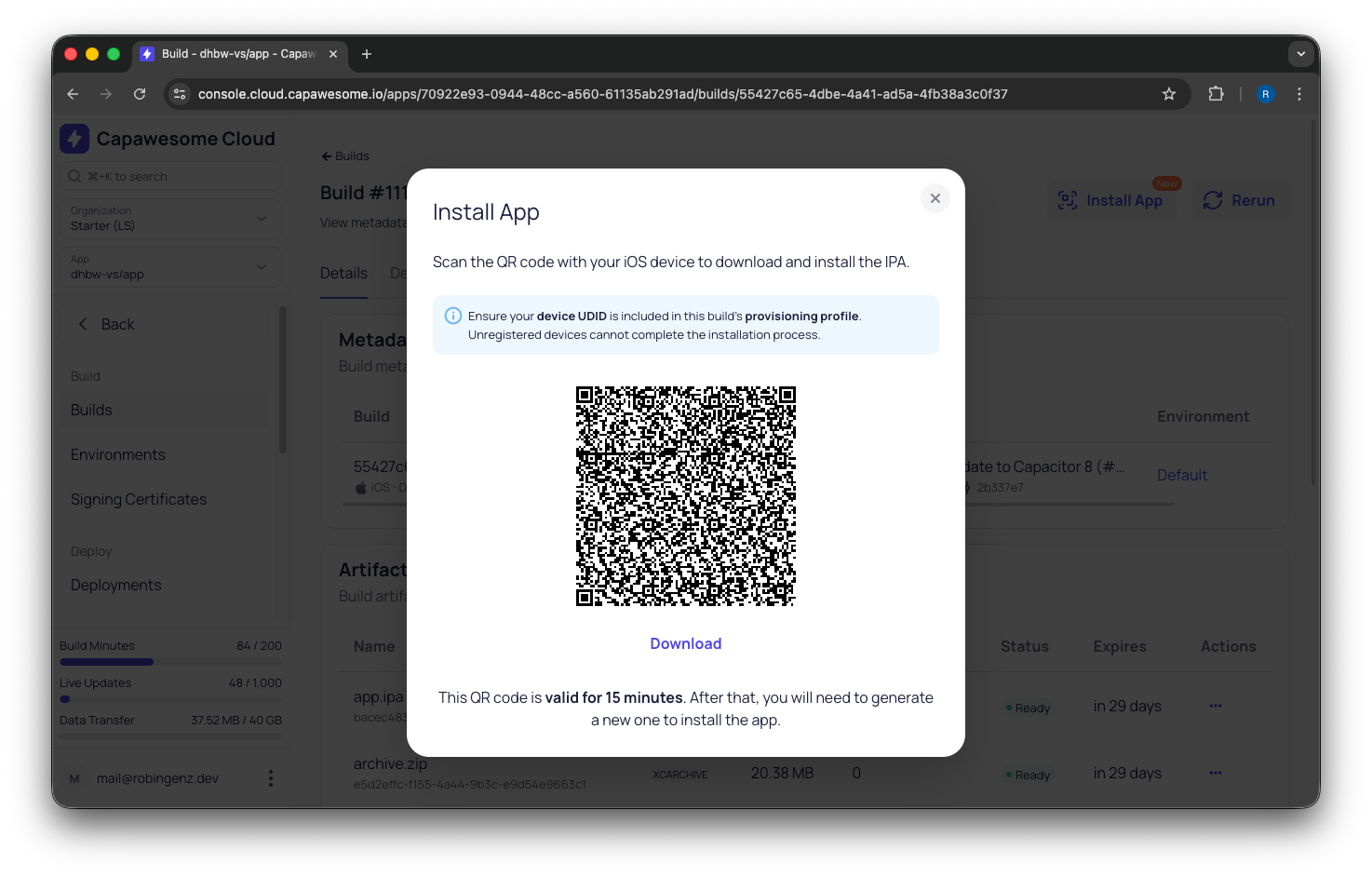
[Capawesome Cloud](/){:target="_blank"} includes a built-in app installation feature similar to what platforms like Diawi and Loadly offer, but fully integrated into the build pipeline. Every iOS development, ad-hoc, or enterprise build and every Android build displays an **Install** button that lets testers install the app directly on their device with a single tap. No additional configuration or setup is required, and the feature is available at no extra cost.
The process works the same on both platforms: once a build is complete, you share a link or QR code with your tester, and they scan it to install the app. You can even turn a build into a public share link that anyone can open without a Capawesome Cloud account. See [Share Mobile App Builds with Testers via Link & QR Code](./share-mobile-app-builds-with-testers.md) for the details. Let's walk through the specifics for each platform.
## Distributing Android Apps
Android distribution is the simpler of the two platforms since there's no device registration required.
### Create a Build
First, trigger a new Android build in Capawesome Cloud:
1. Navigate to the **Builds** page of your app.
2. Click **Build from Git** and select a Git reference (branch, tag, or commit).
3. Select **Android** as the platform and choose a build type (**Debug** or **Release**).
4. Click **Build** to start the build process.
???+ note "Signing Certificates"
**Release** builds require a signing certificate (keystore). Refer to the [Android Signing Certificates](../../cloud/native-builds/certificates/android.md) documentation for setup instructions.
### Install the App
Once the build completes:
1. Open the build details page in Capawesome Cloud.
2. Click the **Install** button.
3. Scan the **QR code** with the Android device or tap **Download** if you're already on the device.
4. Open the downloaded APK to start the installation.
???+ note "Unknown Sources"
Android requires you to allow installations from unknown sources before installing an APK from outside the Play Store. See our [Install an APK on an Android Device](../../cloud/native-builds/install-on-device.md) guide for device-specific instructions.
???+ note "Google Play Protect"
Google Play Protect may show a warning about the app being from an unknown developer. You can dismiss this warning to proceed with the installation.
## Distributing iOS Apps
iOS distribution requires a few extra steps due to Apple's code signing requirements. The tester's device must be registered in your Apple Developer account and included in the provisioning profile used to sign the build.
### Register the Device
Every iOS device has a unique identifier (UDID) that must be registered before it can install a test build.
1. Find the device UDID using the [iOS UDID Finder](/tools/ios-udid-finder/){:target="_blank"} tool.
2. Register the device in the [Apple Developer Portal](https://developer.apple.com/account/resources){:target="_blank"} under **Devices**.
3. Update your provisioning profile to include the new device and re-upload it to Capawesome Cloud.
???+ note "Device Limit"
Apple limits the number of registered devices to 100 per product family (iPhone, iPad, etc.) per membership year. Disabling a device does not free up a slot.
For detailed steps, refer to our [Install an IPA on an iOS Device](../../cloud/native-builds/install-on-device.md) guide.
### Create a Build
1. Navigate to the **Builds** page of your app.
2. Click **Build from Git** and select a Git reference.
3. Select **iOS** as the platform.
4. Select **Development**, **Ad Hoc**, or **Enterprise** as the build type.
5. Select a signing certificate with a provisioning profile that includes the tester's device.
6. Click **Build** to start the build process.
### Install the App
Once the build completes:
1. Open the build details page in Capawesome Cloud.
2. Click the **Install** button.
3. Scan the **QR code** with the iOS device or tap **Download** if you're already on the device.
4. The app will be installed on the device.
## FAQ
### Do testers need a TestFlight or Play Store account to install the build?
No. With over-the-air installation, testers open a link or scan a QR code and install the build directly, without a store account, the TestFlight app, or a review wait. For the full public-link workflow, see [Share Mobile App Builds with Testers via Link & QR Code](./share-mobile-app-builds-with-testers.md).
### Why do I have to register the device for iOS but not for Android?
Apple restricts non-App-Store installs to devices listed in the build's provisioning profile, so each tester's device UDID must be registered first (Enterprise-signed builds are the exception). Android has no such restriction. Testers can install an APK directly once they allow installs from unknown sources. The free [iOS UDID finder](https://capawesome.io/tools/ios-udid-finder/){:target="_blank"} makes collecting UDIDs a one-scan job.
### How is this different from Diawi or Firebase App Distribution?
Services like [Diawi](https://capawesome.io/alternatives/diawi/){:target="_blank"} and Loadly make it easy to share a download link, but they typically lack CI/CD integration, version tracking, and team management. Firebase App Distribution still requires testers to install a device profile. With Capawesome Cloud, sharing is built into the same platform that builds your app, and testers need no accounts or invitations.
### Can I automate build distribution from my CI/CD pipeline?
Yes. Combine [Automations](../../cloud/automations/index.md) with [notification integrations](../../cloud/integrations/index.md) so a push triggers a build and your QA team gets the install link in Slack, Discord, or Microsoft Teams automatically. See [Automating the Process](#automating-the-process) below.
## Related Posts
- [How to Create Your Apple and Google Developer Accounts](./how-to-create-apple-developer-and-google-play-accounts.md)
- [iOS Certificates and Provisioning Profiles Explained](./ios-certificates-and-provisioning-profiles-explained.md)
- [Tips for Setting Up In-App Purchases with Capacitor](./tips-for-setting-up-in-app-purchases-with-capacitor.md)
## Automating the Process
Manually triggering builds every time you want to share a test version gets old fast. With [Automations](../../cloud/automations/index.md), you can configure Capawesome Cloud to automatically trigger a build whenever you push to a specific branch or create a tag. For example, you could set up an automation that builds a new iOS and Android version on every push to `main` or whenever a tag matching `v*` is created.
Combined with [notification integrations](../../cloud/integrations/index.md), this creates a hands-off distribution workflow: a developer pushes code, Capawesome Cloud builds the app, and your QA team gets notified in Slack, Discord, or Microsoft Teams that a new build is ready to install. No one needs to open the Console, run a CLI command, or ping someone on the team. The build link is right there in the notification.
[Try Capawesome Cloud Free](/){ .md-button .md-button--primary }
## Conclusion
Use over-the-air installation for internal QA rounds and stakeholder demos, and save TestFlight for the external beta before release, where the Beta App Review wait is unavoidable. Collect the UDIDs of your testers' iOS devices before the first build rather than after: a device that is missing from the provisioning profile means signing and building again.
For the device-specific steps on each platform, see our step-by-step guides for [Android and iOS](../../cloud/native-builds/install-on-device.md).
After testing, the next step is preparing your store listing and submitting for review. See [How to Prepare Your App Store Listing](./how-to-prepare-your-app-store-listing.md) for everything Apple and Google require before they'll accept your submission. Or, if you want the full journey from web app to live on the stores, start with [From Web App to App Store: The Complete Guide](./11-steps-to-get-your-web-app-on-the-app-store.md).
If you have questions, join the [Capawesome Discord server](https://discord.gg/VCXxSVjefW){:target="_blank"} or [subscribe](https://capawesome.io/newsletter/){:target="_blank"} to the Capawesome newsletter to stay updated.