---
title: "Convert a Web App to a Mobile App in 11 Steps"
description: Convert your web app to a mobile app with Capacitor — 11 steps from web code to native iOS and Android apps live on the App Store and Google Play.
date:
created: 2026-06-04
updated: 2026-09-15
authors:
- djabif
categories:
- Capacitor
- Cloud
- Guides
links:
- Live Update Plugin: sdks/capacitor/live-update.md
faq: true
---
# Convert a Web App to a Mobile App in 11 Steps (2026)
You have a web app. Maybe you built it yourself, maybe you vibe-coded it with an AI assistant over a weekend. It works, you like it, and now you want to convert that web app to a mobile app on the App Store and Google Play.
The problem is that every tutorial you find was written for people who already live in Xcode and Android Studio. They assume you have a Mac, know what a provisioning profile is, and have configured Gradle before. If you're coming from the web world, or you're an [indie maker or early-stage startup](https://capawesome.io/solutions/startups/){:target="_blank"} who just shipped a React or Vue app, those guides feel like they start three levels above where you are.
This guide starts at zero. It covers every step from "I have a web app" to "my app is live on both stores and I can push fixes without waiting for review", using tools that handle the painful parts for you.
We've walked hundreds of users through this exact process. Here's everything we've learned, in one place.
**Key takeaways:**
- Converting a web app to a mobile app takes 11 steps: wrap it with Capacitor, add native features, then handle accounts, signing, builds, testing, and the store submission itself.
- Apple Developer Program enrollment costs $99/year and takes up to 48 hours to approve (5–7 business days if you need a D-U-N-S number for an organization account). Google Play Console is a $25 one-time fee.
- Capawesome Cloud builds both platforms on Apple Silicon M4 Pro hardware in 2–5 minutes, so no Mac is required for iOS.
- Google Play requires personal developer accounts created after November 13, 2023 to run a closed test with 12+ opted-in testers for 14 consecutive days before production access.
- Live Updates ship web-layer changes (HTML, CSS, JavaScript) directly to installed apps in minutes, skipping the 3–7 day store review that native changes still need.
## Who This Guide Is For
This guide is for you if any of these apply:
- You built a web app with React, Next.js, Vue, Angular, Svelte, or any other framework and want to ship it as a native app
- You're vibe-coding a product with Claude, Cursor, or Copilot and want to reach mobile users
- You have a working app but have no idea how to get it into the App Store
- You've been burned by App Store and Google Play Store review delays and want a way to push fixes instantly
- You need to build for iOS but don't own a Mac
By the end of this guide you'll have:
- A native iOS and Android app built from your existing web code
- Both apps live on the App Store and Google Play
- A system to push bug fixes and new features to users in minutes, without app store review
## The Full Picture: What You'll Use
Here's a map of the tools involved. Most of them are free or already covered by a single Capawesome Cloud subscription.
| What you need | Tool | Cost |
| ---------------------------------------------- | ------------------------------------------------------------------------------------- | ----------------- |
| Convert web app to native | [Capacitor](https://capacitorjs.com/) | Free, open source |
| Add native features (camera, biometrics, etc.) | [Capawesome Plugins](https://capawesome.io/docs/sdks/capacitor/) | Free & paid |
| AI-assisted setup | [Capawesome Skills](https://capawesome.io/skills/) | Free |
| Generate iOS certificates | [iOS Certificate Generator](https://capawesome.io/tools/ios-certificate-generator/) | Free |
| Generate Android keystore | [Android Keystore Generator](https://capawesome.io/tools/android-keystore-generator/) | Free |
| Build iOS + Android in the cloud | [Native Builds](https://capawesome.io/cloud/native-builds/) | Capawesome Cloud |
| Publish to App Store + Google Play | [App Store Publishing](https://capawesome.io/cloud/app-store-publishing/) | Capawesome Cloud |
| Push instant updates without review | [Live Updates](https://capawesome.io/cloud/live-updates/) | Capawesome Cloud |
| Automate the whole pipeline | [Automations](https://capawesome.io/cloud/automations/) | Capawesome Cloud |
| Apple developer account | [developer.apple.com](https://developer.apple.com/programs/enroll/) | $99/year |
| Google Play account | [play.google.com/console](https://play.google.com/console/signup) | $25 one-time |
Let's walk through each step.
## Step 1: Convert Your Web App to Native with Capacitor
Converting a web app to a mobile app with [Capacitor](https://capacitorjs.com/) means keeping every line of your existing code. Capacitor packages your production build into an `ios/` and an `android/` project, hands it to the platform's native shell, and exposes device APIs to your JavaScript through plugins when you need them.
This is fundamentally different from React Native or Flutter: there's no rewrite and no new framework to learn. If you can `npm run build` your app today, you can have a native version of it running on a phone by the end of this afternoon.
### PWA vs. native app
Progressive Web Apps are great for some use cases, but they have hard limits when your goal is the app stores. Apple reviews submissions against [App Review Guideline 4.2, Minimum Functionality](https://developer.apple.com/app-store/review/guidelines/#minimum-functionality){:target="_blank"} and rejects apps that feel like a website with nothing app-like added, so a bare wrapper around your PWA is a common first-submission rejection. Google Play allows PWAs through [Trusted Web Activities](https://developer.chrome.com/docs/android/trusted-web-activity){:target="_blank"}, but that route still leaves you with web-only capabilities on a store listing. Wrapping the same code with Capacitor and adding native features like push notifications or biometrics is what turns it into a submission both stores accept.
The day-to-day iOS limitations are just as real: Safari never shows an install prompt (users have to discover "Add to Home Screen" in the share menu on their own), web push only works on iOS 16.4 or later and only after the user has installed the app to their home screen, and device APIs like NFC, Bluetooth, and biometric-protected storage aren't available to web code at all.
A Capacitor app is a real, store-listed native app powered by the same web code. And it's not either/or: the same codebase can keep serving your PWA on the web while Capacitor ships it to both stores with full native API access.
### Production track record
Capacitor runs production apps used by millions of people every day, from indie makers to [Fortune 500 companies](https://ionic.io/customers){:target="_blank"} across fintech, healthcare, logistics, and consumer products. The framework is maintained by the Ionic team, has over 12,000 GitHub stars, and ships regular releases, so an entire ecosystem of tools, services, and companies depends on it long-term.
### Setting Up Capacitor
Install Capacitor in your existing web project:
```bash
npm install @capacitor/core @capacitor/cli
npx cap init
```
Add the iOS and Android platforms:
```bash
npm install @capacitor/ios @capacitor/android
npx cap add ios
npx cap add android
```
Build your web assets and sync them to the native projects:
```bash
npm run build
npx cap sync
```
You now have a `ios/` and `android/` folder at the root of your project containing full native Xcode and Android Studio projects that point at your web build output. Every time you run `npx cap sync`, Capacitor compiles your web assets and copies them into the native projects, so the app always reflects your latest code.
### Works with any framework
Capacitor is framework-agnostic: the only thing that changes per framework is the `webDir` value, pointed at wherever your build command writes its output (`dist/` for a Vite-based React or Vue app, `www/` for Angular, `out/` for a Next.js static export).
This guide keeps moving through the pipeline from here. For the framework-specific config tables, the live reload dev workflow, WebView performance tips, and fixes for the most common setup errors (blank screen on launch, a plugin working on only one platform), see [Capacitor Setup Guide for Any Web Framework](./build-mobile-apps-with-any-web-framework-and-capacitor.md). If your web app came out of Lovable specifically, [Convert Your Lovable App to iOS & Android Apps](./convert-lovable-app-to-mobile-app.md) walks the same 11 steps with Lovable's export flow built in.
### The Vibe Coding Path: Let an AI Agent Do the Setup
If you're building with an AI coding assistant, install the [Capawesome Skills](https://capawesome.io/skills/) to give your agent deep Capacitor knowledge:
```bash
npx skills add capawesome-team/skills --skill capacitor-app-creation
```
Then prompt your agent (Claude Code, Cursor, Copilot):
```
Use the `capacitor-app-creation` skill to set up Capacitor in my project.
```
The agent will initialize Capacitor, add the platforms, fix your `capacitor.config.ts`, and sync everything, correctly on the first try, without you having to know what `npx cap sync` does.
## Step 2: Add Native Features with Plugins
A plain Capacitor app renders your web UI on a phone. Plugins connect your JavaScript code to native device features.
Here's a sample of what's possible with the [Capawesome plugin library](https://capawesome.io/docs/sdks/capacitor/):
### Authentication & Security
**[Biometrics Plugin](https://capawesome.io/docs/sdks/capacitor/biometrics/)**: add Face ID, Touch ID, and fingerprint authentication to your app. One call to `authenticate()` handles the platform-specific prompt on both iOS and Android.
**[Vault Plugin](https://capawesome.io/docs/sdks/capacitor/vault/)**: store secrets (tokens, keys, passwords) behind biometric or device-passcode protection. Backed by hardware-level encryption on both platforms.
**[Apple Sign-In](https://capawesome.io/docs/sdks/capacitor/apple-sign-in/) / [Google Sign-In](https://capawesome.io/docs/sdks/capacitor/google-sign-in/)**: native OAuth flows that look right on every device.
### Camera & Media
**[Audio Player](https://capawesome.io/docs/sdks/capacitor/audio-player/) / [Audio Recorder](https://capawesome.io/docs/sdks/capacitor/audio-recorder/)**: record and play back audio with full platform integration. Background playback, lock screen controls, the works.
**[File Picker](https://capawesome.io/docs/sdks/capacitor/file-picker/)**: let users pick files from their device with the native file browser. Returns the file URI or base64 data.
### Scanning & Recognition
**[ML Kit Barcode Scanning](https://capawesome.io/docs/sdks/capacitor/mlkit/barcode-scanning/)**: on-device barcode and QR code scanning using Google's ML Kit. No server required.
**[ML Kit Document Scanner](https://capawesome.io/docs/sdks/capacitor/mlkit/document-scanner/)**: let users scan documents with edge detection and automatic cropping, just like a proper scanner app.
**[NFC Plugin](https://capawesome.io/docs/sdks/capacitor/nfc/)**: read and write NFC tags on both Android and iOS.
### Connectivity
**[Bluetooth Low Energy](https://capawesome.io/docs/sdks/capacitor/bluetooth-low-energy/)**: connect to BLE peripherals such as fitness trackers, IoT devices, medical devices, and beacons.
**[WiFi Plugin](https://capawesome.io/docs/sdks/capacitor/wifi/)**: get WiFi state, SSID, and signal strength.
### Payments & Monetization
**[Purchases Plugin](https://capawesome.io/docs/sdks/capacitor/purchases/)**: in-app purchases and subscriptions via RevenueCat. One SDK, both stores.
**[Superwall Plugin](https://capawesome.io/docs/sdks/capacitor/superwall/)**: A/B test paywalls without app updates.
### Firebase Integration
The full [Firebase plugin suite](https://capawesome.io/docs/sdks/capacitor/firebase/) covers Analytics, Authentication, Crashlytics, Cloud Messaging (push notifications), Remote Config, Firestore, Cloud Storage, and more, each as a separate, tree-shakeable package.
### And Many More
Capawesome maintains [50+ plugins](https://capawesome.io/docs/sdks/capacitor/) covering sensors (accelerometer, barometer, pedometer), productivity (contacts, app shortcuts, badge count), printing, screen orientation, speech recognition and synthesis, SQLite, geolocation, and more.
???+ note "Can't find the plugin you need?"
Capawesome offers custom plugin development. The team has built custom Capacitor plugins for dozens of companies. [Get in touch.](https://capawesome.io/consulting/)
## Step 3: Create Your Developer Accounts
You need accounts on both platforms before anything can go live. This is a one-time setup, but it has real timelines you need to plan around.
### Apple Developer Program: $99/year
Sign up at [developer.apple.com/programs/enroll](https://developer.apple.com/programs/enroll/). Apple takes up to 48 hours to approve new accounts. If you're registering as an organization (to publish under a company name rather than your personal name), you'll also need a D-U-N-S number, which takes 5–7 business days to obtain.
Start this process first. It's the most common cause of delayed launches.
### Google Play Console: $25 one-time
Sign up at [play.google.com/console/signup](https://play.google.com/console/signup). The $25 fee is paid once and your account never expires. Identity verification usually completes within a few hours.
Full walkthrough: [How to Create Your Apple Developer and Google Play Developer Accounts](./how-to-create-apple-developer-and-google-play-accounts.md)
## Step 4: Generate Your Signing Certificates
Every app submitted to the stores must be cryptographically signed. This is how Apple and Google verify the build came from you. You need:
- **iOS:** a distribution certificate + provisioning profile
- **Android:** a keystore file
This is where most first-timers get stuck. The official Apple documentation for code signing is notoriously opaque. You can generate everything you need directly in your browser, without Xcode or Android Studio.
### Free Browser Tools
**[iOS Certificate Generator](https://capawesome.io/tools/ios-certificate-generator/)** generates iOS development and distribution certificates along with a CSR file, the same thing you'd normally do through Keychain Access on a Mac, but in your browser. No sign-up, nothing leaves your device.
**[Android Keystore Generator](https://capawesome.io/tools/android-keystore-generator/)** creates a PKCS#12 keystore file for signing your Android app. Fill in the fields, download the file, store it somewhere safe. You'll need it for every future release.
**[iOS UDID Finder](https://capawesome.io/tools/ios-udid-finder/)**: if you need to register a test device for development builds, this finds your device UDID from any browser.
Once you have your certificates, upload them to Capawesome Cloud once. Every subsequent build picks them up automatically, with no local keychain required and no credentials in your CI environment variables.
- [Docs: iOS signing certificates](https://capawesome.io/docs/cloud/native-builds/certificates/ios/)
- [Docs: Android signing certificates](https://capawesome.io/docs/cloud/native-builds/certificates/android/)
For a detailed explanation of what certificates and provisioning profiles actually are:
[iOS Certificates and Provisioning Profiles Explained](./ios-certificates-and-provisioning-profiles-explained.md)
## Step 5: Build Your Native App in the Cloud
Traditionally, building an iOS app requires a Mac with the right version of Xcode. Building a production Android APK requires Android Studio with the right Java and Gradle versions configured. Both need your signing credentials stored locally.
Capawesome Cloud [Native Builds](https://capawesome.io/cloud/native-builds/) eliminates all of that. You connect your Git repository, and the build happens on Apple Silicon M4 Pro hardware in the cloud. Typical build times are 2–5 minutes. You can trigger builds from Windows, Linux, or a Chromebook. No Mac required.
### How It Works
**Step 1: Connect your repository**
Link your GitHub, GitLab, Bitbucket, or Azure DevOps repository to Capawesome Cloud. This is a one-time OAuth authorization.
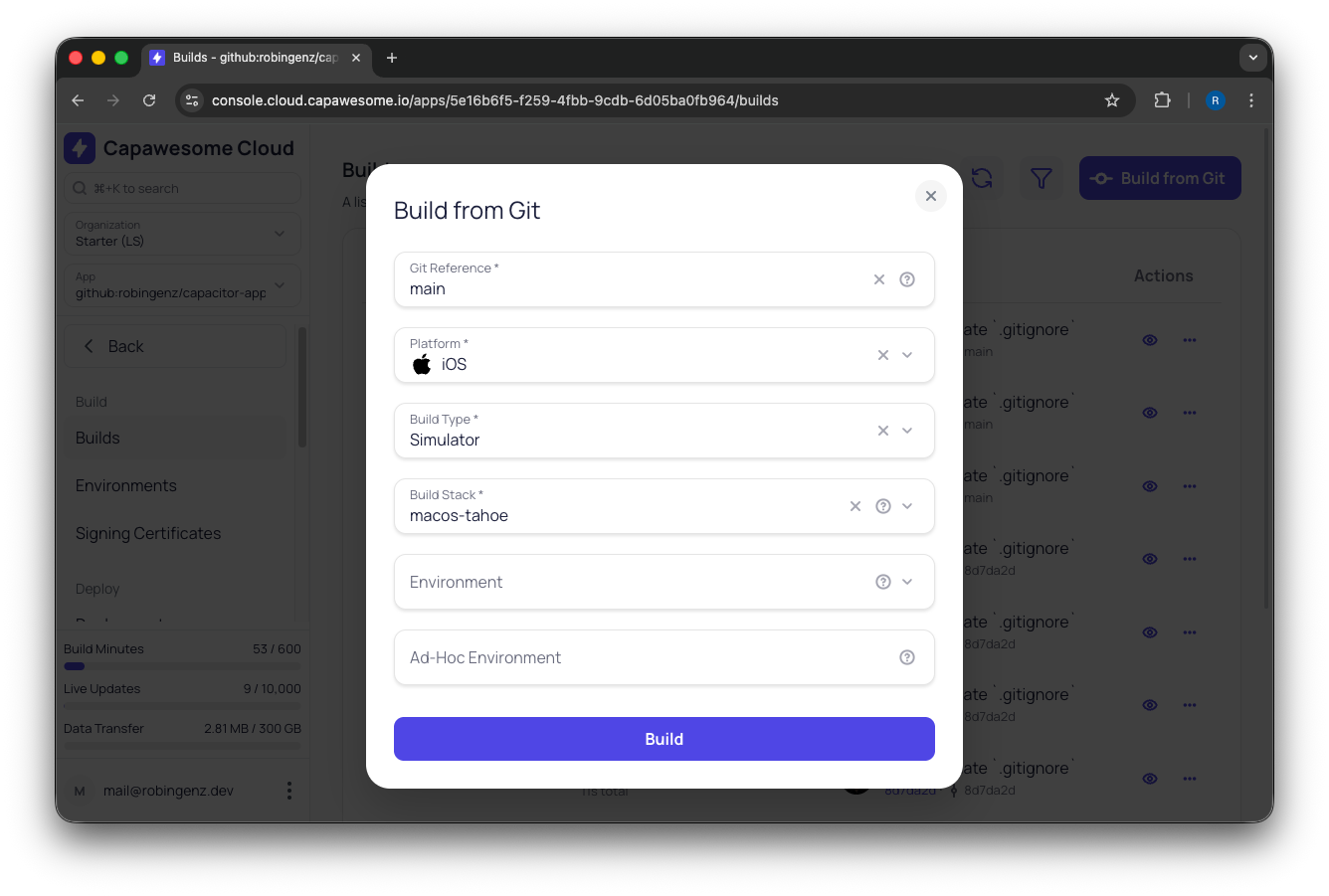
**Step 2: Trigger a build**
From the Capawesome Cloud Console, choose your branch, select iOS or Android, pick your build type (Debug, Release, Simulator), and hit Build.
**Step 3: Download or deploy**
When the build completes, download the IPA or APK/ABB directly, or chain it into an App Store Publishing destination with one click.
### Video Walkthroughs
Android build (full workflow from Git to downloadable ABB):
iOS build (Simulator build and signed Development build):
### Build From the CLI
You can also trigger builds from the terminal with the [Capawesome CLI](https://capawesome.io/docs/cloud/cli/):
```bash
npx @capawesome/cli apps:builds:create \
--platform ios \
--buildType release
```
This makes it easy to plug Capawesome Cloud into any existing CI pipeline: GitHub Actions, GitLab CI, Bitbucket Pipelines, Jenkins, or anything else.
### Advanced Features
- **[Environments](https://capawesome.io/docs/cloud/native-builds/environments/)**: define separate configurations for dev, staging, and production builds
- **[Auto-increment build numbers](https://capawesome.io/docs/cloud/native-builds/auto-incrementing-build-numbers/)**: never manually bump your build number again
- **[Build without Git](https://capawesome.io/docs/cloud/native-builds/build-without-git/)**: upload a ZIP if you don't want to connect a repository
- **[Assist — Ask AI](https://capawesome.io/docs/cloud/assist/)**: when a build fails, click Ask AI to get a plain-English diagnosis with a suggested fix
Full setup guide: [Getting Started with Native Builds](https://capawesome.io/docs/cloud/native-builds/setup/)
## Step 6: Distribute to Testers
Before going to the public stores, get your app onto real devices. Finding bugs on a physical device, especially iOS, is consistently different from finding them in a simulator.
Capawesome Cloud App Store Publishing supports all the major testing channels:
**TestFlight (iOS)**: upload your IPA to TestFlight and invite testers by email. Testers install the app from the TestFlight app. Internal testers (up to 100) skip the review queue; external testers go through a simplified review that usually takes a few hours.
**Google Play Internal Testing**: share your app via a link immediately after upload, with no review. Testers install it directly from the Play Store.
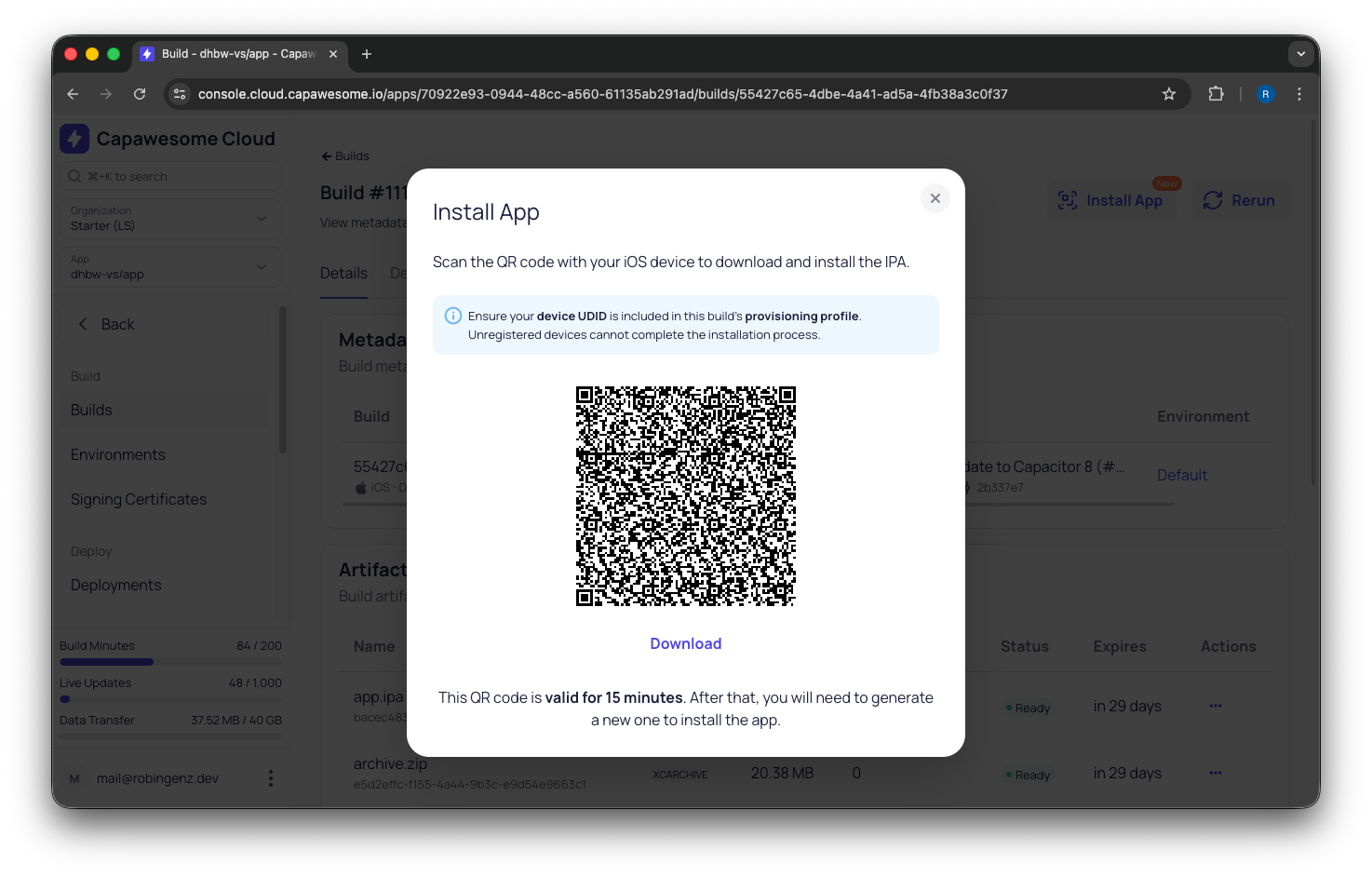
You can also install a build directly on a device from the Capawesome Cloud Console without going through any store:
Full guide: [How to Distribute iOS and Android Apps to Testers](./how-to-distribute-ios-and-android-apps-to-testers.md)
## Step 7: Prepare Your Store Listing
This is where most first-timers hit an unexpected wall. The app is built, it works, but you can't submit it without a complete store listing. Apple and Google require:
- **App icon**: 1024×1024px for iOS (no transparency), 512×512px for Google Play
- **Screenshots**: Apple now requires iPhone 6.9" (1320×2868px) screenshots; these are mandatory
- **App name and description**: Apple gives you 30 characters for the name, 30 for a subtitle, and 100 characters of keywords (comma-separated, don't repeat what's in the name)
- **Privacy policy URL**: required by both platforms, even for free apps with no data collection
- **Age rating**: calculated from a questionnaire in each store's console
- **Data collection disclosures**: Apple's Privacy Nutrition Labels and Google's Data Safety section both require you to declare every type of data your app collects, including data from third-party SDKs
The full checklist with every requirement, device size, and tool recommendation:
[How to Prepare Your App Store Listing](./how-to-prepare-your-app-store-listing.md)
## Step 8: Complete Google Play's Closed Testing Period
This is the most common surprise for first-time publishers, and it can delay your Android launch by weeks.
For personal developer accounts created after November 13, 2023, Google Play requires new apps to complete a closed testing period before they can publish to the public ([source](https://support.google.com/googleplay/android-developer/answer/14151465){:target="_blank"}):
- You need at least 12 testers who actively opt in via a special link
- The testing period must run for at least 14 consecutive days
- After 14 days with 12+ active testers, you can apply for production access
Organization accounts are not subject to this requirement.
This means your Google Play launch is a minimum of two weeks from when you have 12 testers opted in. Start recruiting testers the moment your first Android build is ready. Don't wait until you're "ready to launch."
Good places to find testers: your existing user base (if any), the [Capawesome Discord community](https://discord.gg/VCXxSVjefW){:target="_blank"}, your company's Slack, friends, family.
The App Store does not have this requirement. iOS apps go live immediately after Apple's review.
## Step 9: Submit for Review
With your store listing complete and testing done, you're ready to submit.
### App Store (iOS)
In App Store Connect, set your app's release strategy (manual or automatic after approval), assign the build you want to submit, and click Submit for Review. Apple's review typically takes 3–5 days for new apps.
Common reasons for rejection:
- Missing privacy policy
- App crashes on launch (test on a real device, not just a simulator)
- Metadata mismatch (screenshots don't match the app's actual UI)
- Missing required functionality explanations
- Login credentials not provided. You must provide the review team with an active and functional test account. Because App Review is an automated and manual process, the reviewers cannot access account-restricted features without valid login information.
Be careful with all these requirements, because even though you can resubmit your app after a rejection, each resubmission takes longer to be reviewed.
### Google Play
After your closed testing period, apply for production access in the Google Play Console. Once approved, your initial review typically takes 3–7 days.
### Automated Submissions with Capawesome Cloud
Capawesome Cloud [App Store Publishing](https://capawesome.io/cloud/app-store-publishing/) automates the submission step entirely. You connect your App Store Connect API key and Google Play service account once, configure your store destinations, and then publish with a single click, or automatically on every successful native build via [Automations](https://capawesome.io/docs/cloud/automations/setup/). [Auto-Submit a Capacitor App to TestFlight and Google Play](./auto-submit-capacitor-app-to-testflight-and-google-play.md) walks through both destinations and the tag automations field by field.
Supported destinations:
- Apple App Store (production)
- TestFlight (internal and external)
- Google Play (Internal, Alpha, Beta, Production)
- Firebase App Distribution
When a submission fails, [Ask AI](https://capawesome.io/docs/cloud/assist/) in the Capawesome Console parses Apple's or Google's validator output and tells you exactly what went wrong and how to fix it, in plain language.
## Step 10: Set Up Live Updates (Your Biggest Advantage)
Once your app is approved, every change you ship (a bug fix, a copy tweak, a new feature) must go through the App Store review queue. That's 1–5 days.
Live Updates bypass the queue entirely.
Because Capacitor separates your app into a native shell and a web layer (HTML, CSS, JavaScript, and static assets), you can update the web layer over the air, directly to users' devices, in minutes. Here's what developers like you said after shipping their first app with Capawesome:
**King Arthur Baking:** *"We can quickly deliver improvements without app store delays, saving time and resources while keeping the experience fresh for our baking community."*
**snapAddy**: *"We now deliver daily live updates to more than 200,000 devices without any issues."*
**Summon Worlds**: *"We mainly use over-the-air (OTA) updates to deliver critical bug fixes and updates when waiting on the App Store review process is not an option."*
### What Live Updates Can and Can't Do
**Can update:** any change to your HTML, CSS, JavaScript, images, fonts, JSON data, and other static assets.
**Cannot update:** changes that require new native code, new Capacitor plugins, new iOS/Android permissions, or changes to `Info.plist` / `AndroidManifest.xml`. Those still need a native build and a store review.
In practice, the vast majority of day-to-day iteration (UI changes, bug fixes, new screens, content updates) falls in the "can update" category.
### Setup
Install the Live Update plugin:
```bash
npm install @capawesome/capacitor-live-update@latest
npx cap sync
```
Configure it in `capacitor.config.ts`:
```typescript
import { CapacitorConfig } from '@capacitor/cli';
const config: CapacitorConfig = {
plugins: {
LiveUpdate: {
appId: 'your-app-id-from-capawesome-cloud',
autoUpdateStrategy: 'background',
},
},
};
export default config;
```
`autoUpdateStrategy: 'background'` is the recommended default. The app checks for updates at every launch, downloads them silently in the background, and applies them the next time the user opens the app. No code changes, no user prompts.
Shipping a fix from that point forward:
```bash
npm run build
npx @capawesome/cli apps:liveupdates:upload
```
Every user gets the fix on their next app launch.
### Advanced Live Update Features
Capawesome Cloud Live Updates includes features that enterprise teams depend on:
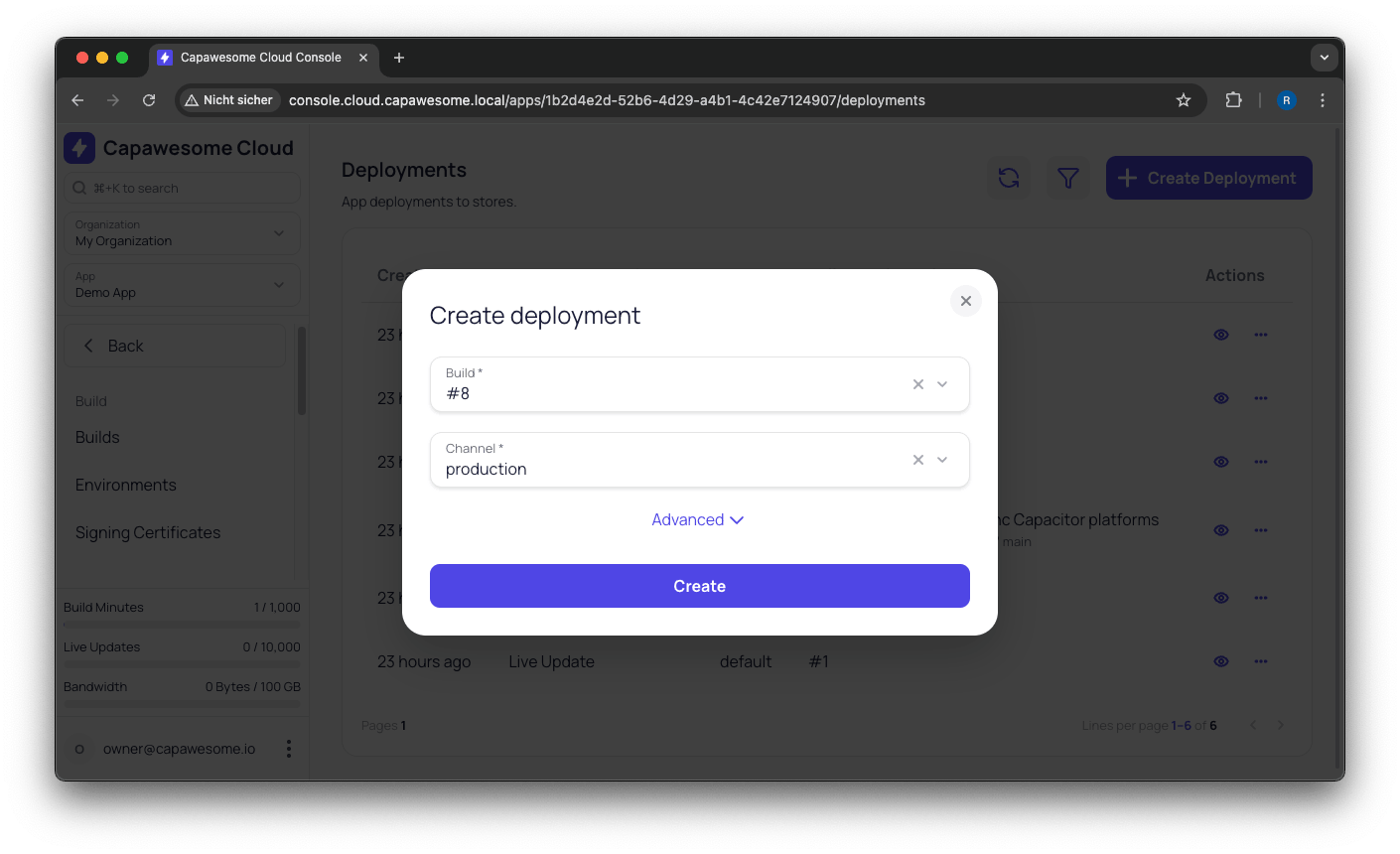
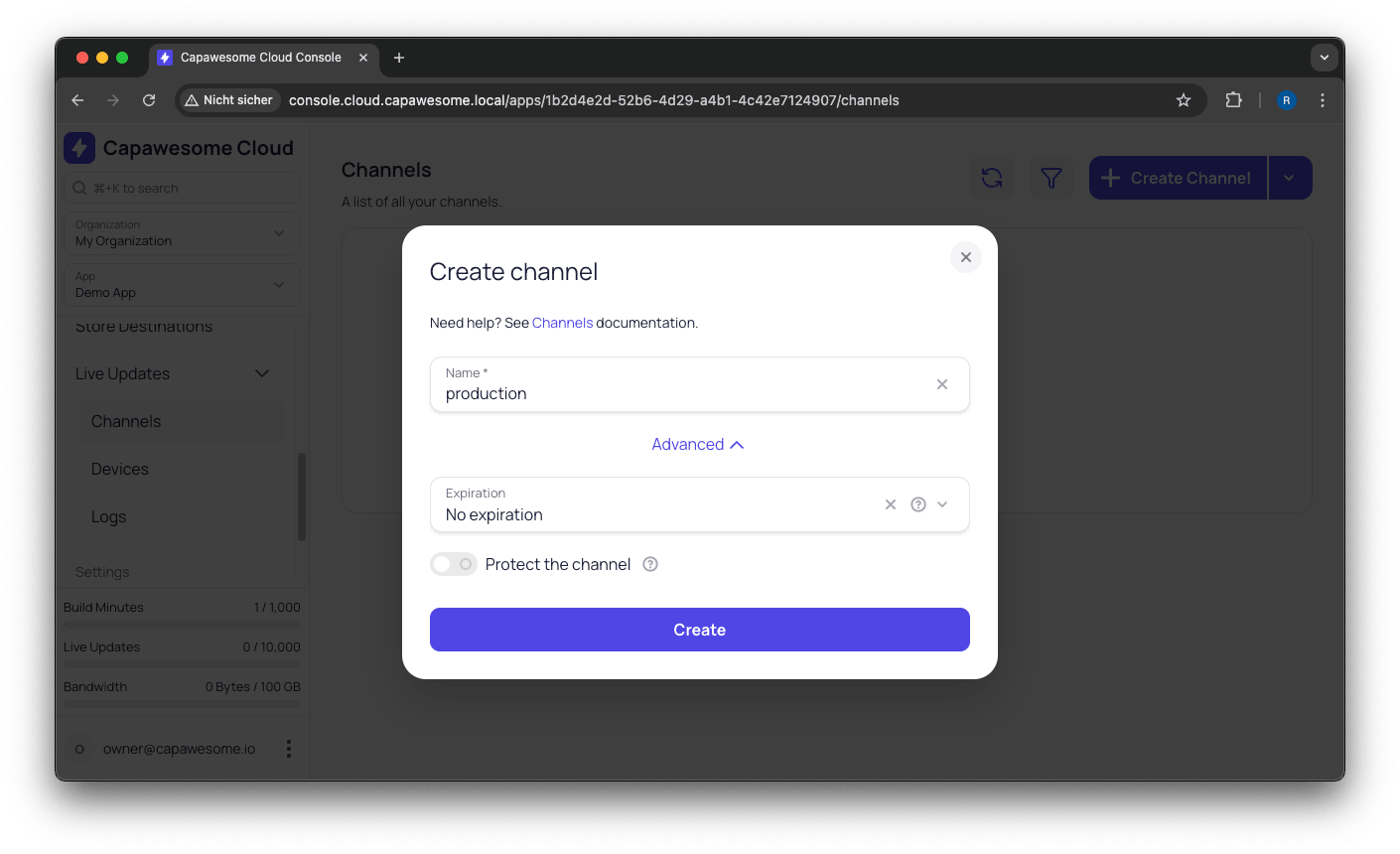
**[Channels](https://capawesome.io/docs/cloud/live-updates/channels/)**: ship different bundles to different user segments. Useful for A/B testing, staged rollouts, or keeping your beta users on a separate track.
**[Rollouts](https://capawesome.io/docs/cloud/live-updates/rollouts/)**: gradually roll out a new bundle to 10%, 25%, 50%, then 100% of users. Watch your error rates before committing to a full release.

**[Rollbacks](https://capawesome.io/docs/cloud/live-updates/rollbacks/)**: if something goes wrong, roll back to the previous bundle instantly from the console.

**[Code Signing](https://capawesome.io/docs/cloud/live-updates/code-signing/)**: RSA-sign your bundles so the Live Update SDK verifies authenticity on every device before applying an update.
**[Delta Updates](https://capawesome.io/docs/cloud/live-updates/bundle-size/)**: only ship the files that changed, not the entire bundle. Reduces update size and delivery time for returning users.
**[Device Management](https://capawesome.io/docs/cloud/live-updates/devices/)**: force specific devices to a specific channel. Great for QA devices, internal testing, or enterprise deployments.
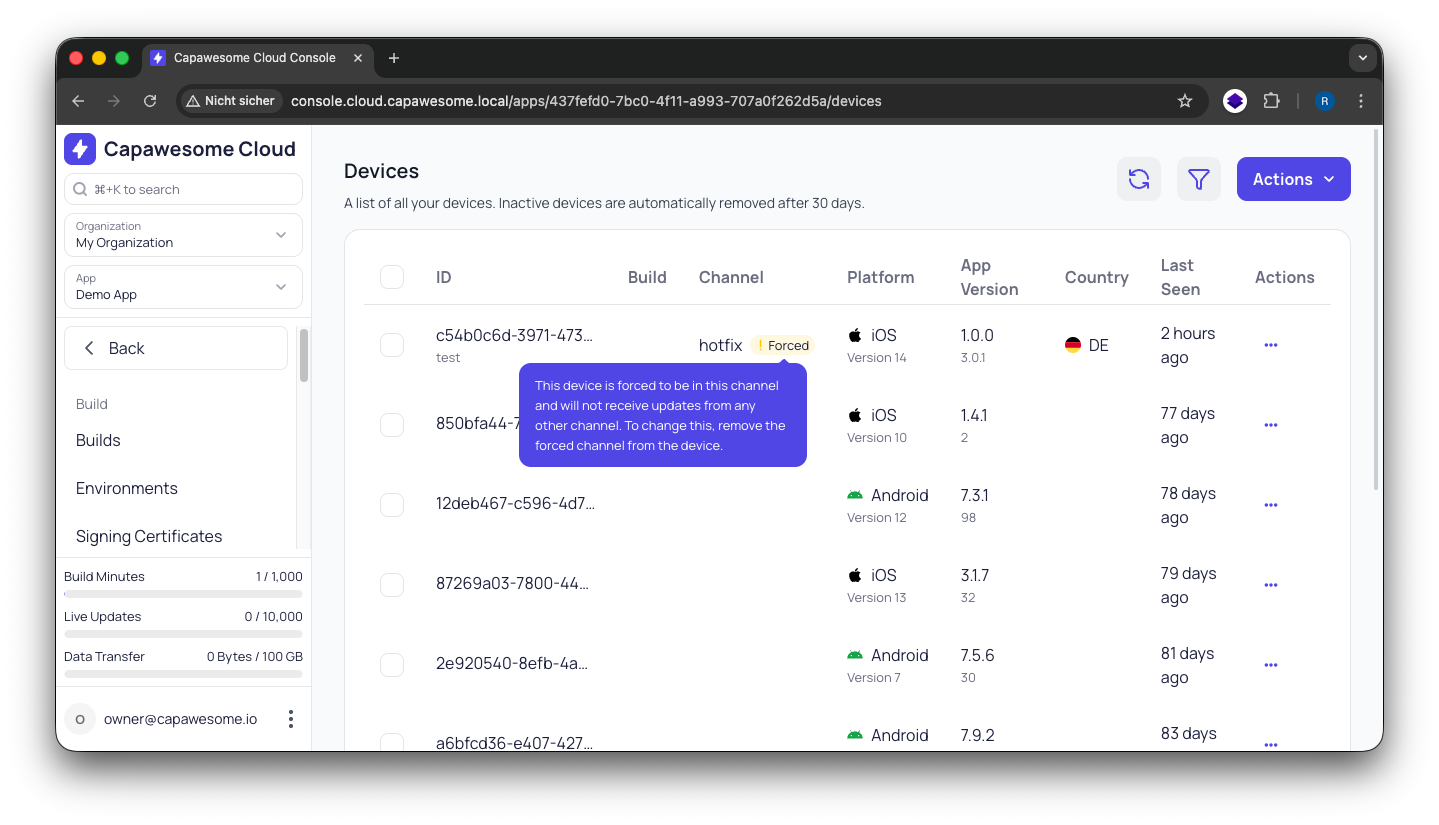
???+ note
Include the Live Update plugin in your first release, even before you have updates to ship. Adding a new plugin requires a new Native Build and another store review, and that's exactly the situation you don't want to be in when you're trying to push a critical fix.
**Full documentation:**
- [Getting Started with Live Updates](https://capawesome.io/docs/cloud/live-updates/setup/)
- [Capacitor Live Updates: A Complete Guide to OTA Updates](./capacitor-live-updates-guide.md)
- [Update Strategies](https://capawesome.io/docs/cloud/live-updates/update-strategies/)
- [Live Updates Best Practices](https://capawesome.io/docs/cloud/live-updates/)
## Step 11: Automate Everything
Once you're comfortable with the flow, the final step is connecting the pieces so that a `git push` triggers the entire pipeline without you touching a dashboard.
[Capawesome Cloud Automations](https://capawesome.io/docs/cloud/automations/setup/) lets you define end-to-end pipelines:
```
git push to main
→ Trigger Native Build (iOS + Android)
→ On success: publish to TestFlight + Google Play Internal
→ On build approval: deploy Live Update to production channel
```
Automations can be triggered on a Git push to a specific branch or tag. When a build or deployment completes, Capawesome Cloud can send a [webhook](https://capawesome.io/docs/cloud/automations/webhooks/) with the result. You can post notifications to Slack, Microsoft Teams, Discord, or any other tool, so your team knows when a build succeeds or fails without watching the console.
For CI/CD pipelines you already have, the [Capawesome CLI](https://capawesome.io/docs/cloud/cli/) and [REST API](https://capawesome.io/docs/cloud/api/) let you trigger any action from GitHub Actions, GitLab CI, Bitbucket Pipelines, Azure DevOps, or Jenkins.
**Guides:**
- [Capacitor CI/CD in 2026: Why Specialization Wins](./ci-cd-for-capacitor-apps.md)
- [CI/CD for Capacitor: Common Pitfalls and How to Avoid Them](./ci-cd-for-capacitor-common-pitfalls.md)
- [GitHub Actions integration](https://capawesome.io/docs/cloud/live-updates/integrations/github-actions/)
- [GitLab CI/CD integration](https://capawesome.io/docs/cloud/live-updates/integrations/gitlab-ci/)
## Everything Inside Capawesome Cloud
Here's the full picture of what Capawesome Cloud gives you: one subscription, one dashboard. All plans include a 14-day free trial.
### Native Builds
Cloud-based iOS and Android builds on Apple Silicon M4 Pro. No Mac, no build servers to manage. Average build time: 2–5 minutes. Includes managed code signing, build history, downloadable artifacts, environment variables, and full build logs.
Thousands of native builds are completed on Capawesome Cloud every month.
### Live Updates
OTA updates delivered over a global CDN. Includes channels, rollouts, rollbacks, RSA code signing, delta updates, device management, and analytics.
### App Store Publishing
One-click submissions to TestFlight, the App Store, Google Play (all tracks), and Firebase App Distribution. Supports multiple destinations per app, ideal for [white-label](https://capawesome.io/solutions/white-label/){:target="_blank"} products or regional variants. Encrypted credentials, protected destinations with role-based access control, and full audit logs.
Thousands of App Store updates are deployed every month.
### Automations
Automatically trigger native builds from Git events, on every push to a branch or on tag creation. Chain builds with store publishing and live update deployments in a single pipeline. When a build completes, Capawesome Cloud sends a [webhook](https://capawesome.io/docs/cloud/automations/webhooks/) with the result so you can connect it to any notification tool.
### Assist: AI Diagnostics
When a build or deployment fails, Ask AI turns the raw validator output from Apple, Google, or your build logs into a plain-language cause → explanation → suggested fix. Opt-in per click, zero data retention.
### Integrations
GitHub, GitLab, Bitbucket, Azure DevOps, Gitea, Git (HTTP/S), Slack, Microsoft Teams, Discord.
### Security & Compliance
- GDPR compliant, data hosted in Germany
- ISO 27001 certified (our data center partners)
- SOC 2 Type II (report available on request)
- All credentials encrypted at rest
- RSA code signing for live update bundles
## Expert help available
Building a Capacitor app is learnable, but sometimes you need someone who's already made all the mistakes. The Capawesome team offers [consulting services](https://capawesome.io/consulting/) for teams that need hands-on help:
- **Capacitor app development**: architecture, development, deployment, and maintenance
- **Custom Capacitor plugins**: if no existing plugin does what you need, we build it. We've delivered custom plugins for dozens of companies, often within a few days
- **Collaborative support**: work alongside your team for architecture reviews, code reviews, debugging, and pairing sessions
- **CI/CD setup**: get your build and deployment pipeline configured correctly from the start
Some reviews from our users:
*"We had to use an Android and iOS SDK in our Capacitor app, for which no plugin existed. Capawesome was able to create a fully functional Capacitor plugin for us within a few days. The communication was excellent and the plugin works perfectly."* (Daniel Ehrhardt, CEO at Codext GmbH)
*"Our Capacitor app had several unique requirements for running operations in the background. The Capawesome team was able to quickly understand our needs and crafted a customized Capacitor plugin that exceeded our expectations."* (Christofer Huber, CTO at WEBPUNKS GmbH)
[Talk to us about your project →](https://capawesome.io/consulting/) if you'd rather have hands-on help than DIY the whole pipeline.
## Pre-launch checklist
Use this before you submit:
**Foundation**
- [ ] Web app builds successfully (`npm run build`)
- [ ] Capacitor initialized and platforms added (`npx cap add ios`, `npx cap add android`)
- [ ] Native features added via plugins as needed
- [ ] Live Update plugin installed and configured
- [ ] App tested on a real device (not just browser/simulator)
**Accounts**
- [ ] Apple Developer Program account created and approved ($99/yr)
- [ ] Google Play Console account created ($25 one-time)
**Certificates**
- [ ] iOS distribution certificate generated and uploaded to Capawesome Cloud
- [ ] iOS provisioning profile generated and uploaded
- [ ] Android keystore generated and uploaded to Capawesome Cloud
**Build & Test**
- [ ] First native build completed via Capawesome Cloud (Debug or Simulator)
- [ ] App distributed to testers via TestFlight / Google Play Internal / Firebase App Distribution
- [ ] Bugs found on real devices fixed
**Store Listing**
- [ ] App icon ready (1024×1024 for iOS, 512×512 for Android)
- [ ] iPhone screenshots ready (required by Apple)
- [ ] iPad screenshots ready (if app supports iPad)
- [ ] Google Play screenshots ready (minimum 2)
- [ ] App name, subtitle/short description, full description written
- [ ] Keywords ready (iOS: 100 chars; Google Play: embedded in description)
- [ ] Privacy policy URL live and accessible
- [ ] Age rating completed in App Store Connect and Google Play Console
- [ ] Apple Privacy Nutrition Labels completed
- [ ] Google Data Safety section completed
**Google Play Only**
- [ ] Closed testing track created with 12+ testers opted in
- [ ] 14-day testing period completed
- [ ] Production access applied for
**Submission**
- [ ] Release build created via Capawesome Cloud (signed, production)
- [ ] App submitted for review on App Store
- [ ] App submitted for review on Google Play
**Post-Launch**
- [ ] First live update bundle deployed
- [ ] Automations configured for future releases
## FAQ
### How do I convert a web app to a mobile app?
Wrap it with [Capacitor](https://capacitorjs.com/): `npm install @capacitor/core @capacitor/cli`, `npx cap init`, then `npx cap add ios` and `npx cap add android`. Your existing web code (React, Vue, Angular, Svelte, or plain HTML) runs unchanged inside a native shell — no rewrite, no new framework. From there, the remaining work is signing certificates, a native build, and the store submissions, which is what Steps 3 through 9 of this guide cover.
### Do I need a Mac to publish my web app to the App Store?
No. Signing certificates can be generated in the browser with the free [iOS Certificate Generator](https://capawesome.io/tools/ios-certificate-generator/), and the actual iOS build runs on Capawesome Cloud's own Apple Silicon M4 Pro hardware. You can trigger it from Windows, Linux, or a Chromebook.
### What's the single biggest reason indie launches get delayed?
Google Play's closed testing requirement, by far. If your personal developer account was created after November 13, 2023, Google requires at least 12 opted-in testers running your app for 14 consecutive days before you can apply for production access. That's a hard two-week floor on your Android launch that has nothing to do with how polished your app is. Start [recruiting testers](https://capawesome.io/solutions/beta-testing/){:target="_blank"} the moment your first Android build exists, not when you feel "ready to launch."
### Realistically, how long does the whole process take from zero to live?
Budget at least 3-4 weeks if you're starting from scratch: up to 48 hours for Apple Developer Program approval (5-7 business days if you need a D-U-N-S number for an organization account), the 14-day Google Play closed testing period running in parallel, then 3-5 days for Apple's review and 3-7 days for Google's initial review. The Apple Developer account and Google Play testers are the two things worth starting on day one, since everything else can happen while you wait on those.
### Can Live Updates really let me skip app store review entirely?
Only for a specific category of changes. Live Updates ship anything in your web layer (HTML, CSS, JavaScript, images, fonts, JSON data) directly to installed apps, no review queue. They cannot ship new native code, new Capacitor plugins, new platform permissions, or changes to `Info.plist` / `AndroidManifest.xml`; those still need a native build and a store review. In practice, most day-to-day iteration (UI tweaks, bug fixes, new screens, content changes) falls into the "can update" bucket.
### What are the most common reasons an App Store submission gets rejected?
A missing privacy policy URL, the app crashing on a real device (testing only in a simulator hides plenty of bugs), screenshots that don't match the app's actual UI, and, very commonly, not providing reviewers with a working test account. Apple's review is partly manual, and reviewers can't access account-restricted features without valid login credentials, so a submission without one is an easy rejection to avoid.
### Do I need to add the Live Update plugin from day one, even before I have anything to update?
Yes. Adding a new Capacitor plugin later requires a new native build and another store review, precisely the delay you're trying to avoid when you eventually need to [push a critical fix](https://capawesome.io/solutions/hotfixes/){:target="_blank"}. Shipping the Live Update plugin in your very first release means the update channel is already there when you need it.
## Try Capawesome Cloud
Every step in this guide after "install Capacitor" (signing, native builds, store submissions, Live Updates, automation) runs on one Capawesome Cloud subscription with a 14-day free trial.
[Start your 14-day free trial →](https://console.cloud.capawesome.io){ .md-button .md-button--primary }
## Final Thoughts
Start with the two things you cannot speed up: enroll in the Apple Developer Program and recruit your 12 Google Play testers on day one. The certificates, the builds, and the store listing can all happen while those two clocks run.
Install the Live Update plugin before your first submission. Adding it later costs you another native build and another store review, at the moment you can least afford one.
Once your app is live, [Capacitor Setup Guide for Any Web Framework](./build-mobile-apps-with-any-web-framework-and-capacitor.md) covers the day-to-day workflow: live reload, WebView performance, and fixes for the setup errors you'll hit as the app grows.
If you get stuck at any step, ask in the [Capawesome Discord](https://discord.gg/VCXxSVjefW){:target="_blank"}, and subscribe to the [Capawesome newsletter](https://capawesome.io/newsletter/){:target="_blank"} for updates on new plugins, Cloud features, and guides like this one.