---
title: Capawesome April 2025 Update
description: The Capawesome April update is here! This update includes new features and improvements for Capawesome Cloud and our Plugins.
date:
created: 2025-05-02
updated: 2026-07-08
authors:
- robingenz
categories:
- Updates
---
# Capawesome April 2025 Update
The Capawesome April update is here! This update includes new features and improvements for [Capawesome Cloud](../../cloud/index.md) and our [Plugins](../../sdks/capacitor/index.md). Let's take a look at the most important changes.
In case you missed it, check out the [March 2025 update](./2025-march-update.md) to catch up on what shipped last month.
## CLI
### Login via browser
The [Capawesome CLI](../../cloud/cli/index.md) now supports logging in via the browser. This feature allows you to authenticate your CLI session using a web-based login flow, making it easier to manage your credentials and access the Capawesome Cloud. To get started, simply run the following command in your terminal:
```bash
npx @capawesome/cli login
```
This will ask you how you would like to authenticate. Select "Login with a web browser" and follow the instructions in your terminal. The CLI will generate a one-time code that you can use to authenticate in your browser.
```bash
✔ How would you like to authenticate Capawesome CLI?
Login with a web browser
╭──────────────────────────────────────╮
│ │
│ Copy your one-time code: VPD2-VCH4 │
│ │
╰──────────────────────────────────────╯
✔ Select Yes to continue in your browser or No to cancel the authentication.
Yes
◐ Opening browser...
◐ Waiting for authentication...
◐ Signing in...
✔ Successfully signed in.
```
## Cloud
### Account linking
You can now set a password for your Capawesome Cloud account if you previously signed up using a third-party provider (e.g., GitHub, or GitLab). This feature also allows you to link one or more third-party accounts to your Capawesome Cloud account. This is useful if you want to use multiple authentication methods or if you want to switch from one provider to another.
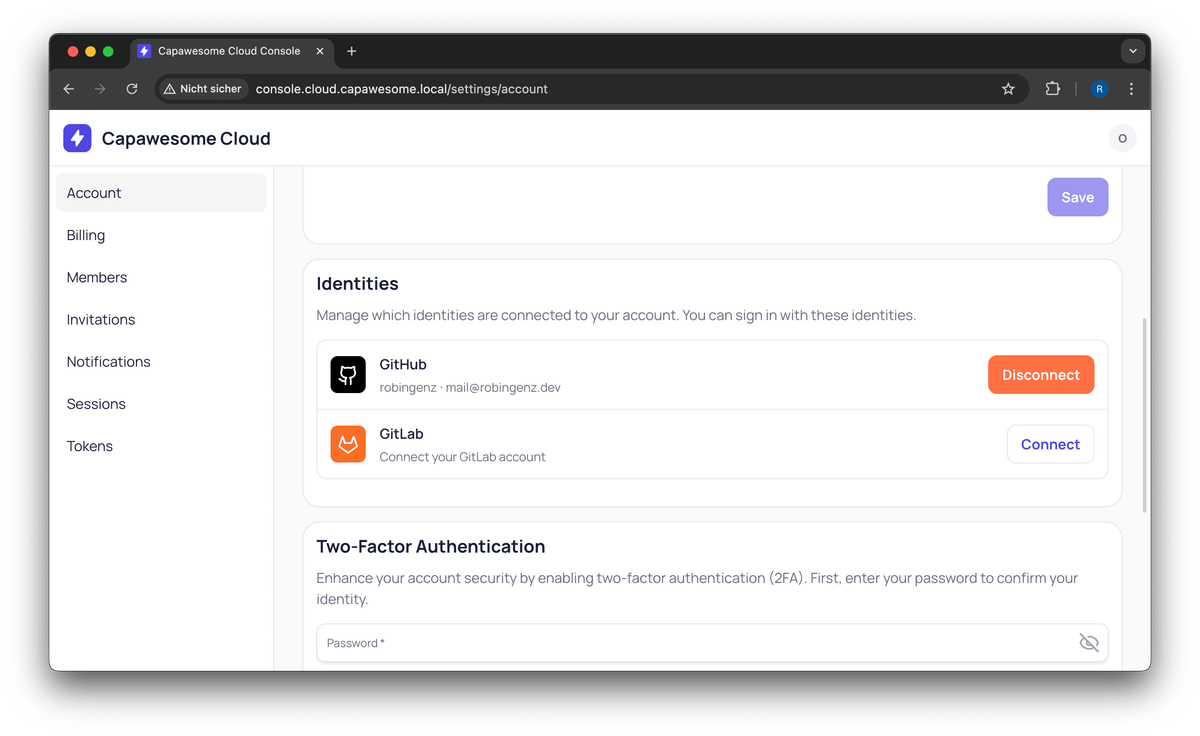
Capawesome Cloud Identities
### Open Source Program
We have launched the [Capawesome Cloud Open Source Program](./capawesome-cloud-open-source-program.md) to support open source projects and developers. This program provides free access to Capawesome Cloud for open source projects, allowing you to use our platform for Over-the-Air (OTA) updates. You can find more information about the program and how to apply in our [blog post](./capawesome-cloud-open-source-program.md).
### Pricing
We have doubled the MAU limit on all plans for both new and existing customers:
- **Free**: 100 MAU (previously 50)
- **Starter**: 1,000 MAU (previously 500)
- **Professional**: 10,000 MAU (previously 5,000)
- **Team**: 100,000 MAU (previously 50,000)
This means that you can now use Capawesome Cloud for larger projects without having to upgrade to a higher plan. We believe that this change will make it easier for developers to get started with Capawesome Cloud and to scale their projects as needed. You can find more information about our pricing plans on our [pricing page](/#pricing){:target="_blank"}.
### Two-factor authentication
You can now enhance the security of your Capawesome Cloud account by enabling two-factor authentication (2FA). This feature adds an extra layer of protection to your account, requiring a second form of verification in addition to your password. To enable 2FA, go to your [account settings](https://console.cloud.capawesome.io/settings/account){:target="_blank"} and follow the instructions.
## Plugins
### Android Edge-to-Edge Support
The [Capacitor Android Edge-to-Edge Support plugin](../../sdks/capacitor/android-edge-to-edge-support.md) got several new features and improvements this month.
##### New `enable()` method
The `enable()` method allows you to re-enable the plugin after it has been disabled. This is useful if you want to temporarily disable the edge-to-edge support and then re-enable it later.
```typescript
import { EdgeToEdge } from '@capawesome/capacitor-android-edge-to-edge-support';
const enable = async () => {
await EdgeToEdge.enable();
};
```
##### New `disable()` method
The `disable()` method allows you to disable the edge-to-edge support. This is useful if you want to temporarily disable the edge-to-edge support without removing the plugin from your project.
```typescript
import { EdgeToEdge } from '@capawesome/capacitor-android-edge-to-edge-support';
const disable = async () => {
await EdgeToEdge.disable();
};
```
##### New `getInsets()` method
The `getInsets()` method allows you to retrieve the current insets that are applied by the plugin. This is useful if you need to pass these values to other plugins that require insets.
```typescript
import { EdgeToEdge } from '@capawesome/capacitor-android-edge-to-edge-support';
const getInsets = async () => {
const { top, bottom, right, left } = await EdgeToEdge.getInsets();
return { top, bottom, right, left };
};
```
### Bluetooth Low Energy
##### Peripheral mode
The [Capacitor Bluetooth Low Energy plugin](../../sdks/capacitor/bluetooth-low-energy.md) now supports peripheral mode on Android on iOS. This feature allows your app to act as a BLE peripheral, enabling other devices to connect and interact with it. This is useful for applications that need to advertise data or provide services to nearby devices.
```typescript
import { BluetoothLowEnergy } from '@capawesome-team/capacitor-bluetooth-low-energy';
const startAdvertising = async () => {
await BluetoothLowEnergy.startAdvertising({
name: 'CapBLE',
services: [
{
id: '12345678-1234-1234-1234-1234567890AB',
characteristics: [
{
id: '87654321-4321-4321-4321-BA0987654321',
descriptors: [], // Descriptors are ignored for now
permissions: {
read: true,
write: true,
},
properties: {
indicate: true,
notify: true,
read: true,
write: true,
},
},
],
},
],
});
};
```
The `startAdvertising` method allows you to specify the name of the peripheral and the services it provides. The services can include characteristics with various properties and permissions.
You can also stop advertising by calling the `stopAdvertising` method:
```typescript
const stopAdvertising = async () => {
await BluetoothLowEnergy.stopAdvertising();
};
```
### Contacts
##### New `birthdate` property
The [Capacitor Contacts plugin](../../sdks/capacitor/contacts.md) now supports the `birthdate` property for contacts. This property allows you to store and retrieve the birthdate of a contact, making it easier to manage contact information.
```typescript
import { Contacts } from '@capawesome-team/capacitor-contacts';
const createContact = async () => {
return Contacts.createContact({
contact: {
birthday: {
day: 1,
month: 1,
year: 1990
},
givenName: 'John',
familyName: 'Doe'
}
});
};
```
Please note that the `year` property is optional and can be omitted if not needed.
### Firebase
#### Analytics
##### New initiate on-device conversion measurement methods
The [Capacitor Firebase Analytics plugin](../../sdks/capacitor/firebase/analytics.md) now supports multiple new methods for initiating on-device conversion measurement. These methods allow you to initiate conversion measurement using email addresses and phone numbers, as well as their hashed versions. This is useful for tracking conversions and measuring the effectiveness of your marketing campaigns.
```typescript
import { FirebaseAnalytics } from '@capacitor-firebase/analytics';
const initiateOnDeviceConversionMeasurementWithEmailAddress = async () => {
await FirebaseAnalytics.initiateOnDeviceConversionMeasurementWithEmailAddress({
emailAddress: 'mail@example.com',
});
};
const initiateOnDeviceConversionMeasurementWithPhoneNumber = async () => {
await FirebaseAnalytics.initiateOnDeviceConversionMeasurementWithPhoneNumber({
phoneNumber: '+49123456789',
});
};
const initiateOnDeviceConversionMeasurementWithHashedEmailAddress = async () => {
await FirebaseAnalytics.initiateOnDeviceConversionMeasurementWithHashedEmailAddress({
emailAddressToHash: 'mail@example.com',
});
};
const initiateOnDeviceConversionMeasurementWithHashedPhoneNumber = async () => {
await FirebaseAnalytics.initiateOnDeviceConversionMeasurementWithHashedPhoneNumber({
phoneNumberToHash: '+49123456789',
});
};
```
### App Check
##### New `tokenChanged` event
The [Capacitor Firebase App Check plugin](../../sdks/capacitor/firebase/app-check.md) now supports the `tokenChanged` event also on Android and iOS. This event is triggered when the App Check token changes, allowing you to handle token updates in your application.
```typescript
import { FirebaseAppCheck } from '@capacitor-firebase/app-check';
const addListener = async () => {
await FirebaseAppCheck.addListener('tokenChanged', (event) => {
console.log('Token changed:', event.token);
});
};
```
### Authentication
The [Capacitor Firebase Authentication plugin](../../sdks/capacitor/firebase/authentication.md) got two new features this month.
##### Facebook Limited Login
The plugin now supports Facebook Limited Login. This feature allows you to authenticate users with Facebook while limiting the amount of data shared with your app. This is useful for improving user privacy and security.
```typescript
import { FirebaseAuthentication } from '@capacitor-firebase/authentication';
const signInWithFacebook = async () => {
const result = await FirebaseAuthentication.signInWithFacebook({
useLimitedLogin: true,
});
return result.user;
};
```
If you don't want to use the limited login feature, you have to request the App Tracking Transparency permission first. This is required by Apple to use Facebook login without limited login:
```typescript
import { FirebaseAuthentication } from '@capacitor-firebase/authentication';
const signInWithFacebook = async () => {
const { status } = await FirebaseAuthentication.requestAppTrackingTransparencyPermission();
if (status !== 'granted') {
throw new Error('App Tracking Transparency permission not granted');
}
const result = await FirebaseAuthentication.signInWithFacebook({
useLimitedLogin: false,
});
return result.user;
};
```
##### Disable the Android Credential Manager
Since a few users have reported issues with the new Android Credential Manager (see [#848](https://github.com/capawesome-team/capacitor-firebase/issues/848){:target="_blank"}), we have added a new property to disable it:
```typescript
import { FirebaseAuthentication } from '@capacitor-firebase/authentication';
const signInWithGoogle = async () => {
const result = await FirebaseAuthentication.signInWithGoogle({
useCredentialManager: false,
});
return result.user;
};
```
By default, the credential manager is enabled. This property is only available on Android.
### ML Kit
#### Barcode Scanning
##### Add torch support
The [Barcode Scanning](../../sdks/capacitor/mlkit/barcode-scanning.md) plugin now has its own methods to control the flashlight again. These methods were first removed and migrated to a separate [Capacitor Torch plugin](../../sdks/capacitor/torch.md). However, as this led to various problems, we have decided to bring the methods back into the barcode scanning plugin.
```typescript
import { BarcodeScanning } from '@capacitor-mlkit/barcode-scanning';
const enableTorch = async () => {
await Torch.enable();
};
const disableTorch = async () => {
await Torch.disable();
};
const toggleTorch = async () => {
await Torch.toggle();
};
const isTorchEnabled = async () => {
const { enabled } = await Torch.isEnabled();
return enabled;
};
const isTorchAvailable = async () => {
const { available } = await Torch.isAvailable();
return available;
};
```
The methods are available on Android and iOS.
##### New `3840x2160` resolution
The [Barcode Scanning](../../sdks/capacitor/mlkit/barcode-scanning.md) plugin now supports the `3840x2160` resolution for scanning barcodes. This resolution is available on Android and iOS devices with a camera that supports this resolution. The new resolution allows for higher quality scans and improved performance in low-light conditions.
```typescript
import { BarcodeScanning, Resolution } from '@capacitor-mlkit/barcode-scanning';
const startScan = async () => {
await BarcodeScanner.startScan({
resolution: Resolution['3840x2160'],
});
};
```
#### Subject Segmentation
We have published a new [Subject Segmentation](../../sdks/capacitor/mlkit/subject-segmentation.md) plugin. This plugin allows you to segment subjects in images, making it easier to create custom image processing applications. The plugin is available on Android.
```typescript
import { SubjectSegmentation } from '@capacitor-mlkit/subject-segmentation';
const processImage = async () => {
const { path } = await SubjectSegmentation.processImage({
path: 'path/to/image.jpg',
confidence: 0.7,
});
return path;
};
```
The plugin provides a simple API for processing images and returning the segmented image. You can adjust the confidence level to control the sensitivity of the segmentation.
### Printer
##### New `printBase64(...)` method
The [Capacitor Printer plugin](../../sdks/capacitor/printer.md) now supports printing base64 encoded files. This feature allows you to print files that are not available on the device's file system, such as files that are generated in memory or downloaded from a remote server. The new `printBase64(...)` method accepts a base64 encoded string and prints it using the default printer.
```typescript
import { Printer } from '@capawesome-team/capacitor-printer';
const printBase64 = async () => {
await Printer.printBase64({
name: 'My Document',
data: 'JVBERi0...',
});
}
```
The method is available on Android and iOS. Please note that large base64 strings may lead to app crashes or performance issues. We therefore recommend using this feature only for small files or images. For larger files, consider saving them to the device's file system and using the `printFile(...)` method.
##### New `printFile(...)` method
The [Capacitor Printer plugin](../../sdks/capacitor/printer.md) now also supports printing files (including images) from the device's file system. The new `printFile(...)` method accepts a file path and prints it using the default printer.
```typescript
import { Printer } from '@capawesome-team/capacitor-printer';
const printFile = async () => {
await Printer.printFile({
mimeType: 'application/pdf',
path: '/path/to/file.pdf',
});
};
```
The method is available on Android and iOS.
