---
title: Capawesome May 2025 Update
description: The Capawesome May update is here! This update includes new features and improvements for Capawesome Cloud and our Plugins.
date:
created: 2025-06-01
updated: 2026-07-08
authors:
- robingenz
categories:
- Updates
---
# Capawesome May 2025 Update
The Capawesome May update is here! This update includes new features and improvements for [Capawesome Cloud](../../cloud/index.md) and our [Plugins](../../sdks/capacitor/index.md). Let's take a look at the most important changes.
In case you missed it, check out the [April 2025 update](./2025-april-update.md) to catch up on what shipped last month.
## Blog
Check out our latest blog post [How to Securely Store Credentials with Capacitor](./how-to-securely-store-credentials-with-capacitor.md) to learn how to securely store credentials and authenticate users using the [Capacitor Biometrics plugin](../../sdks/capacitor/biometrics.md) and [Capacitor Secure Preferences plugin](../../sdks/capacitor/secure-preferences.md) plugins. It's a cross-platform solution that works on both Android and iOS, and it provides a secure way to store sensitive information such as passwords, tokens, or other credentials.
## CLI
The [Capawesome CLI](../../cloud/cli/index.md) has been updated with several new commands and improvements this month.
### New `apps:channels:get` command
The new `apps:channels:get` command allows you to retrieve information about a specific channel in your app. You can use this command to get details such as the channel's ID, name, and metadata. In combination with the `--json` option, you can easily integrate this command into your scripts or workflows to automate tasks related to your app's channels.
For example, the following command retrieves the information about a specific channel in JSON format and extracts the channel ID using [jq](https://github.com/jqlang/jq){:target="_blank"}:
```bash
npx @capawesome/cli apps:channels:get --app-id my-app-id --channel-id my-channel-id --json | jq ".id"
```
### New `apps:channels:list` command
The new `apps:channels:list` command allows you to list all channels in your app. You can use this command to get an overview of all channels and their metadata. Again, you can use the `--json` option to get the output in JSON format, which makes it easy to integrate into your scripts or workflows. Thanks to the `--limit` and `--offset` options, you can also paginate through the list of channels.
```
npx @capawesome/cli apps:channels:list --app-id my-app-id --limit 10 --offset 0 --json
```
### New `apps:channels:update` command
The new `apps:channels:update` command allows you to update the name or bundle limit of a specific channel in your app.
```bash
npx @capawesome/cli apps:channels:update --app-id my-app-id --channel-id my-channel-id --name "New Channel Name" --bundle-limit 100
```
## Cloud
### New Logs page
We have introduced a new Logs page in the Capawesome Cloud Console. This page allows you to view and filter logs for your app, making it easier to debug your implementation when getting started. View detailed information on requests and responses, including status and body, to help you identify issues before they become critical. Read more about the new Logs page in the [docs](../../cloud/live-updates/logs.md).
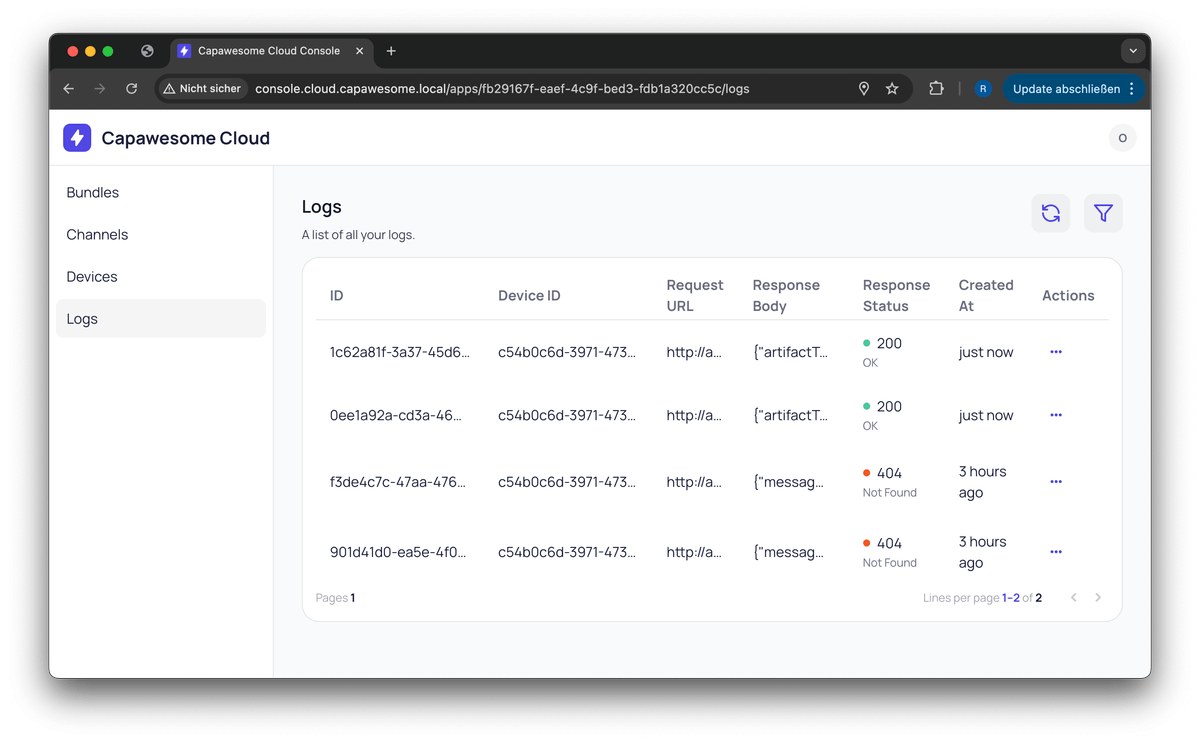
Capawesome Cloud App Logs
## Plugins
### Audio Recorder
The [Capacitor Audio Recorder plugin](../../sdks/capacitor/audio-recorder.md) got several new features and improvements this month.
##### New `bitRate` property
The `StartRecordingOptions` now includes a new `bitRate` property. This property allows you to specify the audio encoding bit rate in bits per second (bps) for the recorded audio. This gives you more control over the audio quality and file size of the recording.
```typescript
import { AudioRecorder } from '@capawesome-team/capacitor-audio-recorder';
const startRecording = async () => {
await AudioRecorder.startRecording({
bitRate: 128000, // 128 kbps
});
};
```
##### New `duration` property
The `StopRecordingResult` and `RecordingStoppedEvent` now include a new `duration` property. This property provides the duration of the recorded audio in milliseconds, allowing you to easily access the length of the recording.
```typescript
import { AudioRecorder } from '@capawesome-team/capacitor-audio-recorder';
const stopRecording = async () => {
const { blob, duration, uri } = await AudioRecorder.stopRecording();
console.log(`Recording duration: ${duration} ms`);
};
```
##### New `sampleRate` property
The `StartRecordingOptions` now includes a new `sampleRate` property. This property allows you to specify the sample rate for the recorded audio. Just like the `bitRate` property, this gives you more control over the audio quality and file size of the recording. The sample rate is specified in Hertz (Hz) and can be set to common values such as 44100 Hz or 48000 Hz.
```typescript
import { AudioRecorder } from '@capawesome-team/capacitor-audio-recorder';
const startRecording = async () => {
await AudioRecorder.startRecording({
sampleRate: 44100,
});
};
```
This property is optional and defaults to 44100 if not specified.
##### New `recordingPaused` event
In order to handle audio interruptions, the plugin now emits a new `recordingPaused` event. This event is triggered when the recording is paused, allowing you to handle any necessary actions in your app.
```typescript
import { AudioRecorder } from '@capawesome-team/capacitor-audio-recorder';
AudioRecorder.addListener('recordingPaused', () => {
console.log('Recording paused');
});
```
### Biometrics
We have published a new [Capacitor Biometrics plugin](../../sdks/capacitor/biometrics.md). This plugin allows you to use biometric authentication (such as fingerprint or face recognition) in your Capacitor app. The plugin provides a simple API for authenticating users and checking if biometric authentication is available on the device.
The plugin is available on Android and iOS.
```typescript
import { Biometrics, ErrorCode } from '@capawesome-team/capacitor-biometrics';
const authenticate = async () => {
try {
await Biometrics.authenticate({
title: 'Authentication Required',
subtitle: 'Please authenticate to continue',
cancelButtonText: 'Cancel',
iosFallbackButtonText: 'Use Passcode',
});
} catch (error) {
if (error.code === ErrorCode.USER_CANCELED) {
console.log('User canceled the authentication.');
} else if (error.code === ErrorCode.NOT_ENROLLED) {
console.log('No biometric authentication enrolled.');
} else if (error.code === ErrorCode.NOT_AVAILABLE) {
console.log('Biometric authentication not available.');
} else {
console.log('Another error occurred:', error);
}
}
};
```
Check out the [announcement post](./announcing-the-capacitor-biometrics-plugin.md) for more details.
### Contacts
The [Capacitor Contacts plugin](../../sdks/capacitor/contacts.md) has received several new features and improvements this month.
##### New `displayContactById(...)` method
The `displayContactById(...)` method allows you to display a contact in the system's default contacts app. This is useful for apps that need to show contact details without having to implement a custom UI.
```typescript
import { Contacts } from '@capawesome-team/capacitor-contacts';
const displayContact = async (id: string) => {
await Contacts.displayContactById({
id,
});
};
```
You just need to pass the contact ID of the contact you want to display. The system will then open the default contacts app and show the contact details.
##### New `updateContactById(...)` and `displayUpdateContactById(...)` methods
The `updateContactById(...)` method allows you to update an existing contact by its ID. This is useful for apps that need to modify contact details without having to create a new contact.
```typescript
import { Contacts } from '@capawesome-team/capacitor-contacts';
const updateContactById = async (id: string) => {
await Contacts.updateContactById({
id,
contact: {
givenName: 'John',
familyName: 'Doe'
}
});
};
```
It's important to note that all fields are required to be provided when updating a contact, even if you only want to change one field. Fields that are not provided will be removed from the contact. This behavior will be improved in a future release to allow partial updates.
In addition, the `displayUpdateContactById(...)` method allows you to display a contact in the system's default contacts app with the option to update it.
```typescript
import { Contacts } from '@capawesome-team/capacitor-contacts';
const displayUpdateContact = async (id: string) => {
await Contacts.displayUpdateContactById({
id,
});
};
```
This way, you don't have to implement a custom UI for updating contacts, and you can leverage the system's default contacts app for this purpose.
##### New `countContacts(...)` method
The `countContacts(...)` method allows you to count the number of contacts in the device's contacts database. This allows you to show the number of contacts in your app without having to fetch all contacts.
```typescript
import { Contacts } from '@capawesome-team/capacitor-contacts';
const countContacts = async () => {
const { count } = await Contacts.countContacts();
console.log(`Number of contacts: ${count}`);
};
```
##### Accounts and Groups support
The plugin now supports Android accounts and iOS groups. This allows you to manage contacts that are associated with specific accounts or groups, making it easier to organize and access contacts in your app.
For example, on Android, you can retrieve the accounts associated with the device using the `getAccounts(...)` method:
```typescript
import { Contacts } from "@capawesome-team/capacitor-contacts";
const getAccounts = async () => {
const { accounts } = await Contacts.getAccounts();
return accounts;
};
```
You can then create a contact and associate it with an account using the `account` property of the `Contact` object:
```typescript
import { Contacts } from "@capawesome-team/capacitor-contacts";
const createContact = async () => {
return Contacts.createContact({
contact: {
account: {
name: 'john@doe.tld',
type: 'com.google'
},
givenName: 'John',
familyName: 'Doe'
},
});
};
```
On iOS, you can retrieve the groups associated with the device using the `getGroups(...)` method:
```typescript
import { Contacts } from "@capawesome-team/capacitor-contacts";
const getGroups = async () => {
const { groups } = await Contacts.getGroups();
return groups;
};
```
Just like with accounts, you can create a contact and associate it with one (or more) group(s) using the `groupIds` property of the `Contact` object:
```typescript
import { Contacts } from "@capawesome-team/capacitor-contacts";
const createContact = async () => {
return Contacts.createContact({
contact: {
groupIds: ['904DE809-D144-4562-8552-DFEB91F0E4BD:ABGroup'],
givenName: 'John',
familyName: 'Doe'
},
});
};
```
You can even create a new group using the [`createGroup(...)`](../../sdks/capacitor/contacts.md#creategroup) method:
```typescript
import { Contacts } from "@capawesome-team/capacitor-contacts";
const createGroup = async () => {
return Contacts.createGroup({
group: {
name: 'Friends'
}
});
};
```
##### Pagination support
That's not all! The plugin now supports pagination for fetching contacts. This allows you to fetch contacts in smaller chunks, which can improve performance and reduce memory usage, especially when dealing with a large number of contacts.
```typescript
import { Contacts } from '@capawesome-team/capacitor-contacts';
const getContacts = async () => {
const { contacts } = await Contacts.getContacts({
limit: 10, // Fetch 10 contacts at a time
offset: 0, // Start from the first contact
});
console.log(contacts);
};
```
### Secure Preferences
We have published a new [Capacitor Secure Preferences plugin](../../sdks/capacitor/secure-preferences.md). This plugin is a drop-in replacement for the [Capacitor Preferences](https://capacitorjs.com/docs/apis/preferences){:target="_blank"} plugin and and allows you to securely store key/value pairs such as passwords, tokens or other sensitive information.
```typescript
import { SecurePreferences } from '@capawesome-team/capacitor-secure-preferences';
const set = async () => {
await SecurePreferences.set({
key: 'password',
value: '123456',
});
};
const get = async () => {
const { value } = await SecurePreferences.get({
key: 'password',
});
console.log(value);
};
```
Check out the [announcement post](./announcing-the-capacitor-secure-preferences-plugin.md) for more details.
### Wifi
#### New `addNetwork(...)` method
The [Capacitor Wifi plugin](../../sdks/capacitor/wifi.md) now includes a new `addNetwork(...)` method. This method displays a system dialog that allows the user to add a new Wi-Fi network with predefined credentials. This is useful for apps that require the user to connect to a specific Wi-Fi network.
```typescript
import { Wifi } from '@capawesome-team/capacitor-wifi';
const addNetwork = async () => {
await Wifi.addNetwork({
ssid: 'MyNetwork',
password: 'MyPassword',
});
}
```
Here is a short video demonstrating how this looks like in practice on Android:
