---
description: Automatically trigger builds from Git events with Capawesome Cloud Automations. No CLI, no external CI/CD — just push and build.
title: Capawesome Cloud Automations: Build on Git Push - Capawesome
image: https://capawesome.io/docs/assets/images/social/blog/announcing-capawesome-cloud-automations.png
---

<!doctype html> 

[Skip to content ](#capawesome-cloud-automations-build-on-git-push) 

[🖥️ Introducing the **Capacitor Electron Platform** — build desktop apps for macOS, Windows, and Linux. Free & open source. ](/blog/announcing-the-capacitor-electron-platform/) 

* [ SDKs ](/docs/sdks/)
* [ Formbricks ](/docs/sdks/capacitor/formbricks/)
* [ Geocoder ](/docs/sdks/capacitor/geocoder/)
* [ Google Sign-In ](/docs/sdks/capacitor/google-sign-in/)
* [ Grafana Faro ](/docs/sdks/capacitor/grafana-faro/)
* [ Gyroscope ](/docs/sdks/capacitor/gyroscope/)
* [ Haptics ](/docs/sdks/capacitor/haptics/)
* [ Home Indicator ](/docs/sdks/capacitor/home-indicator/)
* [ In-App Browser ](/docs/sdks/capacitor/in-app-browser/)
* [ Install Referrer ](/docs/sdks/capacitor/install-referrer/)
* [ Intercom ](/docs/sdks/capacitor/intercom/)
* [ Intune ](/docs/sdks/capacitor/intune/)
* [ Keep Awake ](/docs/sdks/capacitor/keep-awake/)
* [ libSQL ](/docs/sdks/capacitor/libsql/)
* [ Light Sensor ](/docs/sdks/capacitor/light-sensor/)
* [ Live Update ](/docs/sdks/capacitor/live-update/)
* [ Localization ](/docs/sdks/capacitor/localization/)
* [ Mail Composer ](/docs/sdks/capacitor/mail-composer/)
* [ Managed Configurations ](/docs/sdks/capacitor/managed-configurations/)
* [ Maps Launcher ](/docs/sdks/capacitor/maps-launcher/)
* [ Media Session ](/docs/sdks/capacitor/media-session/)
* [ ML Kit ](/docs/sdks/capacitor/mlkit/)
* [ Navigation Bar ](/docs/sdks/capacitor/navigation-bar/)
* [ Network ](/docs/sdks/capacitor/network/)
* [ NFC ](/docs/sdks/capacitor/nfc/)
* [ Node.js ](/docs/sdks/capacitor/nodejs/)
* [ OAuth ](/docs/sdks/capacitor/oauth/)
* [ Passkeys ](/docs/sdks/capacitor/passkeys/)
* [ Password Autofill ](/docs/sdks/capacitor/password-autofill/)
* [ PDF Generator ](/docs/sdks/capacitor/pdf-generator/)
* [ PDF Viewer ](/docs/sdks/capacitor/pdf-viewer/)
* [ Pedometer ](/docs/sdks/capacitor/pedometer/)
* [ Permissions ](/docs/sdks/capacitor/permissions/)
* [ Phone Dialer ](/docs/sdks/capacitor/phone-dialer/)
* [ Photo Editor ](/docs/sdks/capacitor/photo-editor/)
* [ Photo Manipulator ](/docs/sdks/capacitor/photo-manipulator/)
* [ PixLive ](/docs/sdks/capacitor/pixlive/)
* [ PostHog ](/docs/sdks/capacitor/posthog/)
* [ Printer ](/docs/sdks/capacitor/printer/)
* [ Privacy Screen ](/docs/sdks/capacitor/privacy-screen/)
* [ Proximity Sensor ](/docs/sdks/capacitor/proximity-sensor/)
* [ Purchases ](/docs/sdks/capacitor/purchases/)
* [ RealtimeKit ](/docs/sdks/capacitor/realtimekit/)
* [ Root Detection ](/docs/sdks/capacitor/root-detection/)
* [ Screen Brightness ](/docs/sdks/capacitor/screen-brightness/)
* [ Screen Orientation ](/docs/sdks/capacitor/screen-orientation/)
* [ Screen Reader ](/docs/sdks/capacitor/screen-reader/)
* [ Screenshot ](/docs/sdks/capacitor/screenshot/)
* [ Secure Preferences ](/docs/sdks/capacitor/secure-preferences/)
* [ Settings Launcher ](/docs/sdks/capacitor/settings-launcher/)
* [ Shake ](/docs/sdks/capacitor/shake/)
* [ Silent Mode ](/docs/sdks/capacitor/silent-mode/)
* [ SIM ](/docs/sdks/capacitor/sim/)
* [ SMS Composer ](/docs/sdks/capacitor/sms-composer/)
* [ Speech Recognition ](/docs/sdks/capacitor/speech-recognition/)
* [ Speech Synthesis ](/docs/sdks/capacitor/speech-synthesis/)
* [ Share Target ](/docs/sdks/capacitor/share-target/)
* [ Square Mobile Payments ](/docs/sdks/capacitor/square-mobile-payments/)
* [ SQLite ](/docs/sdks/capacitor/sqlite/)
* [ Superwall ](/docs/sdks/capacitor/superwall/)
* [ System WebView ](/docs/sdks/capacitor/system-webview/)
* [ Tauri ](/docs/sdks/capacitor/tauri/)
* [ Text Interaction ](/docs/sdks/capacitor/text-interaction/)
* [ Text Zoom ](/docs/sdks/capacitor/text-zoom/)
* [ Thermal State ](/docs/sdks/capacitor/thermal-state/)
* [ Toast ](/docs/sdks/capacitor/toast/)
* [ Torch ](/docs/sdks/capacitor/torch/)
* [ Vault ](/docs/sdks/capacitor/vault/)
* [ Volume ](/docs/sdks/capacitor/volume/)
* [ Wallet ](/docs/sdks/capacitor/wallet/)
* [ Wifi ](/docs/sdks/capacitor/wifi/)
* [ YouTube Player ](/docs/sdks/capacitor/youtube-player/)
* [ Zip ](/docs/sdks/capacitor/zip/)
* [ Cordova ](/docs/sdks/cordova/)
* [ Cloud ](/docs/cloud/)
* [ Integrations ](/docs/cloud/live-updates/integrations/)
* Concepts
* Reference
* [ Troubleshooting ](/docs/cloud/live-updates/troubleshooting/)
* [ FAQ ](/docs/cloud/live-updates/faq/)
* [ Native Builds ](/docs/cloud/native-builds/)
* [ Set Up Environments ](/docs/cloud/native-builds/environments/)
* [ Overwrite Native Configurations ](/docs/cloud/native-builds/native-configurations/)
* [ Auto-Increment Build Numbers ](/docs/cloud/native-builds/auto-incrementing-build-numbers/)
* [ Configure the Web Build Script ](/docs/cloud/native-builds/web-build-script/)
* [ Build from a Monorepo ](/docs/cloud/native-builds/monorepo/)
* [ Use pnpm, Yarn, or bun ](/docs/cloud/native-builds/package-managers/)
* [ Install Private npm Packages ](/docs/cloud/native-builds/npm-private-registry/)
* [ Override the Java Version ](/docs/cloud/native-builds/override-java-version/)
* [ Custom iOS Provisioning Profiles ](/docs/cloud/native-builds/custom-ios-provisioning-profiles/)
* [ Build without Git ](/docs/cloud/native-builds/build-without-git/)
* [ Access Git Behind a Firewall ](/docs/cloud/native-builds/firewall-access/)
* [ Integrations ](/docs/cloud/native-builds/integrations/)
* Reference
* [ Troubleshooting ](/docs/cloud/native-builds/troubleshooting/)
* [ FAQ ](/docs/cloud/native-builds/faq/)
* [ App Store Publishing ](/docs/cloud/app-store-publishing/)
* [ Submit a Build ](/docs/cloud/app-store-publishing/submit-a-build/)
* [ Submit Automatically After a Build ](/docs/cloud/app-store-publishing/submit-automatically/)
* [ Troubleshooting ](/docs/cloud/app-store-publishing/troubleshooting/)
* [ FAQ ](/docs/cloud/app-store-publishing/faq/)
* [ Automations ](/docs/cloud/automations/)
* [ Reference ](/docs/cloud/automations/reference/)
* [ Troubleshooting ](/docs/cloud/automations/troubleshooting/)
* [ FAQ ](/docs/cloud/automations/faq/)
* [ Assist ](/docs/cloud/assist/)
* [ CLI ](/docs/cloud/cli/)
* APIs and SDKs
* [ Webhooks ](/docs/cloud/webhooks/)
* [ Integrations ](/docs/cloud/integrations/)
* Account
* [ Organization ](/docs/cloud/organizations/)
* [ Two-Factor Enforcement ](/docs/cloud/organizations/two-factor-authentication/)
* [ Audit Logs ](/docs/cloud/organizations/audit-logs/)
* [ Billing ](/docs/cloud/organizations/billing/)
* [ License Keys ](/docs/cloud/license-keys/)
* [ AI ](/docs/ai/)
* [ Insiders ](/docs/insiders/)
* [ Billing & Plans ](/docs/insiders/billing-and-plans/)
* [ FAQ ](/docs/insiders/faq/)
* [ License ](https://capawesome.io/legal/eula/)
* [ Support ](/docs/support/)
* [ Contributing ](/docs/contributing/)
* Contributing code
* [ Code of Conduct ](/docs/contributing/code-of-conduct/)
* [ Questions ](https://docs.github.com/en/discussions/collaborating-with-your-community-using-discussions/participating-in-a-discussion#creating-a-discussion)
* [ Blog ](/blog/)
* Categories

* [ FAQ ](#faq)
* [ Related Posts ](#related-posts)
* [ Getting Started ](#getting-started)
* [ Final Thoughts ](#final-thoughts)

# Capawesome Cloud Automations: Build on Git Push[¶](#capawesome-cloud-automations-build-on-git-push "Permanent link")

**Capawesome Cloud Automations** automatically triggers a build whenever you push to a branch or create a tag — no CLI, no external CI/CD pipeline, no manual steps. Connect your Git repository, set up an automation, and every matching Git event kicks off a build. Configure it once and let Capawesome Cloud handle the rest.

## Why Automations[¶](#why-automations "Permanent link")

Until now, triggering a build on Capawesome Cloud required a manual step — either clicking "Build from Git" in the Console or running a command via the CLI. Many teams worked around this by setting up external CI/CD pipelines (GitHub Actions, GitLab CI, etc.) that called the Capawesome Cloud API on every push. While this worked, it introduced extra complexity: **another pipeline to maintain, another set of credentials to manage, and duplicate costs** for CI/CD minutes you were already paying for with Capawesome Cloud.

Automations remove all of that. Everything happens inside Capawesome Cloud — no external tooling, no CLI, no YAML files. Just a Git repository and Capawesome Cloud. This makes the entire setup **less error-prone** and easier to manage, especially for teams where not every member has a local development environment configured.

## How It Works[¶](#how-it-works "Permanent link")

Setting up an automation takes less than a minute:

1. **Navigate to Automations**: Open the Automations page of your app in the Capawesome Cloud Console.
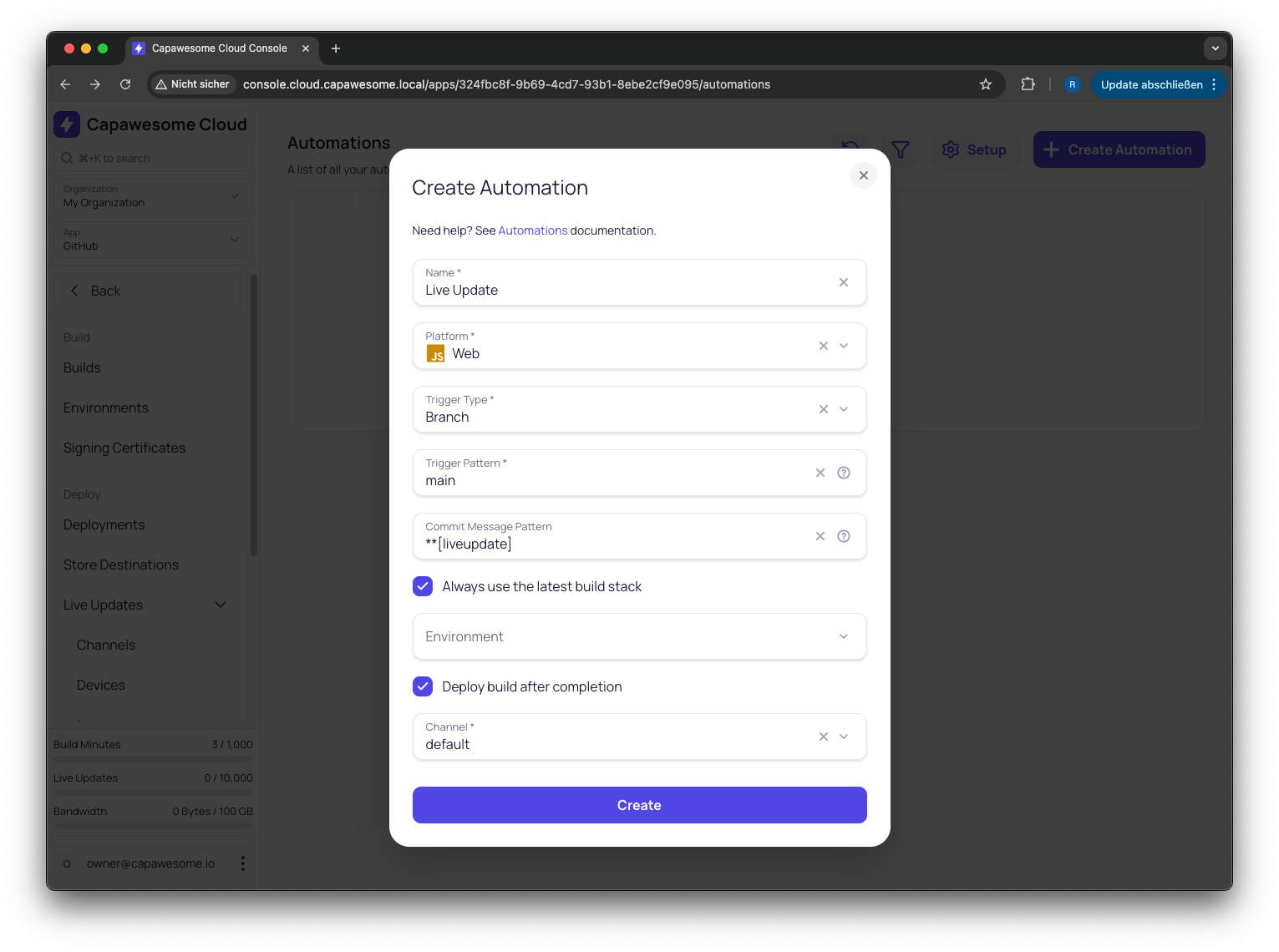
2. **Create an Automation**: Give it a name, select a platform (Android, iOS, or Web), and choose a trigger type — **Branch** or **Tag**.
3. **Set a Trigger Pattern**: Specify which branch or tag should trigger the build, for example `main` or `v*`.
4. **Configure Build Settings** (optional): Attach a signing certificate, environment, store destination, or live update channel.
5. **Push Your Code**: That's it. The next matching push or tag triggers a build automatically.

Once a build is triggered, you'll receive a **notification via email** and can track the build progress directly in the Console — just like any other build.

[Get Started](/)

## Key Features[¶](#key-features "Permanent link")

### Branch and Tag Triggers[¶](#branch-and-tag-triggers "Permanent link")

![Automations List](/docs/assets/images/posts/announcing-capawesome-cloud-automations/038cc423-0343-46c0-88c4-60b81994cd0c.png) 

Manage all your automations in one place

Configure automations to trigger on **branch pushes** or **tag creation**. Use branch triggers for continuous integration workflows (e.g., build on every push to `main`) and tag triggers for release workflows (e.g., build when a version tag like `v1.0.0` is created).

### Pattern Matching[¶](#pattern-matching "Permanent link")

Target specific branches or tags using **name patterns**. For example, trigger builds only for tags starting with `v` or only for pushes to `release/*` branches. This gives you fine-grained control over which Git events actually start a build.

### Commit Message Filtering[¶](#commit-message-filtering "Permanent link")

Optionally filter triggers based on **commit message content**. This lets you skip builds for non-code changes or only build when a specific keyword is present in the commit message.

### Full Build Configuration[¶](#full-build-configuration "Permanent link")

Each automation can include the full set of build settings — **build type, build stack, signing certificate, environment variables, store destination, and live update channel**. This means you can set up a complete pipeline from Git push to app store submission or live update deployment, all without leaving Capawesome Cloud.

### Automatic Webhook Setup[¶](#automatic-webhook-setup "Permanent link")

![Webhook Setup Dialog](/docs/assets/images/posts/announcing-capawesome-cloud-automations/a013ba5b-13e6-490f-a3e8-f50b208df403.png) 

Set up webhooks manually when needed

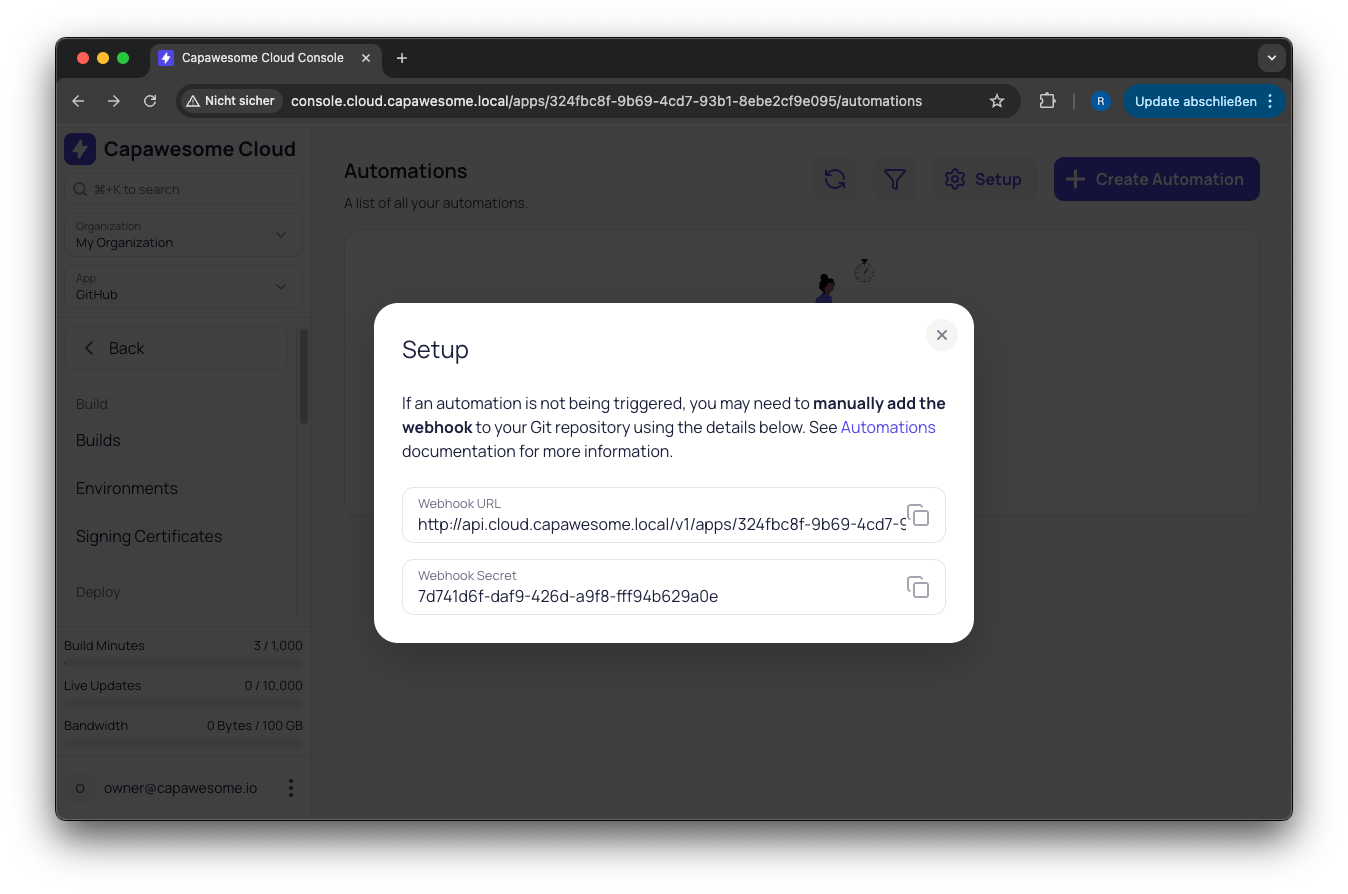
When you create an automation, Capawesome Cloud **automatically registers a webhook** on your connected Git repository. No manual configuration needed in most cases. If automatic registration isn't possible (e.g., for self-hosted providers), you can set up the webhook manually using the values provided in the Setup dialog.

[Learn more about Webhooks](/docs/cloud/automations/webhooks/)

### Enable and Disable[¶](#enable-and-disable "Permanent link")

**Toggle automations on or off** without deleting them. This is useful for temporarily pausing builds during maintenance or when you want to keep a configuration for later use without it triggering on every push.

## FAQ[¶](#faq "Permanent link")

### Do I still need an external CI/CD pipeline like GitHub Actions?[¶](#do-i-still-need-an-external-cicd-pipeline-like-github-actions "Permanent link")

No. Automations run entirely inside Capawesome Cloud — no external tooling, no CLI, and no YAML files to maintain. That removes a separate pipeline, a second set of credentials, and duplicate CI/CD minutes.

### What Git events can trigger a build?[¶](#what-git-events-can-trigger-a-build "Permanent link")

Branch pushes and tag creation. You can narrow triggers with name patterns (for example `main` or `v*`) and optionally filter by commit message content.

### Can an automation sign and publish the app, not just build it?[¶](#can-an-automation-sign-and-publish-the-app-not-just-build-it "Permanent link")

Yes. Each automation can include the full build configuration — build type, build stack, signing certificate, environment variables, store destination, and live update channel — so a single push can go all the way to an app store submission or live update.

### Do I have to set up the webhook myself?[¶](#do-i-have-to-set-up-the-webhook-myself "Permanent link")

Usually not. Capawesome Cloud registers a webhook on your connected Git repository automatically. For providers where that isn't possible (for example self-hosted setups), you can configure it manually with the values shown in the Setup dialog.

## Related Posts[¶](#related-posts "Permanent link")

* [Announcing Capawesome Cloud Assist](/blog/announcing-capawesome-cloud-assist/)
* [Introducing Capawesome: Mobile App Platform](/blog/announcing-capawesome-platform/)
* [Capawesome NPM Registry: Easier Insiders Access](/blog/announcing-the-capawesome-npm-registry/)
* [Built to Last: The Capawesome Story](/blog/built-to-last-the-capawesome-story/)

## Getting Started[¶](#getting-started "Permanent link")

Head over to the [Automations documentation](/docs/cloud/automations/) to learn how to set up your first automation. If you already have a Git repository connected and an app configured in Capawesome Cloud, you can be up and running in under a minute.

[Book a Capawesome Cloud Demo](https://cal.com/team/capawesome/cloud-demo)

## Final Thoughts[¶](#final-thoughts "Permanent link")

Automations bring true CI/CD to Capawesome Cloud without the need for external tools or duplicate infrastructure. Push your code, and Capawesome Cloud takes care of the build — including signing, publishing, and live update deployment if configured. It's the simplest way to keep your Capacitor app builds in sync with your Git workflow.

If you have questions or feedback, join our [Discord community](https://discord.gg/VCXxSVjefW) — we'd love to hear how you're using Automations. And if you want to stay up to date on new features and announcements, [subscribe to our newsletter](/newsletter/).

For more on cloud builds, check out our [Web Builds announcement](/blog/announcing-capawesome-cloud-web-builds/).

July 10, 2026 

Back to top

```json
{
      "@context": "https://schema.org",
      "@type": "BlogPosting",
      "headline": "Capawesome Cloud Automations: Build on Git Push",
      "description": "Automatically trigger builds from Git events with Capawesome Cloud Automations. No CLI, no external CI/CD \u2014 just push and build.",
      "image": "https://capawesome.io/assets/banners/cloud-build-and-deploy-capacitor-apps.png",
      "datePublished": "2026-02-23T00:00:00+00:00",
      "dateModified": "2026-07-10T00:00:00+00:00",
      "author": [
        {
          "@type": "Person",
          "name": "Robin Genz",
          "url": "https://github.com/robingenz"
        }
      ],
      "publisher": {
        "@type": "Organization",
        "name": "Capawesome",
        "url": "https://capawesome.io",
        "logo": {
          "@type": "ImageObject",
          "url": "https://capawesome.io/assets/images/logo.svg"
        }
      },
      "articleSection": "Announcements",
      "keywords": ["Announcements", "Cloud"],
      "isPartOf": {
        "@type": "Blog",
        "@id": "https://capawesome.io/blog/#blog"
      },
      "mainEntityOfPage": "https://capawesome.io/blog/announcing-capawesome-cloud-automations/",
      "url": "https://capawesome.io/blog/announcing-capawesome-cloud-automations/"
    }
{
      "@context": "https://schema.org",
      "@type": "BreadcrumbList",
      "itemListElement": [
        {
          "@type": "ListItem",
          "position": 1,
          "name": "Home",
          "item": "https://capawesome.io/"
        },
        {
          "@type": "ListItem",
          "position": 2,
          "name": "Blog",
          "item": "https://capawesome.io/blog/"
        },
        {
          "@type": "ListItem",
          "position": 3,
          "name": "Capawesome Cloud Automations: Build on Git Push",
          "item": "https://capawesome.io/blog/announcing-capawesome-cloud-automations/"
        }
      ]
    }
{"@context": "https://schema.org", "@type": "FAQPage", "mainEntity": [{"@type": "Question", "name": "Do I still need an external CI/CD pipeline like GitHub Actions?", "acceptedAnswer": {"@type": "Answer", "text": "No. Automations run entirely inside Capawesome Cloud — no external tooling, no CLI, and no YAML files to maintain. That removes a separate pipeline, a second set of credentials, and duplicate CI/CD minutes."}}, {"@type": "Question", "name": "What Git events can trigger a build?", "acceptedAnswer": {"@type": "Answer", "text": "Branch pushes and tag creation. You can narrow triggers with name patterns (for example main or v*) and optionally filter by commit message content."}}, {"@type": "Question", "name": "Can an automation sign and publish the app, not just build it?", "acceptedAnswer": {"@type": "Answer", "text": "Yes. Each automation can include the full build configuration — build type, build stack, signing certificate, environment variables, store destination, and live update channel — so a single push can go all the way to an app store submission or live update."}}, {"@type": "Question", "name": "Do I have to set up the webhook myself?", "acceptedAnswer": {"@type": "Answer", "text": "Usually not. Capawesome Cloud registers a webhook on your connected Git repository automatically. For providers where that isn't possible (for example self-hosted setups), you can configure it manually with the values shown in the Setup dialog."}}], "url": "https://capawesome.io/blog/announcing-capawesome-cloud-automations/"}
```