---
description: Learn how to use the new Capacitor Live Update plugin to deliver real-time updates to your app without resubmitting to app stores.
title: Capacitor Live Update Plugin: OTA App Updates - Capawesome
image: https://capawesome.io/docs/assets/images/social/blog/announcing-the-capacitor-live-update-plugin.png
---

<!doctype html> 

[Skip to content ](#capacitor-live-update-plugin-ota-app-updates) 

[🖥️ Introducing the **Capacitor Electron Platform** — build desktop apps for macOS, Windows, and Linux. Free & open source. ](/blog/announcing-the-capacitor-electron-platform/) 

* [ SDKs ](/docs/sdks/)
* [ Formbricks ](/docs/sdks/capacitor/formbricks/)
* [ Geocoder ](/docs/sdks/capacitor/geocoder/)
* [ Google Sign-In ](/docs/sdks/capacitor/google-sign-in/)
* [ Grafana Faro ](/docs/sdks/capacitor/grafana-faro/)
* [ Gyroscope ](/docs/sdks/capacitor/gyroscope/)
* [ Haptics ](/docs/sdks/capacitor/haptics/)
* [ Home Indicator ](/docs/sdks/capacitor/home-indicator/)
* [ In-App Browser ](/docs/sdks/capacitor/in-app-browser/)
* [ Install Referrer ](/docs/sdks/capacitor/install-referrer/)
* [ Intercom ](/docs/sdks/capacitor/intercom/)
* [ Intune ](/docs/sdks/capacitor/intune/)
* [ Keep Awake ](/docs/sdks/capacitor/keep-awake/)
* [ libSQL ](/docs/sdks/capacitor/libsql/)
* [ Light Sensor ](/docs/sdks/capacitor/light-sensor/)
* [ Live Update ](/docs/sdks/capacitor/live-update/)
* [ Localization ](/docs/sdks/capacitor/localization/)
* [ Mail Composer ](/docs/sdks/capacitor/mail-composer/)
* [ Managed Configurations ](/docs/sdks/capacitor/managed-configurations/)
* [ Maps Launcher ](/docs/sdks/capacitor/maps-launcher/)
* [ Media Session ](/docs/sdks/capacitor/media-session/)
* [ ML Kit ](/docs/sdks/capacitor/mlkit/)
* [ Navigation Bar ](/docs/sdks/capacitor/navigation-bar/)
* [ Network ](/docs/sdks/capacitor/network/)
* [ NFC ](/docs/sdks/capacitor/nfc/)
* [ Node.js ](/docs/sdks/capacitor/nodejs/)
* [ OAuth ](/docs/sdks/capacitor/oauth/)
* [ Passkeys ](/docs/sdks/capacitor/passkeys/)
* [ Password Autofill ](/docs/sdks/capacitor/password-autofill/)
* [ PDF Generator ](/docs/sdks/capacitor/pdf-generator/)
* [ PDF Viewer ](/docs/sdks/capacitor/pdf-viewer/)
* [ Pedometer ](/docs/sdks/capacitor/pedometer/)
* [ Permissions ](/docs/sdks/capacitor/permissions/)
* [ Phone Dialer ](/docs/sdks/capacitor/phone-dialer/)
* [ Photo Editor ](/docs/sdks/capacitor/photo-editor/)
* [ Photo Manipulator ](/docs/sdks/capacitor/photo-manipulator/)
* [ PixLive ](/docs/sdks/capacitor/pixlive/)
* [ PostHog ](/docs/sdks/capacitor/posthog/)
* [ Printer ](/docs/sdks/capacitor/printer/)
* [ Privacy Screen ](/docs/sdks/capacitor/privacy-screen/)
* [ Proximity Sensor ](/docs/sdks/capacitor/proximity-sensor/)
* [ Purchases ](/docs/sdks/capacitor/purchases/)
* [ RealtimeKit ](/docs/sdks/capacitor/realtimekit/)
* [ Root Detection ](/docs/sdks/capacitor/root-detection/)
* [ Screen Brightness ](/docs/sdks/capacitor/screen-brightness/)
* [ Screen Orientation ](/docs/sdks/capacitor/screen-orientation/)
* [ Screen Reader ](/docs/sdks/capacitor/screen-reader/)
* [ Screenshot ](/docs/sdks/capacitor/screenshot/)
* [ Secure Preferences ](/docs/sdks/capacitor/secure-preferences/)
* [ Settings Launcher ](/docs/sdks/capacitor/settings-launcher/)
* [ Shake ](/docs/sdks/capacitor/shake/)
* [ Silent Mode ](/docs/sdks/capacitor/silent-mode/)
* [ SIM ](/docs/sdks/capacitor/sim/)
* [ SMS Composer ](/docs/sdks/capacitor/sms-composer/)
* [ Speech Recognition ](/docs/sdks/capacitor/speech-recognition/)
* [ Speech Synthesis ](/docs/sdks/capacitor/speech-synthesis/)
* [ Share Target ](/docs/sdks/capacitor/share-target/)
* [ Square Mobile Payments ](/docs/sdks/capacitor/square-mobile-payments/)
* [ SQLite ](/docs/sdks/capacitor/sqlite/)
* [ Superwall ](/docs/sdks/capacitor/superwall/)
* [ System WebView ](/docs/sdks/capacitor/system-webview/)
* [ Tauri ](/docs/sdks/capacitor/tauri/)
* [ Text Interaction ](/docs/sdks/capacitor/text-interaction/)
* [ Text Zoom ](/docs/sdks/capacitor/text-zoom/)
* [ Thermal State ](/docs/sdks/capacitor/thermal-state/)
* [ Toast ](/docs/sdks/capacitor/toast/)
* [ Torch ](/docs/sdks/capacitor/torch/)
* [ Vault ](/docs/sdks/capacitor/vault/)
* [ Volume ](/docs/sdks/capacitor/volume/)
* [ Wallet ](/docs/sdks/capacitor/wallet/)
* [ Wifi ](/docs/sdks/capacitor/wifi/)
* [ YouTube Player ](/docs/sdks/capacitor/youtube-player/)
* [ Zip ](/docs/sdks/capacitor/zip/)
* [ Cordova ](/docs/sdks/cordova/)
* [ Cloud ](/docs/cloud/)
* [ Integrations ](/docs/cloud/live-updates/integrations/)
* Concepts
* Reference
* [ Troubleshooting ](/docs/cloud/live-updates/troubleshooting/)
* [ FAQ ](/docs/cloud/live-updates/faq/)
* [ Native Builds ](/docs/cloud/native-builds/)
* [ Set Up Environments ](/docs/cloud/native-builds/environments/)
* [ Overwrite Native Configurations ](/docs/cloud/native-builds/native-configurations/)
* [ Auto-Increment Build Numbers ](/docs/cloud/native-builds/auto-incrementing-build-numbers/)
* [ Configure the Web Build Script ](/docs/cloud/native-builds/web-build-script/)
* [ Build from a Monorepo ](/docs/cloud/native-builds/monorepo/)
* [ Use pnpm, Yarn, or bun ](/docs/cloud/native-builds/package-managers/)
* [ Install Private npm Packages ](/docs/cloud/native-builds/npm-private-registry/)
* [ Override the Java Version ](/docs/cloud/native-builds/override-java-version/)
* [ Custom iOS Provisioning Profiles ](/docs/cloud/native-builds/custom-ios-provisioning-profiles/)
* [ Build without Git ](/docs/cloud/native-builds/build-without-git/)
* [ Access Git Behind a Firewall ](/docs/cloud/native-builds/firewall-access/)
* [ Integrations ](/docs/cloud/native-builds/integrations/)
* Reference
* [ Troubleshooting ](/docs/cloud/native-builds/troubleshooting/)
* [ FAQ ](/docs/cloud/native-builds/faq/)
* [ App Store Publishing ](/docs/cloud/app-store-publishing/)
* [ Submit a Build ](/docs/cloud/app-store-publishing/submit-a-build/)
* [ Submit Automatically After a Build ](/docs/cloud/app-store-publishing/submit-automatically/)
* [ Troubleshooting ](/docs/cloud/app-store-publishing/troubleshooting/)
* [ FAQ ](/docs/cloud/app-store-publishing/faq/)
* [ Automations ](/docs/cloud/automations/)
* [ Reference ](/docs/cloud/automations/reference/)
* [ Troubleshooting ](/docs/cloud/automations/troubleshooting/)
* [ FAQ ](/docs/cloud/automations/faq/)
* [ Assist ](/docs/cloud/assist/)
* [ CLI ](/docs/cloud/cli/)
* APIs and SDKs
* [ Webhooks ](/docs/cloud/webhooks/)
* [ Integrations ](/docs/cloud/integrations/)
* Account
* [ Organization ](/docs/cloud/organizations/)
* [ Two-Factor Enforcement ](/docs/cloud/organizations/two-factor-authentication/)
* [ Audit Logs ](/docs/cloud/organizations/audit-logs/)
* [ Billing ](/docs/cloud/organizations/billing/)
* [ License Keys ](/docs/cloud/license-keys/)
* [ AI ](/docs/ai/)
* [ Insiders ](/docs/insiders/)
* [ Billing & Plans ](/docs/insiders/billing-and-plans/)
* [ FAQ ](/docs/insiders/faq/)
* [ License ](https://capawesome.io/legal/eula/)
* [ Support ](/docs/support/)
* [ Contributing ](/docs/contributing/)
* Contributing code
* [ Code of Conduct ](/docs/contributing/code-of-conduct/)
* [ Questions ](https://docs.github.com/en/discussions/collaborating-with-your-community-using-discussions/participating-in-a-discussion#creating-a-discussion)
* [ Blog ](/blog/)
* Categories

* [ Testing ](#testing)
* [ FAQ ](#faq)
* [ Closing Thoughts ](#closing-thoughts)
* [ Related Posts ](#related-posts)

* Related links

# Capacitor Live Update Plugin: OTA App Updates[¶](#capacitor-live-update-plugin-ota-app-updates "Permanent link")

One of the biggest advantages of Capacitor over other runtimes is the ability to deliver updates in real-time without having to resubmit your app to the app stores, so-called Over-the-Air (OTA) updates. That is exactly what the [Capacitor Live Update plugin](/docs/sdks/capacitor/live-update/) enables. In this blog post, you will learn everything about the plugin and how to implement it in your Capacitor app.

Deprecated 

This guide is deprecated. Please refer to the [Getting Started](/docs/cloud/live-updates/setup/) guide for the most up-to-date instructions and best practices.

## How it works[¶](#how-it-works "Permanent link")

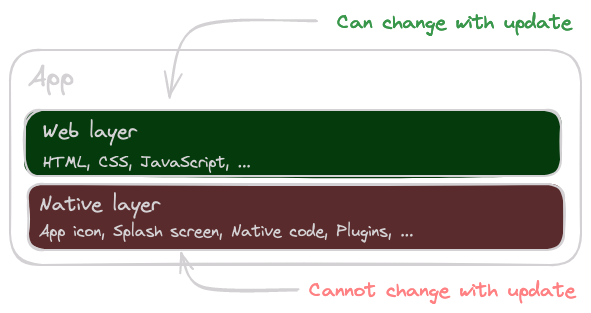
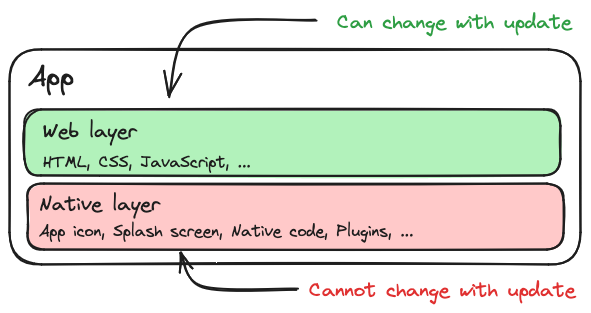
Live updates are a powerful feature that allows you to deliver small bug fixes and updates to your Capacitor app in real-time. For this, it is important to understand the different layers of a Capacitor app and how they interact with each other.
![Layers](/docs/assets/images/diagrams/live-update-layers-light.png#only-light) ![Layers](/docs/assets/images/diagrams/live-update-layers-dark.png#only-dark) 

Capacitor App Layers

As you can see in the image above, a Capacitor app basically consists of a web layer and a native layer. The web layer consists of the HTML, CSS, and JavaScript files that are loaded into the web view. The native layer consists of the native code that is compiled into the app.

Limitation

Live updates only allow you to update the web layer of your app.

So as long as you only make changes to your web application, you can deploy live updates without having to resubmit your app to the app stores. As soon as you make a change to the native code, such as adding a plugin, you must resubmit your app to the app stores.

## Installation[¶](#installation "Permanent link")

First you need to install the package and sync your Capacitor project:

`[](#%5F%5Fcodelineno-0-1)npm install @capawesome/capacitor-live-update
[](#%5F%5Fcodelineno-0-2)npx cap sync
`

## Usage[¶](#usage "Permanent link")

To distribute live updates to your users, we recommend using [Capawesome Cloud](/docs/cloud/live-updates/). Capawesome Cloud provides a complete solution for managing and distributing your bundles with advanced features like [Channels](/docs/cloud/live-updates/channels/), [Rollouts](/docs/cloud/live-updates/rollouts/), and [Analytics](/docs/cloud/).

### Getting Started with Capawesome Cloud[¶](#getting-started-with-capawesome-cloud "Permanent link")

Getting Started Guide 

For the most up-to-date instructions and best practices, check out our comprehensive [Getting Started guide](/docs/cloud/live-updates/setup/). It includes the latest features like automatic update strategies and streamlined setup steps.

To get started, you need to create an account on the [Capawesome Cloud Console](https://console.cloud.capawesome.io).

After you have created an account, we recommend that you install the [Capawesome CLI](/docs/cloud/cli/) to manage your apps and bundles from the command line.

`[](#%5F%5Fcodelineno-1-1)npm install -g @capawesome/cli
`

First, you need to log in to Capawesome Cloud:

`[](#%5F%5Fcodelineno-2-1)npx @capawesome/cli login
`

Then you can create a new app:

`[](#%5F%5Fcodelineno-3-1)npx @capawesome/cli apps:create --name "My App"
`

After you have created an app, you need to configure the [Capacitor Live Update](/docs/sdks/capacitor/live-update/#configuration) plugin. To do this, simply add the ID of the app you have just created to the Capacitor configuration file:

capacitor.config.json

`[](#%5F%5Fcodelineno-4-1){
[](#%5F%5Fcodelineno-4-2)  "plugins": {
[](#%5F%5Fcodelineno-4-3)    "LiveUpdate": {
[](#%5F%5Fcodelineno-4-4)      "appId": "00000000-0000-0000-0000-000000000000"
[](#%5F%5Fcodelineno-4-5)    }
[](#%5F%5Fcodelineno-4-6)  }
[](#%5F%5Fcodelineno-4-7)}
`

Sync your Capacitor project to apply the changes:

`[](#%5F%5Fcodelineno-5-1)npx cap sync
`

Next, you can upload a new bundle to the Capawesome Cloud. For this, you simply need to specify the path to the bundle (e.g. `www` or `dist`) and the ID of the app (see previous step):

`[](#%5F%5Fcodelineno-6-1)npx @capawesome/cli apps:liveupdates:upload --app-id <app-id> --path www
`

Upload to a channel 

We recommend that you also specify a [Channel](/docs/cloud/live-updates/channels/) when uploading the bundle:

`[](#%5F%5Fcodelineno-7-1)npx @capawesome/cli apps:liveupdates:upload --app-id <app-id> --path www --channel production-1.0.0
`

This way you can easily [restrict live updates to native versions](/blog/how-to-restrict-capacitor-live-updates-to-native-versions/) of your app and prevent incompatible updates.

The Capawesome CLI then automatically creates a zip archive of the bundle and uploads it to the Capawesome Cloud where it becomes immediately available for download.

All that's left to do is to call the [sync()](/docs/sdks/capacitor/live-update/#sync) method in your app to check for new updates and apply them if necessary.

`[](#%5F%5Fcodelineno-8-1)import { LiveUpdate } from '@capawesome/capacitor-live-update';
[](#%5F%5Fcodelineno-8-2)
[](#%5F%5Fcodelineno-8-3)const sync = async () => {
[](#%5F%5Fcodelineno-8-4)    const result = await LiveUpdate.sync();
[](#%5F%5Fcodelineno-8-5)    if (result.nextBundleId) {
[](#%5F%5Fcodelineno-8-6)        await LiveUpdate.reload();
[](#%5F%5Fcodelineno-8-7)    }
[](#%5F%5Fcodelineno-8-8)};
`

The new bundle becomes available only after restarting the app. Therefore, if you want to apply the new bundle immediately, you should call the [reload()](/docs/sdks/capacitor/live-update/#reload) method to reload the web view.

Again, make sure to call the [ready()](/docs/sdks/capacitor/live-update/#ready) method as soon as the the app is ready to prevent a rollback:

`[](#%5F%5Fcodelineno-9-1)import { LiveUpdate } from '@capawesome/capacitor-live-update';
[](#%5F%5Fcodelineno-9-2)
[](#%5F%5Fcodelineno-9-3)const ready = async () => {
[](#%5F%5Fcodelineno-9-4)    await LiveUpdate.ready();
[](#%5F%5Fcodelineno-9-5)};
`

## Testing[¶](#testing "Permanent link")

When testing the plugin, you must make sure that you do not use the [Live Reload](https://ionicframework.com/docs/cli/livereload) option, as in this case a development server is used to load the bundle.

Therefore, simply start your app without the live reload option, for example with the following command:

`[](#%5F%5Fcodelineno-10-1)npx cap run android
`

As soon as you have installed a live update, the app will use the live update bundle and no longer the default bundle. So if you make local changes to your app and execute `npx cap run`, for example, these changes will apply to the default bundle, which is not currently in use. You then have three options to get back to the default bundle:

1. **Reset**: Call the [reset()](#reset) method to reset the app to the default bundle.
2. **Reinstall**: Reinstall the app to use the default bundle.
3. **Update**: Increase the `versionCode`/`CFBundleVersion` so that the plugin automatically performs a reset.

However, this is only a problem during development. It is not a problem in production, as the `versionCode`/`CFBundleVersion` is always incremented during a native update and the plugin automatically resets to the default bundle.

## FAQ[¶](#faq "Permanent link")

### What are live updates (over-the-air updates)?[¶](#what-are-live-updates-over-the-air-updates "Permanent link")

Live updates let you ship changes to the **web layer** of your Capacitor app — HTML, CSS, and JavaScript — in real time, without resubmitting to the app stores. Changes to native code still require a new store submission.

### Do live updates need app store review?[¶](#do-live-updates-need-app-store-review "Permanent link")

No, not for web-layer changes. Because only the web bundle is updated, you can ship bug fixes and improvements without waiting for review. Native changes, such as adding a plugin, still go through the stores.

### How do I distribute live updates?[¶](#how-do-i-distribute-live-updates "Permanent link")

We recommend [Capawesome Cloud](/docs/cloud/live-updates/): upload a bundle with the Capawesome CLI and call `sync()` in your app to download and apply it. See the [Getting Started guide](/docs/cloud/live-updates/setup/) for the current setup.

## Closing Thoughts[¶](#closing-thoughts "Permanent link")

The [Capacitor Live Update plugin](/docs/sdks/capacitor/live-update/) brings over-the-air updates to Capacitor, so you can ship web-layer fixes without a store round-trip. Be sure to check out the [API Reference](/docs/sdks/capacitor/live-update/#api) for the full method list — and note that the [Getting Started guide](/docs/cloud/live-updates/setup/) is the most up-to-date reference.

Have a question? [Create a discussion](https://github.com/capawesome-team/capacitor-plugins/discussions/new/choose) in our [GitHub repository](https://github.com/capawesome-team/capacitor-plugins), join the Capawesome [Discord](https://discord.gg/VCXxSVjefW) server, and subscribe to the Capawesome [newsletter](https://capawesome.io/newsletter/) to stay updated.

## Related Posts[¶](#related-posts "Permanent link")

* [Capacitor App Updates: The Complete Guide](/blog/capacitor-app-update-guide/)
* [Capacitor Live Update Plugin 7.3.0 Release](/blog/capacitor-live-update-7-3-0-release/)
* [Capacitor Live Updates: The Complete OTA Guide](/blog/capacitor-live-updates-guide/)
* [Channel Pausing for Capawesome Cloud Live Updates](/blog/capawesome-cloud-channel-pausing/)

July 16, 2026 

Back to top

```json
{
      "@context": "https://schema.org",
      "@type": "BlogPosting",
      "headline": "Capacitor Live Update Plugin: OTA App Updates",
      "description": "Learn how to use the new Capacitor Live Update plugin to deliver real-time updates to your app without resubmitting to app stores.",
      "image": "https://capawesome.io/assets/banners/cloud-build-and-deploy-capacitor-apps.png",
      "datePublished": "2024-04-29T00:00:00+00:00",
      "dateModified": "2026-07-10T00:00:00+00:00",
      "author": [
        {
          "@type": "Person",
          "name": "Robin Genz",
          "url": "https://github.com/robingenz"
        }
      ],
      "publisher": {
        "@type": "Organization",
        "name": "Capawesome",
        "url": "https://capawesome.io",
        "logo": {
          "@type": "ImageObject",
          "url": "https://capawesome.io/assets/images/logo.svg"
        }
      },
      "articleSection": "Announcements",
      "keywords": ["Announcements", "Capacitor", "Cloud", "SDKs"],
      "isPartOf": {
        "@type": "Blog",
        "@id": "https://capawesome.io/blog/#blog"
      },
      "mainEntityOfPage": "https://capawesome.io/blog/announcing-the-capacitor-live-update-plugin/",
      "url": "https://capawesome.io/blog/announcing-the-capacitor-live-update-plugin/"
    }
{
      "@context": "https://schema.org",
      "@type": "BreadcrumbList",
      "itemListElement": [
        {
          "@type": "ListItem",
          "position": 1,
          "name": "Home",
          "item": "https://capawesome.io/"
        },
        {
          "@type": "ListItem",
          "position": 2,
          "name": "Blog",
          "item": "https://capawesome.io/blog/"
        },
        {
          "@type": "ListItem",
          "position": 3,
          "name": "Capacitor Live Update Plugin: OTA App Updates",
          "item": "https://capawesome.io/blog/announcing-the-capacitor-live-update-plugin/"
        }
      ]
    }
{"@context": "https://schema.org", "@type": "FAQPage", "mainEntity": [{"@type": "Question", "name": "What are live updates (over-the-air updates)?", "acceptedAnswer": {"@type": "Answer", "text": "Live updates let you ship changes to the web layer of your Capacitor app — HTML, CSS, and JavaScript — in real time, without resubmitting to the app stores. Changes to native code still require a new store submission."}}, {"@type": "Question", "name": "Do live updates need app store review?", "acceptedAnswer": {"@type": "Answer", "text": "No, not for web-layer changes. Because only the web bundle is updated, you can ship bug fixes and improvements without waiting for review. Native changes, such as adding a plugin, still go through the stores."}}, {"@type": "Question", "name": "How do I distribute live updates?", "acceptedAnswer": {"@type": "Answer", "text": "We recommend Capawesome Cloud: upload a bundle with the Capawesome CLI and call sync() in your app to download and apply it. See the Getting Started guide for the current setup."}}], "url": "https://capawesome.io/blog/announcing-the-capacitor-live-update-plugin/"}
```