---
description: A technical deep dive into how Capacitor Live Updates work internally on Android and iOS, including server paths, code signing, and app store compliance.
title: How Capacitor Live Updates Work Under the Hood - Capawesome
image: https://capawesome.io/docs/assets/images/social/blog/how-live-updates-for-capacitor-work.png
---

<!doctype html> 

[Skip to content ](#how-capacitor-live-updates-work-under-the-hood) 

[🖥️ Introducing the **Capacitor Electron Platform** — build desktop apps for macOS, Windows, and Linux. Free & open source. ](/blog/announcing-the-capacitor-electron-platform/) 

* [ SDKs ](/docs/sdks/)
* [ Formbricks ](/docs/sdks/capacitor/formbricks/)
* [ Geocoder ](/docs/sdks/capacitor/geocoder/)
* [ Google Sign-In ](/docs/sdks/capacitor/google-sign-in/)
* [ Grafana Faro ](/docs/sdks/capacitor/grafana-faro/)
* [ Gyroscope ](/docs/sdks/capacitor/gyroscope/)
* [ Haptics ](/docs/sdks/capacitor/haptics/)
* [ Home Indicator ](/docs/sdks/capacitor/home-indicator/)
* [ In-App Browser ](/docs/sdks/capacitor/in-app-browser/)
* [ Install Referrer ](/docs/sdks/capacitor/install-referrer/)
* [ Intercom ](/docs/sdks/capacitor/intercom/)
* [ Intune ](/docs/sdks/capacitor/intune/)
* [ Keep Awake ](/docs/sdks/capacitor/keep-awake/)
* [ libSQL ](/docs/sdks/capacitor/libsql/)
* [ Light Sensor ](/docs/sdks/capacitor/light-sensor/)
* [ Live Update ](/docs/sdks/capacitor/live-update/)
* [ Localization ](/docs/sdks/capacitor/localization/)
* [ Mail Composer ](/docs/sdks/capacitor/mail-composer/)
* [ Managed Configurations ](/docs/sdks/capacitor/managed-configurations/)
* [ Maps Launcher ](/docs/sdks/capacitor/maps-launcher/)
* [ Media Session ](/docs/sdks/capacitor/media-session/)
* [ ML Kit ](/docs/sdks/capacitor/mlkit/)
* [ Navigation Bar ](/docs/sdks/capacitor/navigation-bar/)
* [ Network ](/docs/sdks/capacitor/network/)
* [ NFC ](/docs/sdks/capacitor/nfc/)
* [ Node.js ](/docs/sdks/capacitor/nodejs/)
* [ OAuth ](/docs/sdks/capacitor/oauth/)
* [ Passkeys ](/docs/sdks/capacitor/passkeys/)
* [ Password Autofill ](/docs/sdks/capacitor/password-autofill/)
* [ PDF Generator ](/docs/sdks/capacitor/pdf-generator/)
* [ PDF Viewer ](/docs/sdks/capacitor/pdf-viewer/)
* [ Pedometer ](/docs/sdks/capacitor/pedometer/)
* [ Permissions ](/docs/sdks/capacitor/permissions/)
* [ Phone Dialer ](/docs/sdks/capacitor/phone-dialer/)
* [ Photo Editor ](/docs/sdks/capacitor/photo-editor/)
* [ Photo Manipulator ](/docs/sdks/capacitor/photo-manipulator/)
* [ PixLive ](/docs/sdks/capacitor/pixlive/)
* [ PostHog ](/docs/sdks/capacitor/posthog/)
* [ Printer ](/docs/sdks/capacitor/printer/)
* [ Privacy Screen ](/docs/sdks/capacitor/privacy-screen/)
* [ Proximity Sensor ](/docs/sdks/capacitor/proximity-sensor/)
* [ Purchases ](/docs/sdks/capacitor/purchases/)
* [ RealtimeKit ](/docs/sdks/capacitor/realtimekit/)
* [ Root Detection ](/docs/sdks/capacitor/root-detection/)
* [ Screen Brightness ](/docs/sdks/capacitor/screen-brightness/)
* [ Screen Orientation ](/docs/sdks/capacitor/screen-orientation/)
* [ Screen Reader ](/docs/sdks/capacitor/screen-reader/)
* [ Screenshot ](/docs/sdks/capacitor/screenshot/)
* [ Secure Preferences ](/docs/sdks/capacitor/secure-preferences/)
* [ Settings Launcher ](/docs/sdks/capacitor/settings-launcher/)
* [ Shake ](/docs/sdks/capacitor/shake/)
* [ Silent Mode ](/docs/sdks/capacitor/silent-mode/)
* [ SIM ](/docs/sdks/capacitor/sim/)
* [ SMS Composer ](/docs/sdks/capacitor/sms-composer/)
* [ Speech Recognition ](/docs/sdks/capacitor/speech-recognition/)
* [ Speech Synthesis ](/docs/sdks/capacitor/speech-synthesis/)
* [ Share Target ](/docs/sdks/capacitor/share-target/)
* [ Square Mobile Payments ](/docs/sdks/capacitor/square-mobile-payments/)
* [ SQLite ](/docs/sdks/capacitor/sqlite/)
* [ Superwall ](/docs/sdks/capacitor/superwall/)
* [ System WebView ](/docs/sdks/capacitor/system-webview/)
* [ Tauri ](/docs/sdks/capacitor/tauri/)
* [ Text Interaction ](/docs/sdks/capacitor/text-interaction/)
* [ Text Zoom ](/docs/sdks/capacitor/text-zoom/)
* [ Thermal State ](/docs/sdks/capacitor/thermal-state/)
* [ Toast ](/docs/sdks/capacitor/toast/)
* [ Torch ](/docs/sdks/capacitor/torch/)
* [ Vault ](/docs/sdks/capacitor/vault/)
* [ Volume ](/docs/sdks/capacitor/volume/)
* [ Wallet ](/docs/sdks/capacitor/wallet/)
* [ Wifi ](/docs/sdks/capacitor/wifi/)
* [ YouTube Player ](/docs/sdks/capacitor/youtube-player/)
* [ Zip ](/docs/sdks/capacitor/zip/)
* [ Cordova ](/docs/sdks/cordova/)
* [ Cloud ](/docs/cloud/)
* [ Integrations ](/docs/cloud/live-updates/integrations/)
* Concepts
* Reference
* [ Troubleshooting ](/docs/cloud/live-updates/troubleshooting/)
* [ FAQ ](/docs/cloud/live-updates/faq/)
* [ Native Builds ](/docs/cloud/native-builds/)
* [ Set Up Environments ](/docs/cloud/native-builds/environments/)
* [ Overwrite Native Configurations ](/docs/cloud/native-builds/native-configurations/)
* [ Auto-Increment Build Numbers ](/docs/cloud/native-builds/auto-incrementing-build-numbers/)
* [ Configure the Web Build Script ](/docs/cloud/native-builds/web-build-script/)
* [ Build from a Monorepo ](/docs/cloud/native-builds/monorepo/)
* [ Use pnpm, Yarn, or bun ](/docs/cloud/native-builds/package-managers/)
* [ Install Private npm Packages ](/docs/cloud/native-builds/npm-private-registry/)
* [ Override the Java Version ](/docs/cloud/native-builds/override-java-version/)
* [ Custom iOS Provisioning Profiles ](/docs/cloud/native-builds/custom-ios-provisioning-profiles/)
* [ Build without Git ](/docs/cloud/native-builds/build-without-git/)
* [ Access Git Behind a Firewall ](/docs/cloud/native-builds/firewall-access/)
* [ Integrations ](/docs/cloud/native-builds/integrations/)
* Reference
* [ Troubleshooting ](/docs/cloud/native-builds/troubleshooting/)
* [ FAQ ](/docs/cloud/native-builds/faq/)
* [ App Store Publishing ](/docs/cloud/app-store-publishing/)
* [ Submit a Build ](/docs/cloud/app-store-publishing/submit-a-build/)
* [ Submit Automatically After a Build ](/docs/cloud/app-store-publishing/submit-automatically/)
* [ Troubleshooting ](/docs/cloud/app-store-publishing/troubleshooting/)
* [ FAQ ](/docs/cloud/app-store-publishing/faq/)
* [ Automations ](/docs/cloud/automations/)
* [ Reference ](/docs/cloud/automations/reference/)
* [ Troubleshooting ](/docs/cloud/automations/troubleshooting/)
* [ FAQ ](/docs/cloud/automations/faq/)
* [ Assist ](/docs/cloud/assist/)
* [ CLI ](/docs/cloud/cli/)
* APIs and SDKs
* [ Webhooks ](/docs/cloud/webhooks/)
* [ Integrations ](/docs/cloud/integrations/)
* Account
* [ Organization ](/docs/cloud/organizations/)
* [ Two-Factor Enforcement ](/docs/cloud/organizations/two-factor-authentication/)
* [ Audit Logs ](/docs/cloud/organizations/audit-logs/)
* [ Billing ](/docs/cloud/organizations/billing/)
* [ License Keys ](/docs/cloud/license-keys/)
* [ AI ](/docs/ai/)
* [ Insiders ](/docs/insiders/)
* [ Billing & Plans ](/docs/insiders/billing-and-plans/)
* [ FAQ ](/docs/insiders/faq/)
* [ License ](https://capawesome.io/legal/eula/)
* [ Support ](/docs/support/)
* [ Contributing ](/docs/contributing/)
* Contributing code
* [ Code of Conduct ](/docs/contributing/code-of-conduct/)
* [ Questions ](https://docs.github.com/en/discussions/collaborating-with-your-community-using-discussions/participating-in-a-discussion#creating-a-discussion)
* [ Blog ](/blog/)
* Categories

* [ Security ](#security)
* [ Compliance ](#compliance)
* [ FAQ ](#faq)
* [ Related Posts ](#related-posts)
* [ Conclusion ](#conclusion)

* Related links

# How Capacitor Live Updates Work Under the Hood[¶](#how-capacitor-live-updates-work-under-the-hood "Permanent link")

One of the biggest advantages of Capacitor over other runtimes is the ability to deliver updates in real-time, without having to resubmit the app to the app stores. This feature is referred to as Live Updates or Over-the-Air (OTA) Updates. This post is a **technical deep dive** into how Live Updates work internally on Android and iOS — covering server paths, code signing, and app store compliance from a plugin developer's perspective.

If you're looking for a hands-on, implementation-focused guide instead, check out [Capacitor Live Updates: A Complete Guide to OTA Updates](/blog/capacitor-live-updates-guide/).

## Concept[¶](#concept "Permanent link")

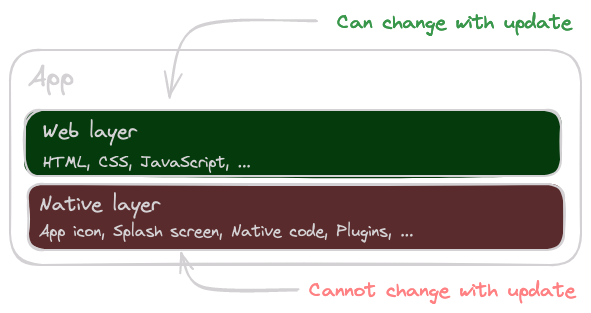
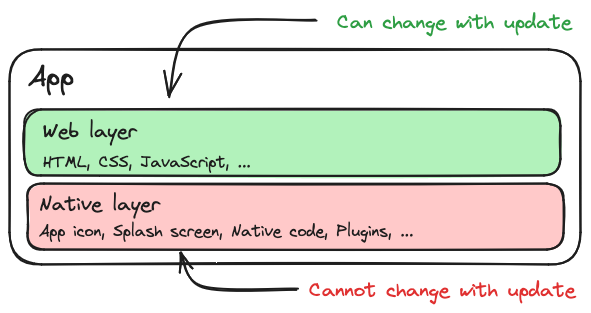
Live Updates are a powerful feature that allows you to deliver minor bug fixes and updates to your Capacitor app in real time. To understand exactly how Live Updates work, it is important to first understand the different layers of a Capacitor app and how they interact with each other.
![Layers](/docs/assets/images/diagrams/live-update-layers-light.png#only-light) ![Layers](/docs/assets/images/diagrams/live-update-layers-dark.png#only-dark) 

Capacitor App Layers

As you can see from the image above, a Capacitor app consists essentially of a web layer and a native layer. The web layer consists of the HTML, CSS, and JS files that are loaded into the web view. The native layer consists of the native code, such as Java or Swift.

Capacitor now allows you to replace the web layer of the app at runtime since those files are not compiled into the app binary. For this purpose, the new HTML, CSS, and JS files only need to be downloaded from a server and stored at a specific location in the app's file system. Let's take a closer look into the mechanics of this process in the following sections.

## Implementation[¶](#implementation "Permanent link")

Capacitor provides various interfaces to instruct the WebView which files should be loaded. Here we distinguish between the **current server path** and the **next server path**.

The **current server path** is the path to the files that are currently loaded in the WebView. Changing the current server path results in a refresh of the WebView. The files are immediately loaded from the new path and displayed in the WebView.

The **next server path**, on the other hand, is the path to the files that should be loaded at the next restart of the app. Changing the next server path does not result in a refresh of the WebView.

### Android[¶](#android "Permanent link")

First, let's take a look at the implementation for Android. Under Android, the next server path is stored in the [SharedPreferences](https://developer.android.com/reference/android/content/SharedPreferences). To change the server path, the [serverBasePath](https://github.com/ionic-team/capacitor/blob/e0f299daaa112fa3bcea81ae539983756f1f7304/android/capacitor/src/main/java/com/getcapacitor/plugin/WebView.java#L15) preference in the [CapWebViewSettings](https://github.com/ionic-team/capacitor/blob/e0f299daaa112fa3bcea81ae539983756f1f7304/android/capacitor/src/main/java/com/getcapacitor/plugin/WebView.java#L14) preferences file of the Capacitor WebView needs to be updated:

`[](#%5F%5Fcodelineno-0-1)private void setNextCapacitorServerPath(String path) {
[](#%5F%5Fcodelineno-0-2)  SharedPreferences.Editor webViewSettingsEditor = getContext().getSharedPreferences("CapWebViewSettings", Activity.MODE_PRIVATE).edit();
[](#%5F%5Fcodelineno-0-3)  webViewSettingsEditor.putString("serverBasePath", path);
[](#%5F%5Fcodelineno-0-4)  webViewSettingsEditor.commit();
[](#%5F%5Fcodelineno-0-5)}
`

The current server path, on the other hand, is set directly via the Capacitor Android Bridge. For this, the [setServerBasePath](https://github.com/ionic-team/capacitor/blob/e0f299daaa112fa3bcea81ae539983756f1f7304/android/capacitor/src/main/java/com/getcapacitor/Bridge.java#L1374) method must be called, and the WebView must be reloaded:

`[](#%5F%5Fcodelineno-1-1)private void setCurrentCapacitorServerPath(String path) {
[](#%5F%5Fcodelineno-1-2)  getBridge().setServerBasePath(path);
[](#%5F%5Fcodelineno-1-3)  getBridge().reload();
[](#%5F%5Fcodelineno-1-4)}
`

To reset the server path to the default value, [public](https://github.com/ionic-team/capacitor/blob/ceee68a2db363e9d9a638aa4ed8569fd82d1013a/android/capacitor/src/main/java/com/getcapacitor/Bridge.java#L89) must be passed as the path. This is especially useful when you want to implement a fallback mechanism in case the new files cannot be loaded.

### iOS[¶](#ios "Permanent link")

Under iOS, the next server path is stored in the [UserDefaults](https://developer.apple.com/documentation/foundation/userdefaults). For this purpose, Capacitor provides the [KeyValueStore](https://github.com/ionic-team/capacitor/blob/7113a198bb8165f69e046fbb0db5c938402367bf/ios/Capacitor/Capacitor/KeyValueStore.swift) class, which is used to store key-value pairs in the UserDefaults. To change the server path, the value for the key [serverBasePath](https://github.com/ionic-team/capacitor/blob/7113a198bb8165f69e046fbb0db5c938402367bf/ios/Capacitor/Capacitor/Plugins/WebView.swift#L32) must now be updated:

`[](#%5F%5Fcodelineno-2-1)private func setNextCapacitorServerPath(path: String) {
[](#%5F%5Fcodelineno-2-2)  KeyValueStore.standard["serverBasePath"] = path
[](#%5F%5Fcodelineno-2-3)}
`

It should be noted that only the last path component of the path is relevant. This is because Capacitor under iOS only supports server paths that are located in the [/Library/NoCloud/ionic\_built\_snapshots](https://github.com/ionic-team/capacitor/blob/3c7b3333762ce8cf7b7c279437dada1e2de7fbea/ios/Capacitor/Capacitor/CAPBridgeViewController.swift#L84:L87) directory. A valid path would be, for example, `/Library/NoCloud/ionic_built_snapshots/my-bundle`.

The current server path is again set via the Capacitor iOS Bridge. To do this, you only need to call the [setServerBasePath](https://github.com/ionic-team/capacitor/blob/e0f299daaa112fa3bcea81ae539983756f1f7304/ios/Capacitor/Capacitor/CAPBridgeViewController.swift#L267) method:

`[](#%5F%5Fcodelineno-3-1)private func setCurrentCapacitorServerPath(path: String) {
[](#%5F%5Fcodelineno-3-2)  self.bridge.viewController.setServerBasePath(path: path)
[](#%5F%5Fcodelineno-3-3)}
`

Also under iOS, the server path can be reset to the default value by passing [public](https://github.com/ionic-team/capacitor/blob/7113a198bb8165f69e046fbb0db5c938402367bf/ios/Capacitor/Capacitor/CAPInstanceDescriptor.m#L17) as the path.

## Security[¶](#security "Permanent link")

An important aspect of Live Updates is security. After all, you don't want your app to be compromised by an attacker. Therefore, it is crucial that the downloaded files are checked for their **authenticity** and **integrity** \- also known as **code signing**.

Authenticity means that the files have not been tampered with and come from a trusted source. Integrity means that the files have not been corrupted during the download process.

To ensure the authenticity and integrity of the downloaded files, these files must be digitally signed. For this, a private key is used to sign the files, and a public key is used to verify the signature. The private key must be kept secret and must not be shared with anyone. The public key, on the other hand, is stored in the app and used to verify the signature.

This is exactly the security mechanism we use in [Capawesome Cloud](/docs/cloud/live-updates/) to securely deliver Live Updates. Therefore not even we are capable of manipulating our customers' files, as we do not have access to the private keys. Feel free to check out our documentation on [Code Signing](/docs/cloud/live-updates/code-signing/).

## Compliance[¶](#compliance "Permanent link")

Now that we understand how Live Updates for Capacitor work, the question arises whether they are compliant with the guidelines of the app stores. And the answer is **yes**!

### Apple App Store[¶](#apple-app-store "Permanent link")

Live Updates are fully compliant with the Apple App Store policies. The [Apple Developer Program License Agreement](https://developer.apple.com/support/terms/apple-developer-program-license-agreement/) states that interpreted code may be downloaded to an application as long as it does not change the primary purpose of the application and does not bypass signing, sandbox, or other security features of the OS:

> Interpreted code may be downloaded to an Application but only so long as such code: (a) does not change the primary purpose of the Application by providing features or functionality that are inconsistent with the intended and advertised purpose of the Application as submitted to the App Store, (b) does not create a store or storefront for other code or applications, and (c) does not bypass signing, sandbox, or other security features of the OS.

So as long as you do not change the primary purpose of your app via Live Updates, they are fully compliant with the Apple App Store policies since they only update the web layer of your app.

### Google Play Store[¶](#google-play-store "Permanent link")

Live Updates are also compliant with the Google Play Policies. The third paragraph of [Device and Network Abuse](https://support.google.com/googleplay/android-developer/answer/9888379/) states that an app distributed via Google Play may not modify, replace, or update itself using any method other than Google Play's update mechanism. However, the same paragraph also states that this restriction does not apply to JavaScript running in a webview or browser:

> This restriction does not apply to code that runs in a virtual machine or an interpreter where either provides indirect access to Android APIs (such as JavaScript in a webview or browser).

As Live Updates can only update the web layer of your app, they are fully compliant with the Google Play Policies.

## FAQ[¶](#faq "Permanent link")

### What's the actual difference between the "current" and "next" server path?[¶](#whats-the-actual-difference-between-the-current-and-next-server-path "Permanent link")

The current server path is what the WebView is loading right now — changing it triggers an immediate reload, so the user sees the new files right away. The next server path only takes effect on the app's next restart and doesn't touch what's currently displayed. This distinction is why a live update can be silently staged in the background (writing to the next path) without disrupting the user's active session, and only takes visible effect later.

### Why does iOS only care about the last path component of the server path?[¶](#why-does-ios-only-care-about-the-last-path-component-of-the-server-path "Permanent link")

Because Capacitor on iOS restricts valid server paths to subdirectories of `/Library/NoCloud/ionic_built_snapshots` — the framework already assumes that directory as the base, so only the final component (e.g. `my-bundle`) needs to be supplied to identify which snapshot to load. This is a hard platform constraint of Capacitor's iOS bridge, not a configurable option.

### How do I reset a Capacitor app back to its built-in bundle programmatically?[¶](#how-do-i-reset-a-capacitor-app-back-to-its-built-in-bundle-programmatically "Permanent link")

Pass `public` as the server path on both Android and iOS. That's Capacitor's documented convention for "use the bundle shipped inside the native binary" rather than any downloaded bundle, and it's the mechanism a fallback or rollback implementation uses to recover from a broken update.

### If Capawesome Cloud doesn't have my private signing key, how does it still deliver signed updates?[¶](#if-capawesome-cloud-doesnt-have-my-private-signing-key-how-does-it-still-deliver-signed-updates "Permanent link")

It doesn't sign anything on your behalf — you generate the RSA keypair yourself, sign each bundle locally (or in your own CI) before uploading, and only the public key ever reaches Capawesome Cloud or your app. This means Capawesome Cloud is structurally unable to tamper with your bundles even if its infrastructure were compromised, since it never has access to the key that could produce a validly signed one.

### Does Apple's or Google's compliance exception apply to any code I download, or just JavaScript in a WebView?[¶](#does-apples-or-googles-compliance-exception-apply-to-any-code-i-download-or-just-javascript-in-a-webview "Permanent link")

Specifically code interpreted in a virtual machine or runtime with indirect API access — JavaScript in a WebView or browser is the explicit example both policies cite. It does not cover downloading and executing native binaries, native libraries, or bytecode that runs outside that sandboxed interpreter, which is why live updates are scoped strictly to the web layer and never touch compiled native code.

## Related Posts[¶](#related-posts "Permanent link")

* [Announcing the Live Update Plugin for Capacitor](/blog/announcing-the-capacitor-live-update-plugin/)
* [Channel Pausing for Capawesome Cloud Live Updates](/blog/capawesome-cloud-channel-pausing/)
* [Channel Surfing with Capacitor Live Updates](/blog/capawesome-cloud-channel-surfing/)

## Conclusion[¶](#conclusion "Permanent link")

Live Updates are a powerful feature that allows you to deliver updates to your Capacitor app in real time. In this blog post, we have looked at how Live Updates work in detail and how they can be implemented in Android and iOS from a plugin developer's perspective. We have also discussed the security and compliance aspects of Live Updates and shown that they are fully compliant with the guidelines of the app stores.

Check out our [Capacitor Live Update plugin](/docs/sdks/capacitor/live-update/) to get started with Live Updates in your app today. If you want to build a complete update strategy that combines live updates with native app store updates, take a look at [Capacitor App Updates: The Complete Guide](/blog/capacitor-app-update-guide/). If you're wondering how Live Updates compare to using `server.url` in production, read [The Right Way to Update Your Capacitor App Remotely](/blog/the-right-way-to-update-your-capacitor-app-remotely/).

July 17, 2026 

Back to top

```json
{
      "@context": "https://schema.org",
      "@type": "BlogPosting",
      "headline": "How Capacitor Live Updates Work Under the Hood",
      "description": "A technical deep dive into how Capacitor Live Updates work internally on Android and iOS, including server paths, code signing, and app store compliance.",
      "image": "https://capawesome.io/assets/banners/cloud-build-and-deploy-capacitor-apps.png",
      "datePublished": "2024-07-22T00:00:00+00:00",
      "dateModified": "2026-07-17T00:00:00+00:00",
      "author": [
        {
          "@type": "Person",
          "name": "Robin Genz",
          "url": "https://github.com/robingenz"
        }
      ],
      "publisher": {
        "@type": "Organization",
        "name": "Capawesome",
        "url": "https://capawesome.io",
        "logo": {
          "@type": "ImageObject",
          "url": "https://capawesome.io/assets/images/logo.svg"
        }
      },
      "articleSection": "Capacitor",
      "keywords": ["Capacitor", "Cloud", "Guides", "SDKs"],
      "isPartOf": {
        "@type": "Blog",
        "@id": "https://capawesome.io/blog/#blog"
      },
      "mainEntityOfPage": "https://capawesome.io/blog/how-live-updates-for-capacitor-work/",
      "url": "https://capawesome.io/blog/how-live-updates-for-capacitor-work/"
    }
{
      "@context": "https://schema.org",
      "@type": "BreadcrumbList",
      "itemListElement": [
        {
          "@type": "ListItem",
          "position": 1,
          "name": "Home",
          "item": "https://capawesome.io/"
        },
        {
          "@type": "ListItem",
          "position": 2,
          "name": "Blog",
          "item": "https://capawesome.io/blog/"
        },
        {
          "@type": "ListItem",
          "position": 3,
          "name": "How Capacitor Live Updates Work Under the Hood",
          "item": "https://capawesome.io/blog/how-live-updates-for-capacitor-work/"
        }
      ]
    }
{"@context": "https://schema.org", "@type": "FAQPage", "mainEntity": [{"@type": "Question", "name": "What's the actual difference between the \"current\" and \"next\" server path?", "acceptedAnswer": {"@type": "Answer", "text": "The current server path is what the WebView is loading right now — changing it triggers an immediate reload, so the user sees the new files right away. The next server path only takes effect on the app's next restart and doesn't touch what's currently displayed. This distinction is why a live update can be silently staged in the background (writing to the next path) without disrupting the user's active session, and only takes visible effect later."}}, {"@type": "Question", "name": "Why does iOS only care about the last path component of the server path?", "acceptedAnswer": {"@type": "Answer", "text": "Because Capacitor on iOS restricts valid server paths to subdirectories of /Library/NoCloud/ionic_built_snapshots — the framework already assumes that directory as the base, so only the final component (e.g. my-bundle) needs to be supplied to identify which snapshot to load. This is a hard platform constraint of Capacitor's iOS bridge, not a configurable option."}}, {"@type": "Question", "name": "How do I reset a Capacitor app back to its built-in bundle programmatically?", "acceptedAnswer": {"@type": "Answer", "text": "Pass public as the server path on both Android and iOS. That's Capacitor's documented convention for \"use the bundle shipped inside the native binary\" rather than any downloaded bundle, and it's the mechanism a fallback or rollback implementation uses to recover from a broken update."}}, {"@type": "Question", "name": "If Capawesome Cloud doesn't have my private signing key, how does it still deliver signed updates?", "acceptedAnswer": {"@type": "Answer", "text": "It doesn't sign anything on your behalf — you generate the RSA keypair yourself, sign each bundle locally (or in your own CI) before uploading, and only the public key ever reaches Capawesome Cloud or your app. This means Capawesome Cloud is structurally unable to tamper with your bundles even if its infrastructure were compromised, since it never has access to the key that could produce a validly signed one."}}, {"@type": "Question", "name": "Does Apple's or Google's compliance exception apply to any code I download, or just JavaScript in a WebView?", "acceptedAnswer": {"@type": "Answer", "text": "Specifically code interpreted in a virtual machine or runtime with indirect API access — JavaScript in a WebView or browser is the explicit example both policies cite. It does not cover downloading and executing native binaries, native libraries, or bytecode that runs outside that sandboxed interpreter, which is why live updates are scoped strictly to the web layer and never touch compiled native code."}}], "url": "https://capawesome.io/blog/how-live-updates-for-capacitor-work/"}
```