---
description: Capacitor plugin for seamless date and time selection with advanced features like localization, theming, and more. Available for Android and iOS.
title: Capacitor Datetime Picker Plugin for Android & iOS - Capawesome
image: https://capawesome.io/docs/assets/images/social/sdks/capacitor/datetime-picker.png
---

<!doctype html> 

[Skip to content ](#capacitor-datetime-picker-plugin) 

[🖥️ Introducing the **Capacitor Electron Platform** — build desktop apps for macOS, Windows, and Linux. Free & open source. ](/blog/announcing-the-capacitor-electron-platform/) 

* [ SDKs ](/docs/sdks/)
* [ API ](#api)
* [ FAQ ](#faq)
* [ Related Plugins ](#related-plugins)
* [ Credits ](#credits)
* [ Newsletter ](#newsletter)
* [ Changelog ](#changelog)
* [ License ](#license)
* [ Device Info ](/docs/sdks/capacitor/device-info/)
* [ Dialog ](/docs/sdks/capacitor/dialog/)
* [ Electron ](/docs/sdks/capacitor/electron/)
* [ Exif ](/docs/sdks/capacitor/exif/)
* [ Facebook Sign-In ](/docs/sdks/capacitor/facebook-sign-in/)
* [ File Compressor ](/docs/sdks/capacitor/file-compressor/)
* [ File Opener ](/docs/sdks/capacitor/file-opener/)
* [ File Picker ](/docs/sdks/capacitor/file-picker/)
* [ Firebase ](/docs/sdks/capacitor/firebase/)
* [ Formbricks ](/docs/sdks/capacitor/formbricks/)
* [ Geocoder ](/docs/sdks/capacitor/geocoder/)
* [ Google Sign-In ](/docs/sdks/capacitor/google-sign-in/)
* [ Grafana Faro ](/docs/sdks/capacitor/grafana-faro/)
* [ Gyroscope ](/docs/sdks/capacitor/gyroscope/)
* [ Haptics ](/docs/sdks/capacitor/haptics/)
* [ Home Indicator ](/docs/sdks/capacitor/home-indicator/)
* [ In-App Browser ](/docs/sdks/capacitor/in-app-browser/)
* [ Install Referrer ](/docs/sdks/capacitor/install-referrer/)
* [ Intercom ](/docs/sdks/capacitor/intercom/)
* [ Intune ](/docs/sdks/capacitor/intune/)
* [ Keep Awake ](/docs/sdks/capacitor/keep-awake/)
* [ libSQL ](/docs/sdks/capacitor/libsql/)
* [ Light Sensor ](/docs/sdks/capacitor/light-sensor/)
* [ Live Update ](/docs/sdks/capacitor/live-update/)
* [ Localization ](/docs/sdks/capacitor/localization/)
* [ Mail Composer ](/docs/sdks/capacitor/mail-composer/)
* [ Managed Configurations ](/docs/sdks/capacitor/managed-configurations/)
* [ Maps Launcher ](/docs/sdks/capacitor/maps-launcher/)
* [ Media Session ](/docs/sdks/capacitor/media-session/)
* [ ML Kit ](/docs/sdks/capacitor/mlkit/)
* [ Navigation Bar ](/docs/sdks/capacitor/navigation-bar/)
* [ Network ](/docs/sdks/capacitor/network/)
* [ NFC ](/docs/sdks/capacitor/nfc/)
* [ Node.js ](/docs/sdks/capacitor/nodejs/)
* [ OAuth ](/docs/sdks/capacitor/oauth/)
* [ Passkeys ](/docs/sdks/capacitor/passkeys/)
* [ Password Autofill ](/docs/sdks/capacitor/password-autofill/)
* [ PDF Generator ](/docs/sdks/capacitor/pdf-generator/)
* [ PDF Viewer ](/docs/sdks/capacitor/pdf-viewer/)
* [ Pedometer ](/docs/sdks/capacitor/pedometer/)
* [ Permissions ](/docs/sdks/capacitor/permissions/)
* [ Phone Dialer ](/docs/sdks/capacitor/phone-dialer/)
* [ Photo Editor ](/docs/sdks/capacitor/photo-editor/)
* [ Photo Manipulator ](/docs/sdks/capacitor/photo-manipulator/)
* [ PixLive ](/docs/sdks/capacitor/pixlive/)
* [ PostHog ](/docs/sdks/capacitor/posthog/)
* [ Printer ](/docs/sdks/capacitor/printer/)
* [ Privacy Screen ](/docs/sdks/capacitor/privacy-screen/)
* [ Proximity Sensor ](/docs/sdks/capacitor/proximity-sensor/)
* [ Purchases ](/docs/sdks/capacitor/purchases/)
* [ RealtimeKit ](/docs/sdks/capacitor/realtimekit/)
* [ Root Detection ](/docs/sdks/capacitor/root-detection/)
* [ Screen Brightness ](/docs/sdks/capacitor/screen-brightness/)
* [ Screen Orientation ](/docs/sdks/capacitor/screen-orientation/)
* [ Screen Reader ](/docs/sdks/capacitor/screen-reader/)
* [ Screenshot ](/docs/sdks/capacitor/screenshot/)
* [ Secure Preferences ](/docs/sdks/capacitor/secure-preferences/)
* [ Settings Launcher ](/docs/sdks/capacitor/settings-launcher/)
* [ Shake ](/docs/sdks/capacitor/shake/)
* [ Silent Mode ](/docs/sdks/capacitor/silent-mode/)
* [ SIM ](/docs/sdks/capacitor/sim/)
* [ SMS Composer ](/docs/sdks/capacitor/sms-composer/)
* [ Speech Recognition ](/docs/sdks/capacitor/speech-recognition/)
* [ Speech Synthesis ](/docs/sdks/capacitor/speech-synthesis/)
* [ Share Target ](/docs/sdks/capacitor/share-target/)
* [ Square Mobile Payments ](/docs/sdks/capacitor/square-mobile-payments/)
* [ SQLite ](/docs/sdks/capacitor/sqlite/)
* [ Superwall ](/docs/sdks/capacitor/superwall/)
* [ System WebView ](/docs/sdks/capacitor/system-webview/)
* [ Tauri ](/docs/sdks/capacitor/tauri/)
* [ Text Interaction ](/docs/sdks/capacitor/text-interaction/)
* [ Text Zoom ](/docs/sdks/capacitor/text-zoom/)
* [ Thermal State ](/docs/sdks/capacitor/thermal-state/)
* [ Toast ](/docs/sdks/capacitor/toast/)
* [ Torch ](/docs/sdks/capacitor/torch/)
* [ Vault ](/docs/sdks/capacitor/vault/)
* [ Volume ](/docs/sdks/capacitor/volume/)
* [ Wallet ](/docs/sdks/capacitor/wallet/)
* [ Wifi ](/docs/sdks/capacitor/wifi/)
* [ YouTube Player ](/docs/sdks/capacitor/youtube-player/)
* [ Zip ](/docs/sdks/capacitor/zip/)
* [ Cordova ](/docs/sdks/cordova/)
* [ Cloud ](/docs/cloud/)
* [ Integrations ](/docs/cloud/live-updates/integrations/)
* Concepts
* Reference
* [ Troubleshooting ](/docs/cloud/live-updates/troubleshooting/)
* [ FAQ ](/docs/cloud/live-updates/faq/)
* [ Native Builds ](/docs/cloud/native-builds/)
* [ Set Up Environments ](/docs/cloud/native-builds/environments/)
* [ Overwrite Native Configurations ](/docs/cloud/native-builds/native-configurations/)
* [ Auto-Increment Build Numbers ](/docs/cloud/native-builds/auto-incrementing-build-numbers/)
* [ Configure the Web Build Script ](/docs/cloud/native-builds/web-build-script/)
* [ Build from a Monorepo ](/docs/cloud/native-builds/monorepo/)
* [ Use pnpm, Yarn, or bun ](/docs/cloud/native-builds/package-managers/)
* [ Install Private npm Packages ](/docs/cloud/native-builds/npm-private-registry/)
* [ Override the Java Version ](/docs/cloud/native-builds/override-java-version/)
* [ Custom iOS Provisioning Profiles ](/docs/cloud/native-builds/custom-ios-provisioning-profiles/)
* [ Build without Git ](/docs/cloud/native-builds/build-without-git/)
* [ Access Git Behind a Firewall ](/docs/cloud/native-builds/firewall-access/)
* [ Integrations ](/docs/cloud/native-builds/integrations/)
* Reference
* [ Troubleshooting ](/docs/cloud/native-builds/troubleshooting/)
* [ FAQ ](/docs/cloud/native-builds/faq/)
* [ App Store Publishing ](/docs/cloud/app-store-publishing/)
* [ Submit a Build ](/docs/cloud/app-store-publishing/submit-a-build/)
* [ Submit Automatically After a Build ](/docs/cloud/app-store-publishing/submit-automatically/)
* [ Troubleshooting ](/docs/cloud/app-store-publishing/troubleshooting/)
* [ FAQ ](/docs/cloud/app-store-publishing/faq/)
* [ Automations ](/docs/cloud/automations/)
* [ Reference ](/docs/cloud/automations/reference/)
* [ Troubleshooting ](/docs/cloud/automations/troubleshooting/)
* [ FAQ ](/docs/cloud/automations/faq/)
* [ Assist ](/docs/cloud/assist/)
* [ CLI ](/docs/cloud/cli/)
* APIs and SDKs
* [ Webhooks ](/docs/cloud/webhooks/)
* [ Integrations ](/docs/cloud/integrations/)
* Account
* [ Organization ](/docs/cloud/organizations/)
* [ Two-Factor Enforcement ](/docs/cloud/organizations/two-factor-authentication/)
* [ Audit Logs ](/docs/cloud/organizations/audit-logs/)
* [ Billing ](/docs/cloud/organizations/billing/)
* [ License Keys ](/docs/cloud/license-keys/)
* [ AI ](/docs/ai/)
* [ Insiders ](/docs/insiders/)
* [ Billing & Plans ](/docs/insiders/billing-and-plans/)
* [ FAQ ](/docs/insiders/faq/)
* [ License ](https://capawesome.io/legal/eula/)
* [ Support ](/docs/support/)
* [ Contributing ](/docs/contributing/)
* Contributing code
* [ Code of Conduct ](/docs/contributing/code-of-conduct/)
* [ Questions ](https://docs.github.com/en/discussions/collaborating-with-your-community-using-discussions/participating-in-a-discussion#creating-a-discussion)
* [ Blog ](/blog/)
* Categories

* [ API ](#api)
* [ FAQ ](#faq)
* [ Related Plugins ](#related-plugins)
* [ Credits ](#credits)
* [ Newsletter ](#newsletter)
* [ Changelog ](#changelog)
* [ License ](#license)

# Capacitor Datetime Picker Plugin[¶](#capacitor-datetime-picker-plugin "Permanent link")

Capacitor plugin for seamless date and time selection with advanced features like localization, theming, and more. Available for Android and iOS.

[ ![Deliver Live Updates to your Capacitor app with Capawesome Cloud](../../../assets/external/cloud.capawesome.io/assets/banners/cloud-build-and-deploy-capacitor-apps.69628c3f.png) ](https://cloud.capawesome.io/) 

## Features[¶](#features "Permanent link")

The Capacitor Datetime Picker plugin is one of the most feature-rich date and time selection solutions for Capacitor apps. Here are some of the key features:

* 🖥️ **Cross-platform**: Supports Android and iOS.
* 📅 **Multiple modes**: Date, time, datetime, and month picker modes.
* 🌍 **Localization**: Support for BCP 47 language tags.
* 🎨 **Theming**: Auto, light, and dark theme support.
* ⚡ **Custom formats**: Define your own date/time format strings.
* 🔒 **Min/Max constraints**: Set minimum and maximum selectable dates/times.
* 📱 **Native UI**: Uses platform-specific picker components.
* ⚙️ **Flexible configuration**: Customizable button texts and picker modes.
* 🤝 **Compatibility**: Works alongside the [Action Sheet](https://capawesome.io/docs/sdks/capacitor/action-sheet/), [Dialog](https://capawesome.io/docs/sdks/capacitor/dialog/) and [Localization](https://capawesome.io/docs/sdks/capacitor/localization/) plugins.
* 🔁 **Up-to-date**: Always supports the latest Capacitor version.

Missing a feature? Just [open an issue](https://github.com/capawesome-team/capacitor-plugins/issues) and we'll take a look!

## Use Cases[¶](#use-cases "Permanent link")

The Datetime Picker plugin is typically used whenever an app needs the user to enter a date or time, for example:

* **Appointment booking**: Let users pick a date and time for a reservation and restrict the selection with minimum and maximum constraints.
* **Profile forms**: Ask for a date of birth with a native, localized date picker.
* **Reminders and alarms**: Let users choose a time of day using the native time picker, optionally with a custom minute interval on iOS.
* **Reports and statements**: Let users select a month and year only, for example to filter a monthly report, using the `month` mode.

## Compatibility[¶](#compatibility "Permanent link")

| Plugin Version | Capacitor Version | Status         |
| -------------- | ----------------- | -------------- |
| 8.x.x          | \>=8.x.x          | Active support |
| 7.x.x          | 7.x.x             | Deprecated     |
| 6.x.x          | 6.x.x             | Deprecated     |
| 5.x.x          | 5.x.x             | Deprecated     |

## Installation[¶](#installation "Permanent link")

You can use our **AI-Assisted Setup** to install the plugin. Add the [Capawesome Skills](https://github.com/capawesome-team/skills) to your AI tool using the following command:

`[](#%5F%5Fcodelineno-0-1)npx skills add capawesome-team/skills --skill capacitor-plugins
`

Then use the following prompt:

`` [](#%5F%5Fcodelineno-1-1)Use the `capacitor-plugins` skill from `capawesome-team/skills` to install the `@capawesome-team/capacitor-datetime-picker` plugin in my project.
 ``

If you prefer **Manual Setup**, install the plugin by running the following commands:

`[](#%5F%5Fcodelineno-2-1)npm install @capawesome-team/capacitor-datetime-picker
[](#%5F%5Fcodelineno-2-2)npx cap sync
`

## Configuration[¶](#configuration "Permanent link")

No configuration required for this plugin.

## Demo[¶](#demo "Permanent link")

A working example can be found here: [robingenz/capacitor-plugin-demo](https://github.com/robingenz/capacitor-plugin-demo)

| Android                                                                                                                                 | iOS                                                                                                                                 |
| --------------------------------------------------------------------------------------------------------------------------------------- | ----------------------------------------------------------------------------------------------------------------------------------- |
| ![Android Demo](../../../assets/external/user-images.githubusercontent.com/13857929/184545710-a837f45f-e335-4903-b3a9-e1f30b42163f.gif) | ![iOS Demo](../../../assets/external/user-images.githubusercontent.com/13857929/184545717-a10291e4-95fe-4453-91f7-c04246c61dec.gif) |

## Usage[¶](#usage "Permanent link")

The following examples show how to present a date, time, or datetime picker, and how to let the user pick a month and year only.

### Present a date, time, or datetime picker[¶](#present-a-date-time-or-datetime-picker "Permanent link")

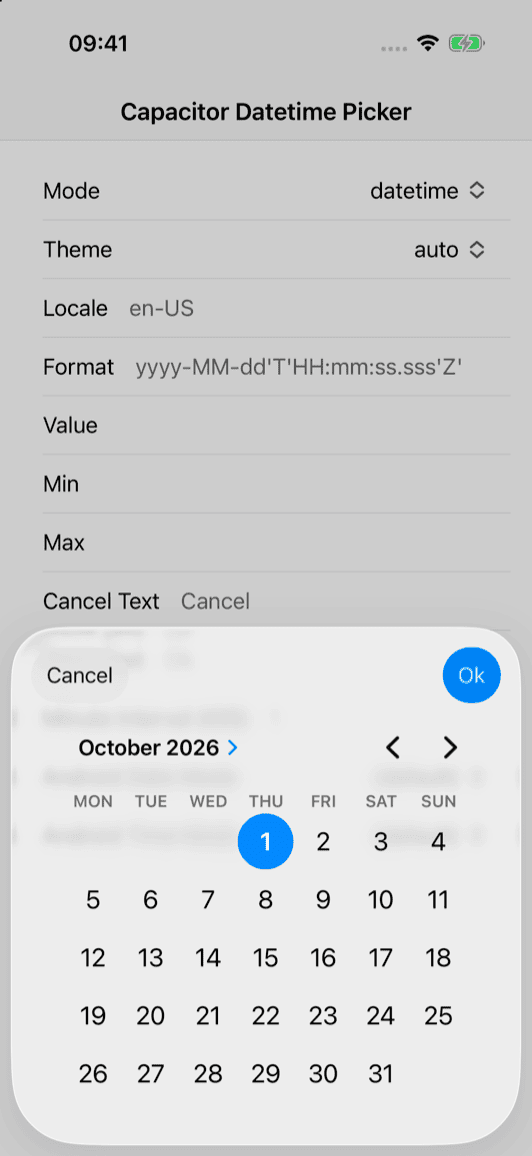
Open the native picker with the `present(...)` method. Use the `mode` option to choose between a date, time, or datetime picker, and customize the theme, locale, and button texts as needed. Only available on Android and iOS:

`[](#%5F%5Fcodelineno-3-1)import { DatetimePicker } from '@capawesome-team/capacitor-datetime-picker';
[](#%5F%5Fcodelineno-3-2)
[](#%5F%5Fcodelineno-3-3)const present = async () => {
[](#%5F%5Fcodelineno-3-4)  const date = new Date('1995-12-24T02:23:00');
[](#%5F%5Fcodelineno-3-5)
[](#%5F%5Fcodelineno-3-6)  const { value } = await DatetimePicker.present({
[](#%5F%5Fcodelineno-3-7)    cancelButtonText: 'Cancel',
[](#%5F%5Fcodelineno-3-8)    doneButtonText: 'Ok',
[](#%5F%5Fcodelineno-3-9)    mode: 'time',
[](#%5F%5Fcodelineno-3-10)    value: date.toISOString(),
[](#%5F%5Fcodelineno-3-11)    theme: 'dark',
[](#%5F%5Fcodelineno-3-12)    locale: 'en-US',
[](#%5F%5Fcodelineno-3-13)  });
[](#%5F%5Fcodelineno-3-14)
[](#%5F%5Fcodelineno-3-15)  return value;
[](#%5F%5Fcodelineno-3-16)};
`

### Let the user pick a month and year only[¶](#let-the-user-pick-a-month-and-year-only "Permanent link")

Use the `month` mode to let the user pick a month and year without a day or time, for example to filter a monthly report. The returned value is the first day of the selected month:

`[](#%5F%5Fcodelineno-4-1)import { DatetimePicker } from '@capawesome-team/capacitor-datetime-picker';
[](#%5F%5Fcodelineno-4-2)
[](#%5F%5Fcodelineno-4-3)const presentMonth = async () => {
[](#%5F%5Fcodelineno-4-4)  const { value } = await DatetimePicker.present({
[](#%5F%5Fcodelineno-4-5)    cancelButtonText: 'Cancel',
[](#%5F%5Fcodelineno-4-6)    doneButtonText: 'Ok',
[](#%5F%5Fcodelineno-4-7)    mode: 'month',
[](#%5F%5Fcodelineno-4-8)    value: '2026-05',
[](#%5F%5Fcodelineno-4-9)    format: 'yyyy-MM',
[](#%5F%5Fcodelineno-4-10)    locale: 'en-US',
[](#%5F%5Fcodelineno-4-11)  });
[](#%5F%5Fcodelineno-4-12)
[](#%5F%5Fcodelineno-4-13)  return value;
[](#%5F%5Fcodelineno-4-14)};
`

## API[¶](#api "Permanent link")

* [present(...)](#present)
* [cancel()](#cancel)
* [Interfaces](#interfaces)

### present(...)[¶](#present "Permanent link")

`[](#%5F%5Fcodelineno-5-1)present(options?: PresentOptions | undefined) => Promise<PresentResult>
`

Open the datetime picker.

An error is thrown if the input is canceled or dismissed by the user.

Only available on Android and iOS.

| Param       | Type                              |
| ----------- | --------------------------------- |
| **options** | [PresentOptions](#presentoptions) |

**Returns:** `Promise<[PresentResult](#presentresult)>`

**Since:** 0.0.1

---

### cancel()[¶](#cancel "Permanent link")

`[](#%5F%5Fcodelineno-6-1)cancel() => Promise<void>
`

Cancel the currently active datetime picker.

If there is no active picker, this method does nothing.

Only available on Android and iOS.

**Since:** 7.2.0

---

### Interfaces[¶](#interfaces "Permanent link")

#### PresentResult[¶](#presentresult "Permanent link")

| Prop      | Type   | Description                                                                                        | Since |
| --------- | ------ | -------------------------------------------------------------------------------------------------- | ----- |
| **value** | string | The value entered by the user. The format of this value matches the value of the format parameter. | 0.0.1 |

#### PresentOptions[¶](#presentoptions "Permanent link")

| Prop                      | Type                    | Description                                                                                                                                                                                                                                                             | Default                                                                                                                                                                                                                      | Since                                                                                                                                                                                                                                                                                                                                                             |            |       |
| ------------------------- | ----------------------- | ----------------------------------------------------------------------------------------------------------------------------------------------------------------------------------------------------------------------------------------------------------------------- | ---------------------------------------------------------------------------------------------------------------------------------------------------------------------------------------------------------------------------- | ----------------------------------------------------------------------------------------------------------------------------------------------------------------------------------------------------------------------------------------------------------------------------------------------------------------------------------------------------------------- | ---------- | ----- |
| **cancelButtonText**      | string                  | The cancel button text.                                                                                                                                                                                                                                                 | 'Cancel'                                                                                                                                                                                                                     | 0.0.1                                                                                                                                                                                                                                                                                                                                                             |            |       |
| **doneButtonText**        | string                  | The done button text.                                                                                                                                                                                                                                                   | 'Ok'                                                                                                                                                                                                                         | 0.0.1                                                                                                                                                                                                                                                                                                                                                             |            |       |
| **format**                | string                  | The format in which values are received and returned.                                                                                                                                                                                                                   | 'yyyy-MM-dd'T'HH![🇲🇲](../../../assets/external/cdn.jsdelivr.net/gh/jdecked/twemoji@16.0.1/assets/svg/1f1f2-1f1f2.svg ":mm:")ss.sss'Z''                                                                                     | 0.0.1                                                                                                                                                                                                                                                                                                                                                             |            |       |
| **locale**                | string                  | BCP 47 language tag to define the language of the UI.                                                                                                                                                                                                                   |                                                                                                                                                                                                                              | 0.0.2                                                                                                                                                                                                                                                                                                                                                             |            |       |
| **max**                   | string                  | The latest date and time to accept. The format of this value must match the value of the format parameter. This value must specify a date string later than or equal to the one specified by the min attribute.                                                         |                                                                                                                                                                                                                              | 0.0.1                                                                                                                                                                                                                                                                                                                                                             |            |       |
| **min**                   | string                  | The earliest date and time to accept. The format of this value must match the value of the format parameter. This value must specify a date string earlier than or equal to the one specified by the max attribute.                                                     |                                                                                                                                                                                                                              | 0.0.1                                                                                                                                                                                                                                                                                                                                                             |            |       |
| **mode**                  | 'date' \| 'time'        | 'datetime'                                                                                                                                                                                                                                                              | 'month'                                                                                                                                                                                                                      | Whether you want a date, time, datetime or month picker. The month mode (since 8.1.0) lets the user pick a month and year only. Unlike the other modes, it uses a custom (non-native) UI on both platforms, because neither Android nor iOS provide a native month-only picker. The returned value is the first day of the selected month at 00:00:00 local time. | 'datetime' | 0.0.1 |
| **theme**                 | 'auto' \| 'light'       | 'dark'                                                                                                                                                                                                                                                                  | Choose the theme that the datetime picker should have. With auto the system theme is used. This value overwrites the theme configuration value. Only available on Android and iOS. Spinner options only available on Android |                                                                                                                                                                                                                                                                                                                                                                   | 0.0.1      |       |
| **value**                 | string                  | The predefined value when opening the picker. The format of this value must match the value of the format parameter.                                                                                                                                                    |                                                                                                                                                                                                                              | 0.0.1                                                                                                                                                                                                                                                                                                                                                             |            |       |
| **androidTimePickerMode** | 'clock' \| 'spinner'    | Whether to use the spinner or clock mode for the time picker on Android. This value overwrites the androidTimePickerMode configuration value. Only available on Android.                                                                                                |                                                                                                                                                                                                                              | 5.1.0                                                                                                                                                                                                                                                                                                                                                             |            |       |
| **androidDatePickerMode** | 'spinner' \| 'calendar' | Whether to use the calendar or spinner mode for the date picker on Android. This value overwrites the androidDatePickerMode configuration value. Only available on Android.                                                                                             |                                                                                                                                                                                                                              | 5.1.0                                                                                                                                                                                                                                                                                                                                                             |            |       |
| **minuteInterval**        | number                  | The minute interval of the time picker. This controls the granularity of the minute selector (e.g., 15 for 0, 15, 30, 45). The value must be evenly divisible into 60\. Only available on iOS when using time or datetime modes. On Android, this parameter is ignored. | 1                                                                                                                                                                                                                            | 7.1.0                                                                                                                                                                                                                                                                                                                                                             |            |       |

## FAQ[¶](#faq "Permanent link")

### What happens when the user cancels the picker?[¶](#what-happens-when-the-user-cancels-the-picker "Permanent link")

The `present(...)` method throws an error if the input is canceled or dismissed by the user. Make sure to catch this error in your code, for example to keep the previous value.

### How can I close the picker programmatically?[¶](#how-can-i-close-the-picker-programmatically "Permanent link")

Use the `cancel()` method to cancel the currently active datetime picker, for example when your app is sent to the background. If there is no active picker, this method does nothing.

### How do I restrict which dates the user can select?[¶](#how-do-i-restrict-which-dates-the-user-can-select "Permanent link")

Use the `min` and `max` options of the `present(...)` method to define the earliest and latest date and time to accept. The format of both values must match the value of the `format` parameter.

### How do I let the user pick only a month and year?[¶](#how-do-i-let-the-user-pick-only-a-month-and-year "Permanent link")

Set the `mode` option to `month`. Unlike the other modes, the month picker uses a custom (non-native) UI on both platforms, because neither Android nor iOS provide a native month-only picker. The returned value is the first day of the selected month at 00:00:00 local time. See the [usage example](#let-the-user-pick-a-month-and-year-only) above.

### Can I change the language and theme of the picker?[¶](#can-i-change-the-language-and-theme-of-the-picker "Permanent link")

Yes, use the `locale` option with a BCP 47 language tag to define the language of the UI, and the `theme` option to choose between `auto`, `light`, and `dark`. With `auto`, the system theme is used.

### Does this plugin work on the Web?[¶](#does-this-plugin-work-on-the-web "Permanent link")

No, this plugin is only available on Android and iOS, where it uses platform-specific picker components. The `present(...)` and `cancel()` methods are not available on the Web.

## Related Plugins[¶](#related-plugins "Permanent link")

* [Action Sheet](https://capawesome.io/docs/sdks/capacitor/action-sheet/): Show native action sheets.
* [Dialog](https://capawesome.io/docs/sdks/capacitor/dialog/): Display native alert, confirm, and prompt dialogs.
* [Localization](https://capawesome.io/docs/sdks/capacitor/localization/): Read the user's preferred locales to localize the picker.

## Credits[¶](#credits "Permanent link")

The iOS implementation of this plugin is based on [RPicker](https://github.com/rheyansh/RPicker) which is licensed under [MIT](https://github.com/rheyansh/RPicker/blob/master/LICENSE).

## Newsletter[¶](#newsletter "Permanent link")

Stay up to date with the latest news and updates about the Capawesome, Capacitor, and Ionic ecosystem by subscribing to our [Capawesome Newsletter](https://cloud.capawesome.io/newsletter/).

## Changelog[¶](#changelog "Permanent link")

See [CHANGELOG.md](https://github.com/capawesome-team/capacitor-plugins/blob/main/packages/datetime-picker/CHANGELOG.md).

## License[¶](#license "Permanent link")

See [LICENSE](https://github.com/capawesome-team/capacitor-plugins/blob/main/packages/datetime-picker/LICENSE).

July 8, 2026 

Back to top

```json
{"@context": "https://schema.org", "@graph": [{"@type": "TechArticle", "@id": "https://capawesome.io/docs/sdks/capacitor/datetime-picker/#article", "headline": "Capacitor Datetime Picker Plugin for Android & iOS", "name": "Capacitor Datetime Picker Plugin for Android & iOS", "description": "Capacitor plugin for seamless date and time selection with advanced features like localization, theming, and more. Available for Android and iOS.", "inLanguage": "en", "url": "https://capawesome.io/docs/sdks/capacitor/datetime-picker/", "mainEntityOfPage": "https://capawesome.io/docs/sdks/capacitor/datetime-picker/", "author": {"@type": "Organization", "name": "Capawesome", "url": "https://capawesome.io", "logo": {"@type": "ImageObject", "url": "https://capawesome.io/assets/images/logo.svg"}}, "publisher": {"@type": "Organization", "name": "Capawesome", "url": "https://capawesome.io", "logo": {"@type": "ImageObject", "url": "https://capawesome.io/assets/images/logo.svg"}}, "about": {"@id": "https://capawesome.io/docs/sdks/capacitor/datetime-picker/#software"}}, {"@type": "SoftwareSourceCode", "@id": "https://capawesome.io/docs/sdks/capacitor/datetime-picker/#software", "name": "Capacitor Datetime Picker Plugin for Android & iOS", "description": "Capacitor plugin for seamless date and time selection with advanced features like localization, theming, and more. Available for Android and iOS.", "url": "https://capawesome.io/docs/sdks/capacitor/datetime-picker/", "programmingLanguage": "TypeScript", "runtimePlatform": "Capacitor", "codeRepository": "https://github.com/capawesome-team", "author": {"@type": "Organization", "name": "Capawesome", "url": "https://capawesome.io", "logo": {"@type": "ImageObject", "url": "https://capawesome.io/assets/images/logo.svg"}}, "publisher": {"@type": "Organization", "name": "Capawesome", "url": "https://capawesome.io", "logo": {"@type": "ImageObject", "url": "https://capawesome.io/assets/images/logo.svg"}}}]}
{"@context": "https://schema.org", "@type": "FAQPage", "mainEntity": [{"@type": "Question", "name": "What happens when the user cancels the picker?", "acceptedAnswer": {"@type": "Answer", "text": "The present(...) method throws an error if the input is canceled or dismissed by the user. Make sure to catch this error in your code, for example to keep the previous value."}}, {"@type": "Question", "name": "How can I close the picker programmatically?", "acceptedAnswer": {"@type": "Answer", "text": "Use the cancel() method to cancel the currently active datetime picker, for example when your app is sent to the background. If there is no active picker, this method does nothing."}}, {"@type": "Question", "name": "How do I restrict which dates the user can select?", "acceptedAnswer": {"@type": "Answer", "text": "Use the min and max options of the present(...) method to define the earliest and latest date and time to accept. The format of both values must match the value of the format parameter."}}, {"@type": "Question", "name": "How do I let the user pick only a month and year?", "acceptedAnswer": {"@type": "Answer", "text": "Set the mode option to month. Unlike the other modes, the month picker uses a custom (non-native) UI on both platforms, because neither Android nor iOS provide a native month-only picker. The returned value is the first day of the selected month at 00:00:00 local time. See the usage example above."}}, {"@type": "Question", "name": "Can I change the language and theme of the picker?", "acceptedAnswer": {"@type": "Answer", "text": "Yes, use the locale option with a BCP 47 language tag to define the language of the UI, and the theme option to choose between auto, light, and dark. With auto, the system theme is used."}}, {"@type": "Question", "name": "Does this plugin work on the Web?", "acceptedAnswer": {"@type": "Answer", "text": "No, this plugin is only available on Android and iOS, where it uses platform-specific picker components. The present(...) and cancel() methods are not available on the Web."}}], "url": "https://capawesome.io/docs/sdks/capacitor/datetime-picker/"}
```