---
title: Capacitor Share Target Plugin for Android, iOS & Web
description: Capacitor plugin to receive content such as text, links, and files from other apps. Available for Android, iOS, and Web.
tags:
- Insiders
- Android
- iOS
- Web
search:
boost: 2
faq: true
github_repo: capawesome-team/capacitor-plugins
---
# Capacitor Share Target Plugin
Capacitor plugin to receive content such as text, links, and files from other apps.

## Features
The Capacitor Share Target plugin is one of the most complete solutions for receiving shared content in Capacitor apps. Here are some of the key features:
- 🖥️ **Cross-platform**: Supports Android, iOS and Web.
- 📝 **Multi-content types**: Handle text, URLs, images, videos, and files.
- 🌐 **Web Share Target API**: Leverage the native sharing capabilities of the web.
- 📦 **Large File Support**: Efficient file caching without memory limitations.
- 🤝 **Compatibility**: Works alongside the [Android Intent Launcher](https://capawesome.io/docs/sdks/capacitor/android-intent-launcher/), [Clipboard](https://capawesome.io/docs/sdks/capacitor/clipboard/) and [File Opener](https://capawesome.io/docs/sdks/capacitor/file-opener/) plugins.
- 📦 **CocoaPods & SPM**: Supports CocoaPods and Swift Package Manager for iOS.
- 🔁 **Up-to-date**: Always supports the latest Capacitor version.
- ⭐️ **Support**: Priority support from the Capawesome Team.
- ✨ **Handcrafted**: Built from the ground up with care and expertise, not forked or AI-generated.
Missing a feature? Just [open an issue](https://github.com/capawesome-team/capacitor-plugins/issues) and we'll take a look!
## Use Cases
The Share Target plugin is typically used whenever an app wants to appear in the share sheet of the operating system, for example:
- **Media imports**: Receive images and videos shared from the gallery or other apps.
- **Save-for-later apps**: Receive links and text shared from browsers or social media apps, for example in a bookmarking or note-taking app.
- **File handling**: Receive documents such as PDFs shared from other apps for further processing.
- **PWA share target**: Let your Progressive Web App receive shared content via the Web Share Target API.
## Compatibility
| Plugin Version | Capacitor Version | Status |
| -------------- | ----------------- | -------------- |
| 8.x.x | >=8.x.x | Active support |
| 0.2.x | 7.x.x | Deprecated |
## Demo
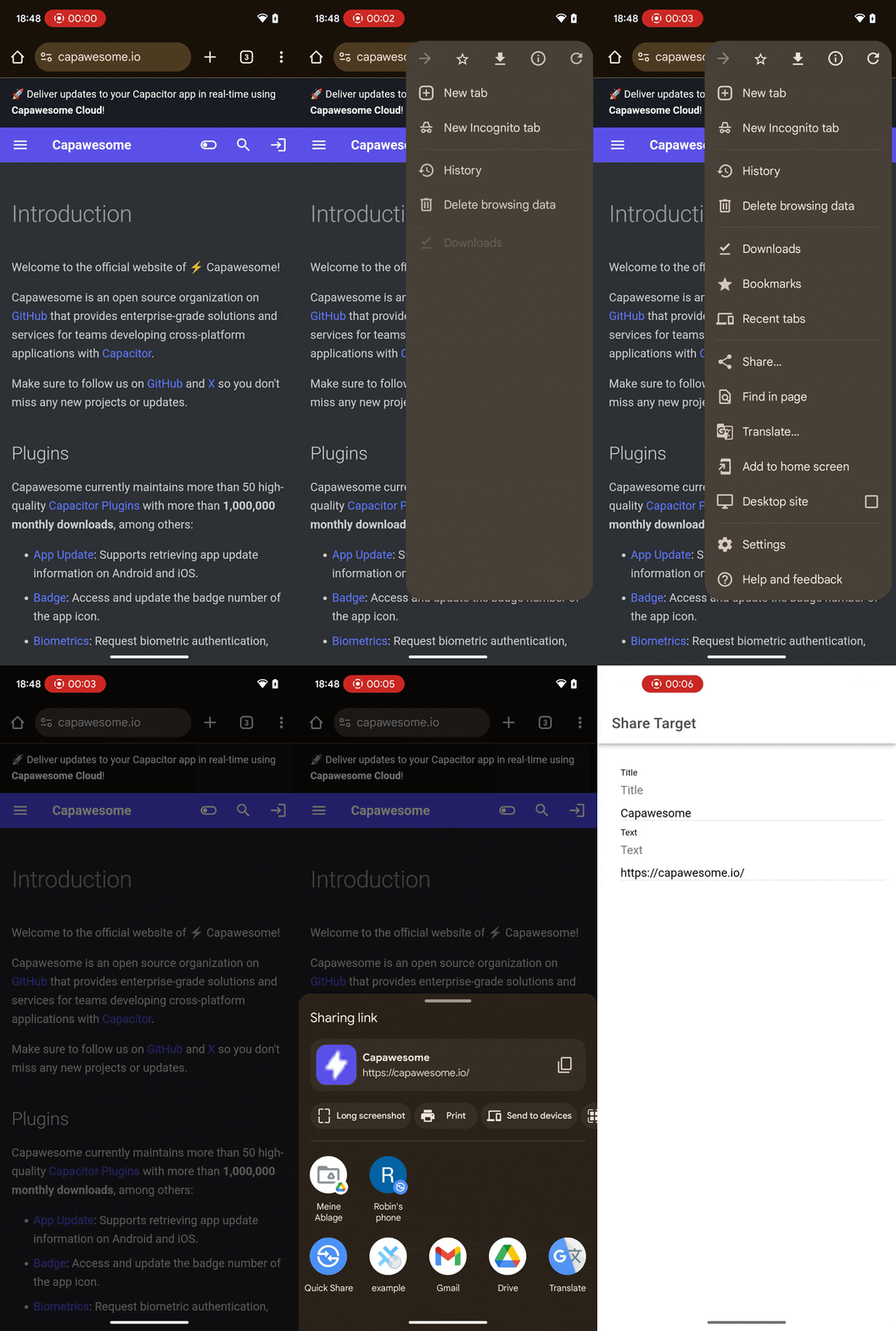
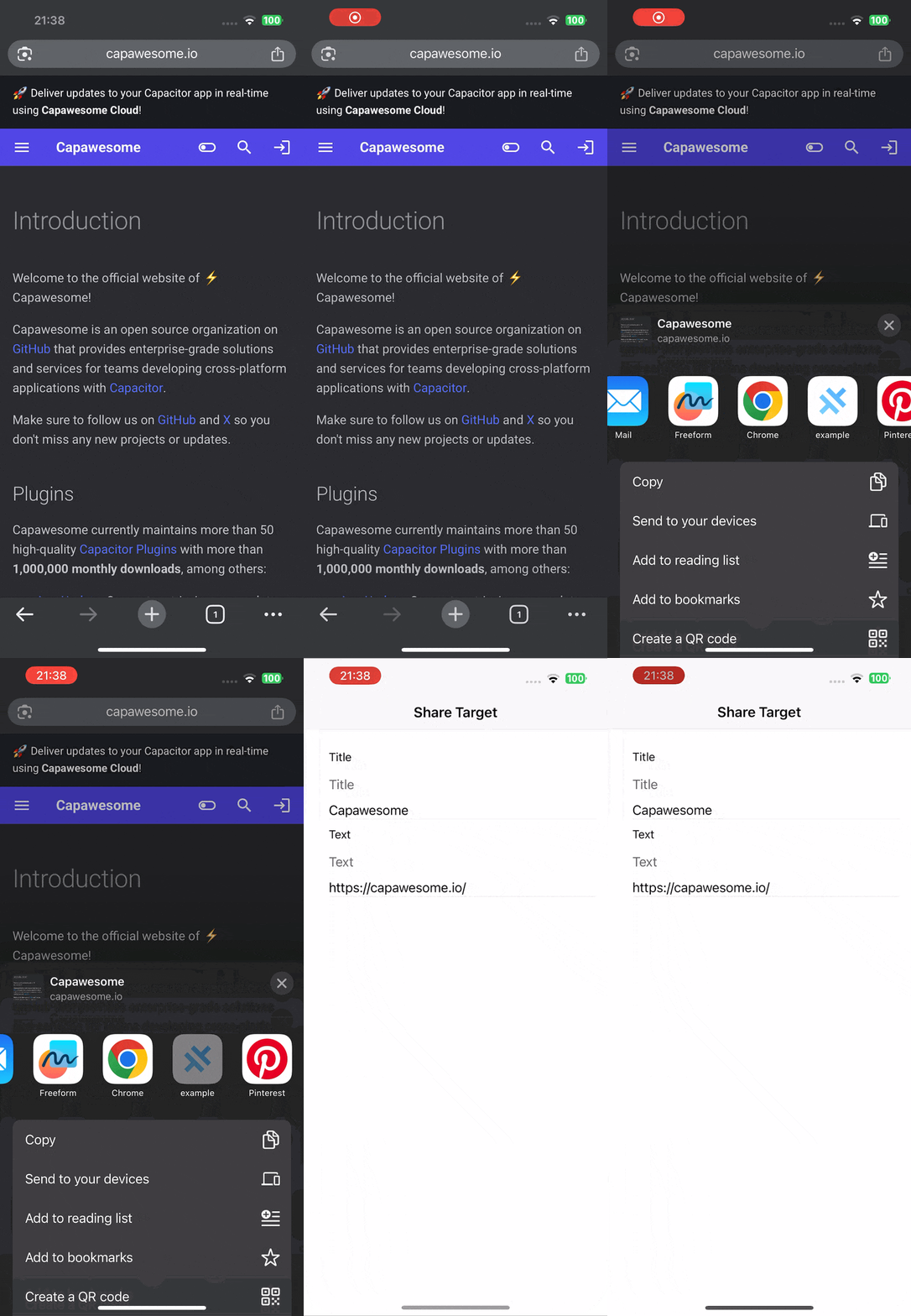
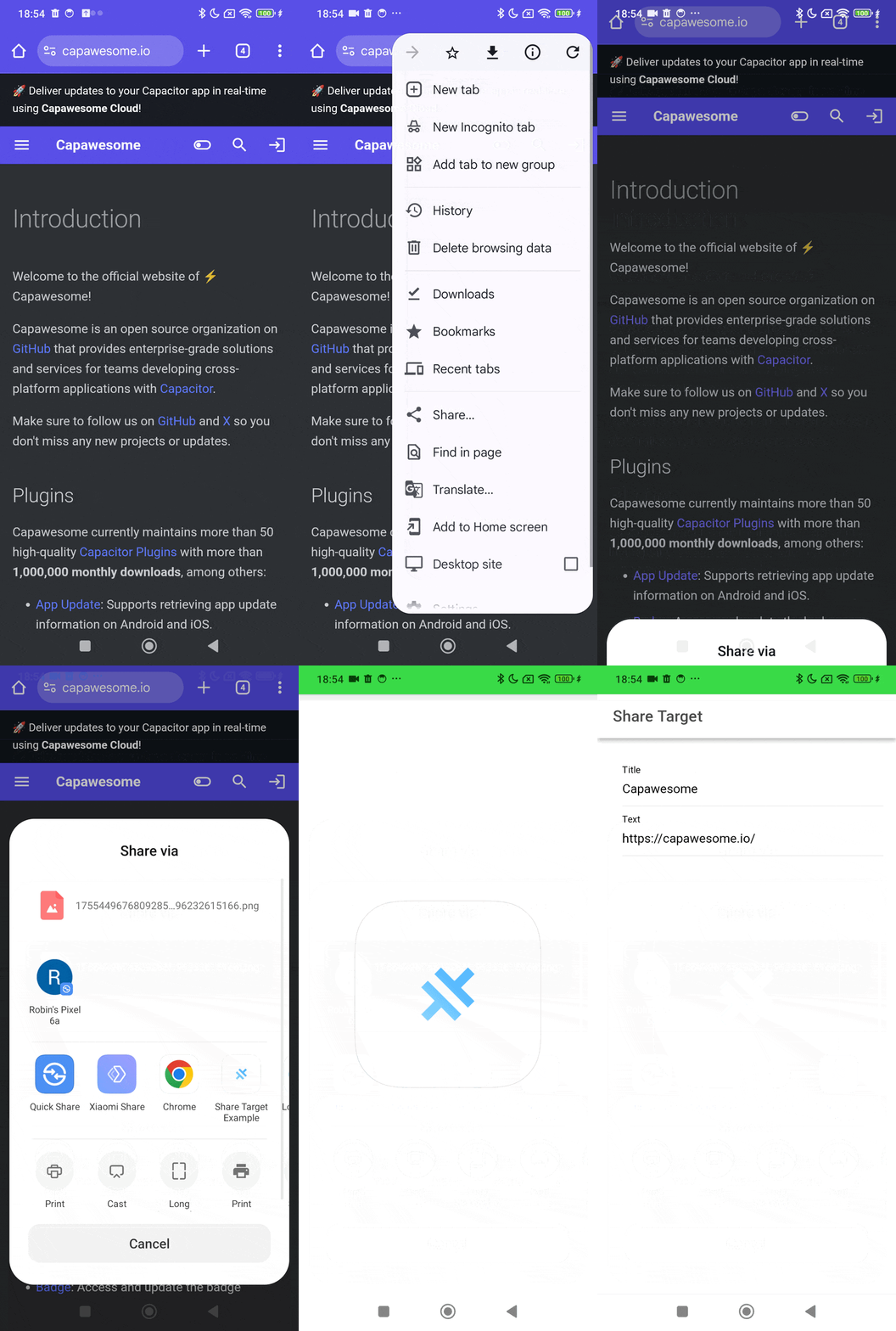
A working example can be found [here](https://github.com/capawesome-team/capacitor-share-target-demo).
| Android | iOS | Web |
| ----------------------------------------------------------------------------------------------------------------------------- | --------------------------------------------------------------------------------------------------------------------- | --------------------------------------------------------------------------------------------------------------------- |
|  |
|  |
|  |
## Installation
This plugin is only available to [Capawesome Insiders](https://capawesome.io/insiders/).
First, make sure you have the Capawesome npm registry set up.
You can do this by running the following commands:
```
npm config set @capawesome-team:registry https://npm.registry.capawesome.io
npm config set //npm.registry.capawesome.io/:_authToken
```
**Attention**: Replace `` with the license key you received from Polar. If you don't have a license key yet, you can get one by becoming a [Capawesome Insider](https://capawesome.io/insiders/).
Next, you can use our **AI-Assisted Setup** to install the plugin.
Add the [Capawesome Skills](https://github.com/capawesome-team/skills) to your AI tool using the following command:
```bash
npx skills add capawesome-team/skills --skill capacitor-plugins
```
Then use the following prompt:
```
Use the `capacitor-plugins` skill from `capawesome-team/skills` to install the `@capawesome-team/capacitor-share-target` plugin in my project.
```
If you prefer **Manual Setup**, install the plugin by running the following commands and follow the platform-specific instructions below:
```bash
npm install @capawesome-team/capacitor-share-target
npx cap sync
```
### Android
#### Intent Filters
To enable your app to receive shared content from other apps, you need to add intent filters to your main activity in `AndroidManifest.xml` (usually `android/app/src/main/AndroidManifest.xml`).
For example, to handle text, URLs, and other text-based content, add the following intent filter:
```xml
```
To handle a single image, add the following intent filter:
```xml
```
To handle multiple images, add the following intent filter:
```xml
```
You can also add additional intent filters for other MIME types as needed, such as `application/pdf` for PDF files or `video/*` for videos.
**Attention**: Make sure to add these intent filters inside the `` tag of your main activity, typically `MainActivity`. Also, make sure the activity has the `android:exported="true"` attribute set, which allows other apps to send intents to it. The `android:launchMode="singleTask"` attribute is recommended to prevent multiple instances of your app from being created when receiving shared content.
Here's an example of how your `AndroidManifest.xml` might look like:
```xml
```
#### Proguard
If you are using Proguard, you need to add the following rules to your `proguard-rules.pro` file:
```
-keep class io.capawesome.capacitorjs.plugins.** { *; }
```
#### Variables
If needed, you can define the following project variable in your app's `variables.gradle` file to change the default version of the dependency:
- `$androidxExifInterfaceVersion` version of `androidx.exifinterface:exifinterface` (default: `1.4.2`)
This can be useful if you encounter dependency conflicts with other plugins in your project.
### iOS
On iOS, it's not possible to receive shared content directly in the main app. Instead, you need to create a share extension that can handle the shared content and then communicate it back to your main app. This involves setting up a URL scheme and configuring the share extension to handle the shared content. The communication between the share extension and the main app is done using URL schemes, which allows the share extension to open the main app with the shared content as parameters in the URL.
#### URL Scheme
To enable your app to be opened by the share extension, you need to set up a URL scheme in your iOS app. This is done by adding a URL type in your app's `Info.plist` file. Add the following code to your `Info.plist` file:
```xml
CFBundleURLTypes
CFBundleURLSchemes
YOUR_URL_SCHEME
```
**Attention**: Replace `YOUR_URL_SCHEME` with your desired URL scheme (e.g. `myapp`). This will allow your app to be opened with URLs like `myapp://?text=Hello%20World`.
#### Share Extension
To enable your app to receive shared content from other apps on iOS, you need to create a share extension. First, you need to add a new target to your Xcode project:
1. Open your Xcode project.
2. Go to `File` > `New` > `Target...`.
3. Select `Share Extension` from the list of templates.
4. Name your extension `AppShare` and click `Finish`.
This will create a new target in your Xcode project with the necessary files for a share extension. If you see a prompt to activate the new scheme, choose "Don't Activate". There is one file called `MainInterface.storyboard` that you should delete **via Xcode**, as we will not need it.
After this, you need to configure the share extension to handle the shared content. Open the `Info.plist` file of your share extension **in a text editor of your choice** and replace its content with the following:
```xml
NSExtension
NSExtensionAttributes
NSExtensionActivationRule
NSExtensionActivationDictionaryVersion
2
NSExtensionActivationSupportsWebURLWithMaxCount
1
NSExtensionActivationSupportsText
NSExtensionActivationSupportsWebURLWithMaxCount
10
NSExtensionActivationSupportsFileWithMaxCount
10
NSExtensionActivationSupportsImageWithMaxCount
10
NSExtensionActivationSupportsMovieWithMaxCount
10
NSExtensionActivationSupportsWebPageWithMaxCount
1
NSExtensionPrincipalClass
AppShare.ShareViewController
NSExtensionPointIdentifier
com.apple.share-services
```
Feel free to adjust the `NSExtensionActivationRule` keys to match the types of content you want to support. The example above supports text, web URLs, files, images, and movies.
Next, you need to update the `ShareViewController.swift` file in your share extension target and replace its content with the following code:
```swift
import MobileCoreServices
import Social
import UIKit
import UniformTypeIdentifiers
struct SharedFileData {
let uri: String
let name: String?
let mimeType: String?
}
class ShareViewController: UIViewController {
private let appGroupIdentifier = "group."
private let urlScheme = ""
override func viewDidAppear(_ animated: Bool) {
super.viewDidAppear(animated)
self.extensionContext!.completeRequest(returningItems: [], completionHandler: nil)
}
override func viewDidLoad() {
super.viewDidLoad()
Task {
processSharedContent()
}
}
private func openURL(_ url: URL) {
var responder: UIResponder? = self
while responder != nil {
if let application = responder as? UIApplication {
application.open(url, options: [:], completionHandler: nil)
return
}
responder = responder?.next
}
}
private func sharedContainerURL(for fileName: String) -> URL? {
guard let containerURL = FileManager.default.containerURL(forSecurityApplicationGroupIdentifier: appGroupIdentifier) else {
return nil
}
return containerURL.appendingPathComponent(fileName)
}
private func removeFileIfExists(at url: URL) throws {
if FileManager.default.fileExists(atPath: url.path) {
try FileManager.default.removeItem(at: url)
}
}
private func copyFileToSharedContainer(_ sourceURL: URL) -> String? {
let fileName = sourceURL.lastPathComponent
guard let destinationURL = sharedContainerURL(for: fileName) else {
return nil
}
do {
try removeFileIfExists(at: destinationURL)
try FileManager.default.copyItem(at: sourceURL, to: destinationURL)
return destinationURL.absoluteString
} catch {
print("Error copying file to shared container: \(error)")
return nil
}
}
private func copyImageToSharedContainerWithFixedOrientation(_ sourceURL: URL) -> String? {
let fileName = sourceURL.lastPathComponent
guard let destinationURL = sharedContainerURL(for: fileName) else {
return nil
}
do {
try removeFileIfExists(at: destinationURL)
if let fixedImageData = loadImageDataWithFixedOrientation(from: sourceURL) {
try fixedImageData.write(to: destinationURL)
} else {
try FileManager.default.copyItem(at: sourceURL, to: destinationURL)
}
return destinationURL.absoluteString
} catch {
print("Error copying image to shared container: \(error)")
return nil
}
}
private func loadImageDataWithFixedOrientation(from url: URL) -> Data? {
guard let source = CGImageSourceCreateWithURL(url as CFURL, nil),
let cgImage = CGImageSourceCreateImageAtIndex(source, 0, nil) else {
return nil
}
let uiImage = UIImage(cgImage: cgImage)
let fixedImage = normalizeImageOrientation(uiImage)
let fileExtension = url.pathExtension.lowercased()
if fileExtension == "jpg" || fileExtension == "jpeg" {
return fixedImage.jpegData(compressionQuality: 0.9)
} else {
return fixedImage.pngData()
}
}
private func normalizeImageOrientation(_ image: UIImage) -> UIImage {
if let fixedImage = image.fixedOrientation() {
return fixedImage
}
return image
}
private func extractFileMetadata(from url: URL) -> (name: String, mimeType: String?) {
let fileName = url.lastPathComponent
let mimeType = getMimeType(from: url)
return (fileName, mimeType.isEmpty ? nil : mimeType)
}
private func getMimeType(from url: URL) -> String {
let fileExtension = url.pathExtension as CFString
guard let extUTI = UTTypeCreatePreferredIdentifierForTag(kUTTagClassFilenameExtension, fileExtension, nil)?.takeUnretainedValue() else {
return ""
}
guard let mimeUTI = UTTypeCopyPreferredTagWithClass(extUTI, kUTTagClassMIMEType) else {
return ""
}
return mimeUTI.takeRetainedValue() as String
}
private func buildAppURL(textValues: [String], fileValues: [SharedFileData], title: String) -> URL {
var urlComponents = URLComponents(string: "\(urlScheme)://?")!
var queryItems: [URLQueryItem] = []
if !title.isEmpty {
queryItems.append(URLQueryItem(name: "title", value: title))
}
queryItems.append(contentsOf: textValues.filter { !$0.isEmpty }.map {
URLQueryItem(name: "text", value: $0)
})
for (index, file) in fileValues.enumerated() {
queryItems.append(URLQueryItem(name: "fileUri\(index)", value: file.uri))
if let name = file.name {
queryItems.append(URLQueryItem(name: "fileName\(index)", value: name))
}
if let mimeType = file.mimeType {
queryItems.append(URLQueryItem(name: "fileMimeType\(index)", value: mimeType))
}
}
urlComponents.queryItems = queryItems.isEmpty ? nil : queryItems
return urlComponents.url!
}
private func sendData(with textValues: [String], fileValues: [SharedFileData], title: String) {
let url = buildAppURL(textValues: textValues, fileValues: fileValues, title: title)
openURL(url)
}
private func processImageAttachment(_ attachment: NSItemProvider, dispatchGroup: DispatchGroup, completion: @escaping (SharedFileData?) -> Void) {
dispatchGroup.enter()
attachment.loadItem(forTypeIdentifier: UTType.image.identifier, options: nil) { [weak self] (item, _) in
defer { dispatchGroup.leave() }
guard let self = self else {
completion(nil)
return
}
if let url = item as? URL {
if let sharedPath = self.copyImageToSharedContainerWithFixedOrientation(url) {
let metadata = self.extractFileMetadata(from: url)
completion(SharedFileData(uri: sharedPath, name: metadata.name, mimeType: metadata.mimeType))
return
}
} else if let image = item as? UIImage {
let fixedImage = self.normalizeImageOrientation(image)
if let data = fixedImage.pngData() {
let base64String = data.base64EncodedString()
completion(SharedFileData(uri: "data:image/png;base64,\(base64String)", name: nil, mimeType: "image/png"))
return
}
}
completion(nil)
}
}
private func processMovieAttachment(_ attachment: NSItemProvider, dispatchGroup: DispatchGroup, completion: @escaping (SharedFileData?) -> Void) {
dispatchGroup.enter()
attachment.loadItem(forTypeIdentifier: UTType.movie.identifier, options: nil) { [weak self] (item, _) in
defer { dispatchGroup.leave() }
guard let self = self else {
completion(nil)
return
}
if let url = item as? URL {
if let sharedPath = self.copyFileToSharedContainer(url) {
let metadata = self.extractFileMetadata(from: url)
completion(SharedFileData(uri: sharedPath, name: metadata.name, mimeType: metadata.mimeType))
return
}
}
completion(nil)
}
}
private func processPlainTextAttachment(_ attachment: NSItemProvider, dispatchGroup: DispatchGroup, completion: @escaping (String?) -> Void) {
dispatchGroup.enter()
attachment.loadItem(forTypeIdentifier: UTType.plainText.identifier, options: nil) { (item, _) in
defer { dispatchGroup.leave() }
if let text = item as? String {
completion(text)
} else {
completion(nil)
}
}
}
private func processURLAttachment(_ attachment: NSItemProvider, dispatchGroup: DispatchGroup, completion: @escaping (String?) -> Void) {
dispatchGroup.enter()
attachment.loadItem(forTypeIdentifier: UTType.url.identifier, options: nil) { (item, _) in
defer { dispatchGroup.leave() }
if let url = item as? URL {
completion(url.absoluteString)
} else {
completion(nil)
}
}
}
private func processSharedContent() {
guard let extensionContext = extensionContext,
let item = extensionContext.inputItems.first as? NSExtensionItem,
let attachments = item.attachments else {
self.extensionContext?.completeRequest(returningItems: [], completionHandler: nil)
return
}
var textValues: [String] = []
var fileValues: [SharedFileData] = []
let title = item.attributedTitle?.string ?? item.attributedContentText?.string ?? ""
let dispatchGroup = DispatchGroup()
for attachment in attachments {
if attachment.hasItemConformingToTypeIdentifier(UTType.image.identifier) {
processImageAttachment(attachment, dispatchGroup: dispatchGroup) { fileData in
if let fileData = fileData {
fileValues.append(fileData)
}
}
}
if attachment.hasItemConformingToTypeIdentifier(UTType.movie.identifier) {
processMovieAttachment(attachment, dispatchGroup: dispatchGroup) { fileData in
if let fileData = fileData {
fileValues.append(fileData)
}
}
}
if attachment.hasItemConformingToTypeIdentifier(UTType.plainText.identifier) {
processPlainTextAttachment(attachment, dispatchGroup: dispatchGroup) { text in
if let text = text {
textValues.append(text)
}
}
}
if attachment.hasItemConformingToTypeIdentifier(UTType.url.identifier) {
processURLAttachment(attachment, dispatchGroup: dispatchGroup) { urlString in
if let urlString = urlString {
textValues.append(urlString)
}
}
}
}
dispatchGroup.notify(queue: .main) { [weak self] in
self?.sendData(with: textValues, fileValues: fileValues, title: title)
}
}
}
extension UIImage {
private func applyRotationTransform(for orientation: UIImage.Orientation, to transform: CGAffineTransform, size: CGSize) -> CGAffineTransform {
var result = transform
switch orientation {
case .down, .downMirrored:
result = result.translatedBy(x: size.width, y: size.height)
result = result.rotated(by: .pi)
case .left, .leftMirrored:
result = result.translatedBy(x: size.width, y: 0)
result = result.rotated(by: .pi / 2.0)
case .right, .rightMirrored:
result = result.translatedBy(x: 0, y: size.height)
result = result.rotated(by: -.pi / 2.0)
case .up, .upMirrored:
break
@unknown default:
break
}
return result
}
private func applyMirrorTransform(for orientation: UIImage.Orientation, to transform: CGAffineTransform, size: CGSize) -> CGAffineTransform {
var result = transform
switch orientation {
case .upMirrored, .downMirrored:
result = result.translatedBy(x: size.width, y: 0)
result = result.scaledBy(x: -1, y: 1)
case .leftMirrored, .rightMirrored:
result = result.translatedBy(x: size.height, y: 0)
result = result.scaledBy(x: -1, y: 1)
case .up, .down, .left, .right:
break
@unknown default:
break
}
return result
}
private func drawRect(for orientation: UIImage.Orientation, size: CGSize) -> CGRect {
switch orientation {
case .left, .leftMirrored, .right, .rightMirrored:
return CGRect(x: 0, y: 0, width: size.height, height: size.width)
default:
return CGRect(x: 0, y: 0, width: size.width, height: size.height)
}
}
func fixedOrientation() -> UIImage? {
guard imageOrientation != .up else {
return self.copy() as? UIImage
}
guard let cgImage = self.cgImage,
let colorSpace = cgImage.colorSpace,
let context = CGContext(data: nil,
width: Int(size.width),
height: Int(size.height),
bitsPerComponent: cgImage.bitsPerComponent,
bytesPerRow: 0,
space: colorSpace,
bitmapInfo: CGImageAlphaInfo.premultipliedLast.rawValue) else {
return nil
}
var transform = CGAffineTransform.identity
transform = applyRotationTransform(for: imageOrientation, to: transform, size: size)
transform = applyMirrorTransform(for: imageOrientation, to: transform, size: size)
context.concatenate(transform)
context.draw(cgImage, in: drawRect(for: imageOrientation, size: size))
guard let newCGImage = context.makeImage() else { return nil }
return UIImage(cgImage: newCGImage, scale: 1, orientation: .up)
}
}
```
**Attention**: Replace `` with the URL scheme you defined in your main app's `Info.plist` file (e.g. `myapp`) and `` with your app identifier (e.g. `com.example.app`). Make sure to keep the `group.` prefix for the app group identifier.
Finally, you need to pass the URLs opened by the share extension to the plugin. If your app uses the UIScene lifecycle (default since Capacitor 8.5), modify the `SceneDelegate.swift` file of your main app target. Add the missing import and the following code to the `scene(_:willConnectTo:options:)` and `scene(_:openURLContexts:)` methods:
```diff
+ import ShareTargetPlugin
func scene(_ scene: UIScene, willConnectTo session: UISceneSession, options connectionOptions: UIScene.ConnectionOptions) {
guard let windowScene = scene as? UIWindowScene else { return }
window = UIWindow(windowScene: windowScene)
window?.rootViewController = CAPBridgeViewController()
window?.makeKeyAndVisible()
+ // Handle share target URLs that launched the app
+ for context in connectionOptions.urlContexts {
+ let _ = ShareTargetPlugin.handleOpenUrl(context.url)
+ }
+
SceneDelegateProxy.shared.scene(scene, willConnectTo: session, options: connectionOptions)
}
func scene(_ scene: UIScene, openURLContexts URLContexts: Set) {
+ // Handle share target URLs
+ for context in URLContexts {
+ let _ = ShareTargetPlugin.handleOpenUrl(context.url)
+ }
+
SceneDelegateProxy.shared.scene(scene, openURLContexts: URLContexts)
}
```
If your app does not use the UIScene lifecycle, modify the `AppDelegate.swift` file of your main app target instead. Add the missing import and the following code to the `application(_:open:options:)` method:
```diff
+ import ShareTargetPlugin
func application(_ app: UIApplication, open url: URL, options: [UIApplication.OpenURLOptionsKey: Any] = [:]) -> Bool {
+ // Handle share target URLs
+ let _ = ShareTargetPlugin.handleOpenUrl(url)
+
// Called when the app was launched with a url. Feel free to add additional processing here,
// but if you want the App API to support tracking app url opens, make sure to keep this call
return ApplicationDelegateProxy.shared.application(app, open: url, options: options)
}
```
If your project still uses CocoaPods instead of Swift Package Manager (SPM), import `CapawesomeTeamCapacitorShareTarget` rather than `ShareTargetPlugin`:
```diff
+ import CapawesomeTeamCapacitorShareTarget
```
#### Capabilities
If you want to receive not only text but also files (e.g., images, videos) from other apps, you need to enable the "App Groups" capability for both your main app and the share extension. This allows both targets to share files in a common container. To do this, follow these steps:
1. Open your Xcode project.
2. Select your app target.
3. Go to the "Signing & Capabilities" tab.
4. Click the "+" button to add a new capability.
5. Select "App Groups" from the list.
6. Create a new app group using the format `group.` (e.g., `group.com.example.app`).
7. Repeat the same steps for your share extension target, ensuring that both targets use the same app group identifier.
If you don't want to receive files, you can skip this step.
## Configuration
No configuration required for this plugin.
## Web
To use this plugin on the web, you need to set up a **Progressive Web App (PWA)** with a web manifest and service worker that handles share targets.
### Manifest
To allow your PWA to act as a share target, you need to add a `share_target` configuration to your web manifest (`manifest.json`):
```json
{
"share_target": {
"action": "/_share-target",
"method": "POST",
"enctype": "multipart/form-data",
"params": {
"title": "title",
"text": "text",
"url": "url",
"files": [
{
"name": "files",
"accept": ["*/*"]
}
]
}
}
}
```
For more information on setting up the share target for your PWA, refer to the [Web Share Target documentation](https://developer.mozilla.org/en-US/docs/Web/Manifest/share_target).
### Service Worker
Since service workers are the only way to intercept network requests in a PWA, you'll need to create one to handle the share target requests. Just create a file named `sw.js` in your project's root directory and add the following code:
```javascript
self.addEventListener('fetch', event => {
const url = new URL(event.request.url);
if (event.request.method === 'POST' && url.pathname === '/_share-target') {
event.respondWith(handleShareTarget(event.request));
} else if (url.pathname.startsWith('/_share-file/')) {
event.respondWith(handleFileRequest(event.request));
}
});
async function handleFileRequest(request) {
try {
const url = new URL(request.url);
const fileId = url.pathname.substring(13); // Remove '/_share-file/' prefix
const cache = await caches.open('share-target-files');
const cacheKey = `/${fileId}`;
const response = await cache.match(cacheKey);
if (response) {
return response;
} else {
return new Response('File not found', { status: 404 });
}
} catch (error) {
console.error('Error serving file:', error);
return new Response('Internal error', { status: 500 });
}
}
async function handleShareTarget(request) {
try {
const formData = await request.formData();
const title = formData.get('title') || '';
const text = formData.get('text') || '';
const url = formData.get('url') || '';
const files = formData.getAll('files');
const texts = [];
if (text) texts.push(text);
if (url) texts.push(url);
const shareData = {
title: title,
texts: texts.length > 0 ? texts : undefined,
files: undefined,
};
if (files.length > 0) {
const sharedFiles = [];
const cache = await caches.open('share-target-files');
for (const file of files) {
if (file instanceof File && file.size > 0) {
const fileId = `share-file-${Date.now()}-${Math.random().toString(36).substring(2, 11)}`;
const cacheKey = `/${fileId}`;
const response = new Response(file, {
headers: {
'Content-Type': file.type,
'Content-Length': file.size.toString(),
'X-File-Name': file.name || 'unknown',
}
});
await cache.put(cacheKey, response);
sharedFiles.push({
uri: `/_share-file/${fileId}`,
name: file.name || undefined,
mimeType: file.type || undefined,
});
}
}
if (sharedFiles.length > 0) {
shareData.files = sharedFiles;
}
}
const redirectUrl = new URL('/', self.location.origin);
if (shareData.title) {
redirectUrl.searchParams.set('title', shareData.title);
}
if (shareData.texts && shareData.texts.length > 0) {
shareData.texts.forEach((text, index) => {
redirectUrl.searchParams.set(`text${index}`, text);
});
}
if (shareData.files && shareData.files.length > 0) {
shareData.files.forEach((file, index) => {
redirectUrl.searchParams.set(`fileUri${index}`, file.uri);
if (file.name) {
redirectUrl.searchParams.set(`fileName${index}`, file.name);
}
if (file.mimeType) {
redirectUrl.searchParams.set(`fileMimeType${index}`, file.mimeType);
}
});
}
return Response.redirect(redirectUrl.href, 303);
} catch (error) {
console.error('Error handling share target:', error);
return Response.redirect('/', 303);
}
}
```
Now, register your service worker in your main JavaScript file:
```javascript
if ('serviceWorker' in navigator) {
navigator.serviceWorker.register('/sw.js');
}
```
## Usage
The following example shows how to listen for content shared to your app and load the shared files.
### Listen for shared content
Add a listener for the `shareReceived` event to handle content shared to your app. The event contains the title, text content, and files that were shared. On Android and iOS, load shared files using `Capacitor.convertFileSrc(...)` and the [Fetch API](https://developer.mozilla.org/en-US/docs/Web/API/Fetch_API/Using_Fetch); on the web, the file URIs are cached file URLs that can be fetched directly:
```typescript
import { ShareTarget } from '@capawesome-team/capacitor-share-target';
import { Capacitor } from '@capacitor/core';
const addListener = async () => {
await ShareTarget.addListener('shareReceived', (event) => {
console.log('Share received:', event);
// Handle shared files
if (event.files) {
event.files.forEach(async (file) => {
const webPath = Capacitor.convertFileSrc(file.uri);
const response = await fetch(webPath);
const blob = await response.blob();
// Process the file...
});
}
});
};
```
## API
* [`addListener('shareReceived', ...)`](#addlistenersharereceived-)
* [`removeAllListeners()`](#removealllisteners)
* [Interfaces](#interfaces)
### addListener('shareReceived', ...)
```typescript
addListener(eventName: 'shareReceived', listenerFunc: (event: ShareReceivedEvent) => void) => Promise
```
Called when a share is received.
| Param | Type |
| ------------------ | ------------------------------------------------------------------------------------- |
| **`eventName`** |
|
## Installation
This plugin is only available to [Capawesome Insiders](https://capawesome.io/insiders/).
First, make sure you have the Capawesome npm registry set up.
You can do this by running the following commands:
```
npm config set @capawesome-team:registry https://npm.registry.capawesome.io
npm config set //npm.registry.capawesome.io/:_authToken
```
**Attention**: Replace `` with the license key you received from Polar. If you don't have a license key yet, you can get one by becoming a [Capawesome Insider](https://capawesome.io/insiders/).
Next, you can use our **AI-Assisted Setup** to install the plugin.
Add the [Capawesome Skills](https://github.com/capawesome-team/skills) to your AI tool using the following command:
```bash
npx skills add capawesome-team/skills --skill capacitor-plugins
```
Then use the following prompt:
```
Use the `capacitor-plugins` skill from `capawesome-team/skills` to install the `@capawesome-team/capacitor-share-target` plugin in my project.
```
If you prefer **Manual Setup**, install the plugin by running the following commands and follow the platform-specific instructions below:
```bash
npm install @capawesome-team/capacitor-share-target
npx cap sync
```
### Android
#### Intent Filters
To enable your app to receive shared content from other apps, you need to add intent filters to your main activity in `AndroidManifest.xml` (usually `android/app/src/main/AndroidManifest.xml`).
For example, to handle text, URLs, and other text-based content, add the following intent filter:
```xml
```
To handle a single image, add the following intent filter:
```xml
```
To handle multiple images, add the following intent filter:
```xml
```
You can also add additional intent filters for other MIME types as needed, such as `application/pdf` for PDF files or `video/*` for videos.
**Attention**: Make sure to add these intent filters inside the `` tag of your main activity, typically `MainActivity`. Also, make sure the activity has the `android:exported="true"` attribute set, which allows other apps to send intents to it. The `android:launchMode="singleTask"` attribute is recommended to prevent multiple instances of your app from being created when receiving shared content.
Here's an example of how your `AndroidManifest.xml` might look like:
```xml
```
#### Proguard
If you are using Proguard, you need to add the following rules to your `proguard-rules.pro` file:
```
-keep class io.capawesome.capacitorjs.plugins.** { *; }
```
#### Variables
If needed, you can define the following project variable in your app's `variables.gradle` file to change the default version of the dependency:
- `$androidxExifInterfaceVersion` version of `androidx.exifinterface:exifinterface` (default: `1.4.2`)
This can be useful if you encounter dependency conflicts with other plugins in your project.
### iOS
On iOS, it's not possible to receive shared content directly in the main app. Instead, you need to create a share extension that can handle the shared content and then communicate it back to your main app. This involves setting up a URL scheme and configuring the share extension to handle the shared content. The communication between the share extension and the main app is done using URL schemes, which allows the share extension to open the main app with the shared content as parameters in the URL.
#### URL Scheme
To enable your app to be opened by the share extension, you need to set up a URL scheme in your iOS app. This is done by adding a URL type in your app's `Info.plist` file. Add the following code to your `Info.plist` file:
```xml
CFBundleURLTypes
CFBundleURLSchemes
YOUR_URL_SCHEME
```
**Attention**: Replace `YOUR_URL_SCHEME` with your desired URL scheme (e.g. `myapp`). This will allow your app to be opened with URLs like `myapp://?text=Hello%20World`.
#### Share Extension
To enable your app to receive shared content from other apps on iOS, you need to create a share extension. First, you need to add a new target to your Xcode project:
1. Open your Xcode project.
2. Go to `File` > `New` > `Target...`.
3. Select `Share Extension` from the list of templates.
4. Name your extension `AppShare` and click `Finish`.
This will create a new target in your Xcode project with the necessary files for a share extension. If you see a prompt to activate the new scheme, choose "Don't Activate". There is one file called `MainInterface.storyboard` that you should delete **via Xcode**, as we will not need it.
After this, you need to configure the share extension to handle the shared content. Open the `Info.plist` file of your share extension **in a text editor of your choice** and replace its content with the following:
```xml
NSExtension
NSExtensionAttributes
NSExtensionActivationRule
NSExtensionActivationDictionaryVersion
2
NSExtensionActivationSupportsWebURLWithMaxCount
1
NSExtensionActivationSupportsText
NSExtensionActivationSupportsWebURLWithMaxCount
10
NSExtensionActivationSupportsFileWithMaxCount
10
NSExtensionActivationSupportsImageWithMaxCount
10
NSExtensionActivationSupportsMovieWithMaxCount
10
NSExtensionActivationSupportsWebPageWithMaxCount
1
NSExtensionPrincipalClass
AppShare.ShareViewController
NSExtensionPointIdentifier
com.apple.share-services
```
Feel free to adjust the `NSExtensionActivationRule` keys to match the types of content you want to support. The example above supports text, web URLs, files, images, and movies.
Next, you need to update the `ShareViewController.swift` file in your share extension target and replace its content with the following code:
```swift
import MobileCoreServices
import Social
import UIKit
import UniformTypeIdentifiers
struct SharedFileData {
let uri: String
let name: String?
let mimeType: String?
}
class ShareViewController: UIViewController {
private let appGroupIdentifier = "group."
private let urlScheme = ""
override func viewDidAppear(_ animated: Bool) {
super.viewDidAppear(animated)
self.extensionContext!.completeRequest(returningItems: [], completionHandler: nil)
}
override func viewDidLoad() {
super.viewDidLoad()
Task {
processSharedContent()
}
}
private func openURL(_ url: URL) {
var responder: UIResponder? = self
while responder != nil {
if let application = responder as? UIApplication {
application.open(url, options: [:], completionHandler: nil)
return
}
responder = responder?.next
}
}
private func sharedContainerURL(for fileName: String) -> URL? {
guard let containerURL = FileManager.default.containerURL(forSecurityApplicationGroupIdentifier: appGroupIdentifier) else {
return nil
}
return containerURL.appendingPathComponent(fileName)
}
private func removeFileIfExists(at url: URL) throws {
if FileManager.default.fileExists(atPath: url.path) {
try FileManager.default.removeItem(at: url)
}
}
private func copyFileToSharedContainer(_ sourceURL: URL) -> String? {
let fileName = sourceURL.lastPathComponent
guard let destinationURL = sharedContainerURL(for: fileName) else {
return nil
}
do {
try removeFileIfExists(at: destinationURL)
try FileManager.default.copyItem(at: sourceURL, to: destinationURL)
return destinationURL.absoluteString
} catch {
print("Error copying file to shared container: \(error)")
return nil
}
}
private func copyImageToSharedContainerWithFixedOrientation(_ sourceURL: URL) -> String? {
let fileName = sourceURL.lastPathComponent
guard let destinationURL = sharedContainerURL(for: fileName) else {
return nil
}
do {
try removeFileIfExists(at: destinationURL)
if let fixedImageData = loadImageDataWithFixedOrientation(from: sourceURL) {
try fixedImageData.write(to: destinationURL)
} else {
try FileManager.default.copyItem(at: sourceURL, to: destinationURL)
}
return destinationURL.absoluteString
} catch {
print("Error copying image to shared container: \(error)")
return nil
}
}
private func loadImageDataWithFixedOrientation(from url: URL) -> Data? {
guard let source = CGImageSourceCreateWithURL(url as CFURL, nil),
let cgImage = CGImageSourceCreateImageAtIndex(source, 0, nil) else {
return nil
}
let uiImage = UIImage(cgImage: cgImage)
let fixedImage = normalizeImageOrientation(uiImage)
let fileExtension = url.pathExtension.lowercased()
if fileExtension == "jpg" || fileExtension == "jpeg" {
return fixedImage.jpegData(compressionQuality: 0.9)
} else {
return fixedImage.pngData()
}
}
private func normalizeImageOrientation(_ image: UIImage) -> UIImage {
if let fixedImage = image.fixedOrientation() {
return fixedImage
}
return image
}
private func extractFileMetadata(from url: URL) -> (name: String, mimeType: String?) {
let fileName = url.lastPathComponent
let mimeType = getMimeType(from: url)
return (fileName, mimeType.isEmpty ? nil : mimeType)
}
private func getMimeType(from url: URL) -> String {
let fileExtension = url.pathExtension as CFString
guard let extUTI = UTTypeCreatePreferredIdentifierForTag(kUTTagClassFilenameExtension, fileExtension, nil)?.takeUnretainedValue() else {
return ""
}
guard let mimeUTI = UTTypeCopyPreferredTagWithClass(extUTI, kUTTagClassMIMEType) else {
return ""
}
return mimeUTI.takeRetainedValue() as String
}
private func buildAppURL(textValues: [String], fileValues: [SharedFileData], title: String) -> URL {
var urlComponents = URLComponents(string: "\(urlScheme)://?")!
var queryItems: [URLQueryItem] = []
if !title.isEmpty {
queryItems.append(URLQueryItem(name: "title", value: title))
}
queryItems.append(contentsOf: textValues.filter { !$0.isEmpty }.map {
URLQueryItem(name: "text", value: $0)
})
for (index, file) in fileValues.enumerated() {
queryItems.append(URLQueryItem(name: "fileUri\(index)", value: file.uri))
if let name = file.name {
queryItems.append(URLQueryItem(name: "fileName\(index)", value: name))
}
if let mimeType = file.mimeType {
queryItems.append(URLQueryItem(name: "fileMimeType\(index)", value: mimeType))
}
}
urlComponents.queryItems = queryItems.isEmpty ? nil : queryItems
return urlComponents.url!
}
private func sendData(with textValues: [String], fileValues: [SharedFileData], title: String) {
let url = buildAppURL(textValues: textValues, fileValues: fileValues, title: title)
openURL(url)
}
private func processImageAttachment(_ attachment: NSItemProvider, dispatchGroup: DispatchGroup, completion: @escaping (SharedFileData?) -> Void) {
dispatchGroup.enter()
attachment.loadItem(forTypeIdentifier: UTType.image.identifier, options: nil) { [weak self] (item, _) in
defer { dispatchGroup.leave() }
guard let self = self else {
completion(nil)
return
}
if let url = item as? URL {
if let sharedPath = self.copyImageToSharedContainerWithFixedOrientation(url) {
let metadata = self.extractFileMetadata(from: url)
completion(SharedFileData(uri: sharedPath, name: metadata.name, mimeType: metadata.mimeType))
return
}
} else if let image = item as? UIImage {
let fixedImage = self.normalizeImageOrientation(image)
if let data = fixedImage.pngData() {
let base64String = data.base64EncodedString()
completion(SharedFileData(uri: "data:image/png;base64,\(base64String)", name: nil, mimeType: "image/png"))
return
}
}
completion(nil)
}
}
private func processMovieAttachment(_ attachment: NSItemProvider, dispatchGroup: DispatchGroup, completion: @escaping (SharedFileData?) -> Void) {
dispatchGroup.enter()
attachment.loadItem(forTypeIdentifier: UTType.movie.identifier, options: nil) { [weak self] (item, _) in
defer { dispatchGroup.leave() }
guard let self = self else {
completion(nil)
return
}
if let url = item as? URL {
if let sharedPath = self.copyFileToSharedContainer(url) {
let metadata = self.extractFileMetadata(from: url)
completion(SharedFileData(uri: sharedPath, name: metadata.name, mimeType: metadata.mimeType))
return
}
}
completion(nil)
}
}
private func processPlainTextAttachment(_ attachment: NSItemProvider, dispatchGroup: DispatchGroup, completion: @escaping (String?) -> Void) {
dispatchGroup.enter()
attachment.loadItem(forTypeIdentifier: UTType.plainText.identifier, options: nil) { (item, _) in
defer { dispatchGroup.leave() }
if let text = item as? String {
completion(text)
} else {
completion(nil)
}
}
}
private func processURLAttachment(_ attachment: NSItemProvider, dispatchGroup: DispatchGroup, completion: @escaping (String?) -> Void) {
dispatchGroup.enter()
attachment.loadItem(forTypeIdentifier: UTType.url.identifier, options: nil) { (item, _) in
defer { dispatchGroup.leave() }
if let url = item as? URL {
completion(url.absoluteString)
} else {
completion(nil)
}
}
}
private func processSharedContent() {
guard let extensionContext = extensionContext,
let item = extensionContext.inputItems.first as? NSExtensionItem,
let attachments = item.attachments else {
self.extensionContext?.completeRequest(returningItems: [], completionHandler: nil)
return
}
var textValues: [String] = []
var fileValues: [SharedFileData] = []
let title = item.attributedTitle?.string ?? item.attributedContentText?.string ?? ""
let dispatchGroup = DispatchGroup()
for attachment in attachments {
if attachment.hasItemConformingToTypeIdentifier(UTType.image.identifier) {
processImageAttachment(attachment, dispatchGroup: dispatchGroup) { fileData in
if let fileData = fileData {
fileValues.append(fileData)
}
}
}
if attachment.hasItemConformingToTypeIdentifier(UTType.movie.identifier) {
processMovieAttachment(attachment, dispatchGroup: dispatchGroup) { fileData in
if let fileData = fileData {
fileValues.append(fileData)
}
}
}
if attachment.hasItemConformingToTypeIdentifier(UTType.plainText.identifier) {
processPlainTextAttachment(attachment, dispatchGroup: dispatchGroup) { text in
if let text = text {
textValues.append(text)
}
}
}
if attachment.hasItemConformingToTypeIdentifier(UTType.url.identifier) {
processURLAttachment(attachment, dispatchGroup: dispatchGroup) { urlString in
if let urlString = urlString {
textValues.append(urlString)
}
}
}
}
dispatchGroup.notify(queue: .main) { [weak self] in
self?.sendData(with: textValues, fileValues: fileValues, title: title)
}
}
}
extension UIImage {
private func applyRotationTransform(for orientation: UIImage.Orientation, to transform: CGAffineTransform, size: CGSize) -> CGAffineTransform {
var result = transform
switch orientation {
case .down, .downMirrored:
result = result.translatedBy(x: size.width, y: size.height)
result = result.rotated(by: .pi)
case .left, .leftMirrored:
result = result.translatedBy(x: size.width, y: 0)
result = result.rotated(by: .pi / 2.0)
case .right, .rightMirrored:
result = result.translatedBy(x: 0, y: size.height)
result = result.rotated(by: -.pi / 2.0)
case .up, .upMirrored:
break
@unknown default:
break
}
return result
}
private func applyMirrorTransform(for orientation: UIImage.Orientation, to transform: CGAffineTransform, size: CGSize) -> CGAffineTransform {
var result = transform
switch orientation {
case .upMirrored, .downMirrored:
result = result.translatedBy(x: size.width, y: 0)
result = result.scaledBy(x: -1, y: 1)
case .leftMirrored, .rightMirrored:
result = result.translatedBy(x: size.height, y: 0)
result = result.scaledBy(x: -1, y: 1)
case .up, .down, .left, .right:
break
@unknown default:
break
}
return result
}
private func drawRect(for orientation: UIImage.Orientation, size: CGSize) -> CGRect {
switch orientation {
case .left, .leftMirrored, .right, .rightMirrored:
return CGRect(x: 0, y: 0, width: size.height, height: size.width)
default:
return CGRect(x: 0, y: 0, width: size.width, height: size.height)
}
}
func fixedOrientation() -> UIImage? {
guard imageOrientation != .up else {
return self.copy() as? UIImage
}
guard let cgImage = self.cgImage,
let colorSpace = cgImage.colorSpace,
let context = CGContext(data: nil,
width: Int(size.width),
height: Int(size.height),
bitsPerComponent: cgImage.bitsPerComponent,
bytesPerRow: 0,
space: colorSpace,
bitmapInfo: CGImageAlphaInfo.premultipliedLast.rawValue) else {
return nil
}
var transform = CGAffineTransform.identity
transform = applyRotationTransform(for: imageOrientation, to: transform, size: size)
transform = applyMirrorTransform(for: imageOrientation, to: transform, size: size)
context.concatenate(transform)
context.draw(cgImage, in: drawRect(for: imageOrientation, size: size))
guard let newCGImage = context.makeImage() else { return nil }
return UIImage(cgImage: newCGImage, scale: 1, orientation: .up)
}
}
```
**Attention**: Replace `` with the URL scheme you defined in your main app's `Info.plist` file (e.g. `myapp`) and `` with your app identifier (e.g. `com.example.app`). Make sure to keep the `group.` prefix for the app group identifier.
Finally, you need to pass the URLs opened by the share extension to the plugin. If your app uses the UIScene lifecycle (default since Capacitor 8.5), modify the `SceneDelegate.swift` file of your main app target. Add the missing import and the following code to the `scene(_:willConnectTo:options:)` and `scene(_:openURLContexts:)` methods:
```diff
+ import ShareTargetPlugin
func scene(_ scene: UIScene, willConnectTo session: UISceneSession, options connectionOptions: UIScene.ConnectionOptions) {
guard let windowScene = scene as? UIWindowScene else { return }
window = UIWindow(windowScene: windowScene)
window?.rootViewController = CAPBridgeViewController()
window?.makeKeyAndVisible()
+ // Handle share target URLs that launched the app
+ for context in connectionOptions.urlContexts {
+ let _ = ShareTargetPlugin.handleOpenUrl(context.url)
+ }
+
SceneDelegateProxy.shared.scene(scene, willConnectTo: session, options: connectionOptions)
}
func scene(_ scene: UIScene, openURLContexts URLContexts: Set) {
+ // Handle share target URLs
+ for context in URLContexts {
+ let _ = ShareTargetPlugin.handleOpenUrl(context.url)
+ }
+
SceneDelegateProxy.shared.scene(scene, openURLContexts: URLContexts)
}
```
If your app does not use the UIScene lifecycle, modify the `AppDelegate.swift` file of your main app target instead. Add the missing import and the following code to the `application(_:open:options:)` method:
```diff
+ import ShareTargetPlugin
func application(_ app: UIApplication, open url: URL, options: [UIApplication.OpenURLOptionsKey: Any] = [:]) -> Bool {
+ // Handle share target URLs
+ let _ = ShareTargetPlugin.handleOpenUrl(url)
+
// Called when the app was launched with a url. Feel free to add additional processing here,
// but if you want the App API to support tracking app url opens, make sure to keep this call
return ApplicationDelegateProxy.shared.application(app, open: url, options: options)
}
```
If your project still uses CocoaPods instead of Swift Package Manager (SPM), import `CapawesomeTeamCapacitorShareTarget` rather than `ShareTargetPlugin`:
```diff
+ import CapawesomeTeamCapacitorShareTarget
```
#### Capabilities
If you want to receive not only text but also files (e.g., images, videos) from other apps, you need to enable the "App Groups" capability for both your main app and the share extension. This allows both targets to share files in a common container. To do this, follow these steps:
1. Open your Xcode project.
2. Select your app target.
3. Go to the "Signing & Capabilities" tab.
4. Click the "+" button to add a new capability.
5. Select "App Groups" from the list.
6. Create a new app group using the format `group.` (e.g., `group.com.example.app`).
7. Repeat the same steps for your share extension target, ensuring that both targets use the same app group identifier.
If you don't want to receive files, you can skip this step.
## Configuration
No configuration required for this plugin.
## Web
To use this plugin on the web, you need to set up a **Progressive Web App (PWA)** with a web manifest and service worker that handles share targets.
### Manifest
To allow your PWA to act as a share target, you need to add a `share_target` configuration to your web manifest (`manifest.json`):
```json
{
"share_target": {
"action": "/_share-target",
"method": "POST",
"enctype": "multipart/form-data",
"params": {
"title": "title",
"text": "text",
"url": "url",
"files": [
{
"name": "files",
"accept": ["*/*"]
}
]
}
}
}
```
For more information on setting up the share target for your PWA, refer to the [Web Share Target documentation](https://developer.mozilla.org/en-US/docs/Web/Manifest/share_target).
### Service Worker
Since service workers are the only way to intercept network requests in a PWA, you'll need to create one to handle the share target requests. Just create a file named `sw.js` in your project's root directory and add the following code:
```javascript
self.addEventListener('fetch', event => {
const url = new URL(event.request.url);
if (event.request.method === 'POST' && url.pathname === '/_share-target') {
event.respondWith(handleShareTarget(event.request));
} else if (url.pathname.startsWith('/_share-file/')) {
event.respondWith(handleFileRequest(event.request));
}
});
async function handleFileRequest(request) {
try {
const url = new URL(request.url);
const fileId = url.pathname.substring(13); // Remove '/_share-file/' prefix
const cache = await caches.open('share-target-files');
const cacheKey = `/${fileId}`;
const response = await cache.match(cacheKey);
if (response) {
return response;
} else {
return new Response('File not found', { status: 404 });
}
} catch (error) {
console.error('Error serving file:', error);
return new Response('Internal error', { status: 500 });
}
}
async function handleShareTarget(request) {
try {
const formData = await request.formData();
const title = formData.get('title') || '';
const text = formData.get('text') || '';
const url = formData.get('url') || '';
const files = formData.getAll('files');
const texts = [];
if (text) texts.push(text);
if (url) texts.push(url);
const shareData = {
title: title,
texts: texts.length > 0 ? texts : undefined,
files: undefined,
};
if (files.length > 0) {
const sharedFiles = [];
const cache = await caches.open('share-target-files');
for (const file of files) {
if (file instanceof File && file.size > 0) {
const fileId = `share-file-${Date.now()}-${Math.random().toString(36).substring(2, 11)}`;
const cacheKey = `/${fileId}`;
const response = new Response(file, {
headers: {
'Content-Type': file.type,
'Content-Length': file.size.toString(),
'X-File-Name': file.name || 'unknown',
}
});
await cache.put(cacheKey, response);
sharedFiles.push({
uri: `/_share-file/${fileId}`,
name: file.name || undefined,
mimeType: file.type || undefined,
});
}
}
if (sharedFiles.length > 0) {
shareData.files = sharedFiles;
}
}
const redirectUrl = new URL('/', self.location.origin);
if (shareData.title) {
redirectUrl.searchParams.set('title', shareData.title);
}
if (shareData.texts && shareData.texts.length > 0) {
shareData.texts.forEach((text, index) => {
redirectUrl.searchParams.set(`text${index}`, text);
});
}
if (shareData.files && shareData.files.length > 0) {
shareData.files.forEach((file, index) => {
redirectUrl.searchParams.set(`fileUri${index}`, file.uri);
if (file.name) {
redirectUrl.searchParams.set(`fileName${index}`, file.name);
}
if (file.mimeType) {
redirectUrl.searchParams.set(`fileMimeType${index}`, file.mimeType);
}
});
}
return Response.redirect(redirectUrl.href, 303);
} catch (error) {
console.error('Error handling share target:', error);
return Response.redirect('/', 303);
}
}
```
Now, register your service worker in your main JavaScript file:
```javascript
if ('serviceWorker' in navigator) {
navigator.serviceWorker.register('/sw.js');
}
```
## Usage
The following example shows how to listen for content shared to your app and load the shared files.
### Listen for shared content
Add a listener for the `shareReceived` event to handle content shared to your app. The event contains the title, text content, and files that were shared. On Android and iOS, load shared files using `Capacitor.convertFileSrc(...)` and the [Fetch API](https://developer.mozilla.org/en-US/docs/Web/API/Fetch_API/Using_Fetch); on the web, the file URIs are cached file URLs that can be fetched directly:
```typescript
import { ShareTarget } from '@capawesome-team/capacitor-share-target';
import { Capacitor } from '@capacitor/core';
const addListener = async () => {
await ShareTarget.addListener('shareReceived', (event) => {
console.log('Share received:', event);
// Handle shared files
if (event.files) {
event.files.forEach(async (file) => {
const webPath = Capacitor.convertFileSrc(file.uri);
const response = await fetch(webPath);
const blob = await response.blob();
// Process the file...
});
}
});
};
```
## API
* [`addListener('shareReceived', ...)`](#addlistenersharereceived-)
* [`removeAllListeners()`](#removealllisteners)
* [Interfaces](#interfaces)
### addListener('shareReceived', ...)
```typescript
addListener(eventName: 'shareReceived', listenerFunc: (event: ShareReceivedEvent) => void) => Promise
```
Called when a share is received.
| Param | Type |
| ------------------ | ------------------------------------------------------------------------------------- |
| **`eventName`** | 'shareReceived' |
| **`listenerFunc`** | (event: ShareReceivedEvent) => void |
**Returns:** Promise<PluginListenerHandle>
**Since:** 0.1.0
--------------------
### removeAllListeners()
```typescript
removeAllListeners() => Promise
```
Remove all listeners for this plugin.
**Since:** 0.1.0
--------------------
### Interfaces
#### PluginListenerHandle
| Prop | Type |
| ------------ | ----------------------------------------- |
| **`remove`** | () => Promise<void> |
#### ShareReceivedEvent
| Prop | Type | Description | Since |
| ----------- | ------------------------- | -------------------------------------------------------------------------------------------------------------------------------------------------------------------- | ----- |
| **`title`** | string | The title of the shared content. | 0.1.0 |
| **`texts`** | string[] | The text content that was shared. | 0.1.0 |
| **`files`** | SharedFile[] | The files that were shared. On **Android**, only files provided through a `content://` URI of another app are included. Other URIs are ignored for security reasons. | 0.2.0 |
#### SharedFile
| Prop | Type | Description | Since |
| -------------- | ------------------- | ---------------------------------------------------------------------------------------------------------------------------------------------------------------------------------------------------------------------- | ----- |
| **`mimeType`** | string | The mime type of the shared file. | 0.2.0 |
| **`name`** | string | The name of the shared file with or without extension. | 0.2.0 |
| **`uri`** | string | The URI of the shared file. On **Android** and **iOS**, this will contain the file paths or base64 encoded data URLs of the shared files. On **Web**, this will contain cached file URLs that can be fetched directly. | 0.2.0 |
## Troubleshooting
##### `Unable to find compatibility version string for object version XX`
When creating a share extension, you might encounter the following error when building your app:
```
Unable to find compatibility version string for object version 70
```
This error is typically caused by an updated `objectVersion` value in the `project.pbxproj` file of your Xcode project. To resolve this issue, you need to manually revert the `objectVersion` value to a previous version that is compatible with your Xcode version.
## FAQ
### What types of content can my app receive?
The plugin can handle text, URLs, images, videos, and other files. Which content types your app actually receives depends on your configuration: the intent filters in your `AndroidManifest.xml` on Android, the `NSExtensionActivationRule` of your share extension on iOS, and the `share_target` configuration in your web manifest for Progressive Web Apps. See the [Installation](#installation) section for details.
### Why do I need a share extension on iOS?
On iOS, it's not possible to receive shared content directly in the main app. Instead, a share extension handles the shared content and communicates it back to your main app via a URL scheme. The [Installation](#installation) section walks you through creating the share extension, setting up the URL scheme, and handling the URLs in your `SceneDelegate.swift` or `AppDelegate.swift`.
### How do I read the files that were shared?
Each shared file contains a `uri` property. On Android and iOS, this contains the file path or a base64 encoded data URL of the shared file, which you can load using `Capacitor.convertFileSrc(...)` and the Fetch API. On the web, the `uri` contains a cached file URL that can be fetched directly. See the [usage example](#listen-for-shared-content) above.
### Why does my app not appear in the share sheet on Android?
Make sure you have added the appropriate intent filters inside the `` tag of your main activity in `AndroidManifest.xml` for the MIME types you want to receive. Also, the activity must have the `android:exported="true"` attribute set so that other apps can send intents to it, as described in the [Installation](#installation) section.
### Does the plugin work in a Progressive Web App?
Yes, the plugin leverages the Web Share Target API. You need to add a `share_target` configuration to your web manifest and register a service worker that handles the share target requests, as described in the [Web](#web) section.
### Can I use this plugin with Ionic, React, Vue or Angular?
Yes, the plugin is framework-agnostic. It works in any Capacitor app regardless of the web framework, including Ionic with Angular, React, or Vue, as well as plain JavaScript projects.
## Related Plugins
- [Android Intent Launcher](https://capawesome.io/docs/sdks/capacitor/android-intent-launcher/): Launch arbitrary Android intents, for example to share content with other apps.
- [Clipboard](https://capawesome.io/docs/sdks/capacitor/clipboard/): Read from and write to the system clipboard.
- [File Opener](https://capawesome.io/docs/sdks/capacitor/file-opener/): Open a received file with the default application.
- [File Picker](https://capawesome.io/docs/sdks/capacitor/file-picker/): Let the user select a file, directory, image, or video from the device.
## Newsletter
Stay up to date with the latest news and updates about the Capawesome, Capacitor, and Ionic ecosystem by subscribing to our [Capawesome Newsletter](https://cloud.capawesome.io/newsletter/).
## Changelog
See [CHANGELOG.md](https://github.com/capawesome-team/capacitor-plugins/blob/main/packages/share-target/CHANGELOG.md).
## Breaking Changes
See [BREAKING.md](https://github.com/capawesome-team/capacitor-plugins/blob/main/packages/share-target/BREAKING.md).
## License
See [LICENSE](https://github.com/capawesome-team/capacitor-plugins/blob/main/packages/share-target/LICENSE).