---
description: Capacitor plugin to show native toast notifications with configurable position and duration. Supports Android, iOS, and the web.
title: Capacitor Toast Plugin for Android, iOS and Web - Capawesome
image: https://capawesome.io/docs/assets/images/social/sdks/capacitor/toast.png
---

<!doctype html> 

[Skip to content ](#capacitor-toast-plugin) 

[📲 Introducing **Build Sharing** — get your builds onto testers' devices with a link & QR code. No account required. ](/blog/share-mobile-app-builds-with-testers/) 

* [ SDKs ](/docs/sdks/)
* [ Formbricks ](/docs/sdks/capacitor/formbricks/)
* [ Geocoder ](/docs/sdks/capacitor/geocoder/)
* [ Google Sign-In ](/docs/sdks/capacitor/google-sign-in/)
* [ Grafana Faro ](/docs/sdks/capacitor/grafana-faro/)
* [ Gyroscope ](/docs/sdks/capacitor/gyroscope/)
* [ Haptics ](/docs/sdks/capacitor/haptics/)
* [ Home Indicator ](/docs/sdks/capacitor/home-indicator/)
* [ In-App Browser ](/docs/sdks/capacitor/in-app-browser/)
* [ Install Referrer ](/docs/sdks/capacitor/install-referrer/)
* [ Keep Awake ](/docs/sdks/capacitor/keep-awake/)
* [ libSQL ](/docs/sdks/capacitor/libsql/)
* [ Light Sensor ](/docs/sdks/capacitor/light-sensor/)
* [ Live Update ](/docs/sdks/capacitor/live-update/)
* [ Localization ](/docs/sdks/capacitor/localization/)
* [ Mail Composer ](/docs/sdks/capacitor/mail-composer/)
* [ Managed Configurations ](/docs/sdks/capacitor/managed-configurations/)
* [ Maps Launcher ](/docs/sdks/capacitor/maps-launcher/)
* [ Media Session ](/docs/sdks/capacitor/media-session/)
* [ ML Kit ](/docs/sdks/capacitor/mlkit/)
* [ Navigation Bar ](/docs/sdks/capacitor/navigation-bar/)
* [ Network ](/docs/sdks/capacitor/network/)
* [ NFC ](/docs/sdks/capacitor/nfc/)
* [ Node.js ](/docs/sdks/capacitor/nodejs/)
* [ OAuth ](/docs/sdks/capacitor/oauth/)
* [ Passkeys ](/docs/sdks/capacitor/passkeys/)
* [ Password Autofill ](/docs/sdks/capacitor/password-autofill/)
* [ PDF Generator ](/docs/sdks/capacitor/pdf-generator/)
* [ PDF Viewer ](/docs/sdks/capacitor/pdf-viewer/)
* [ Pedometer ](/docs/sdks/capacitor/pedometer/)
* [ Permissions ](/docs/sdks/capacitor/permissions/)
* [ Phone Dialer ](/docs/sdks/capacitor/phone-dialer/)
* [ Photo Editor ](/docs/sdks/capacitor/photo-editor/)
* [ Photo Manipulator ](/docs/sdks/capacitor/photo-manipulator/)
* [ PixLive ](/docs/sdks/capacitor/pixlive/)
* [ PostHog ](/docs/sdks/capacitor/posthog/)
* [ Printer ](/docs/sdks/capacitor/printer/)
* [ Privacy Screen ](/docs/sdks/capacitor/privacy-screen/)
* [ Proximity Sensor ](/docs/sdks/capacitor/proximity-sensor/)
* [ Purchases ](/docs/sdks/capacitor/purchases/)
* [ RealtimeKit ](/docs/sdks/capacitor/realtimekit/)
* [ Root Detection ](/docs/sdks/capacitor/root-detection/)
* [ Screen Brightness ](/docs/sdks/capacitor/screen-brightness/)
* [ Screen Orientation ](/docs/sdks/capacitor/screen-orientation/)
* [ Screen Reader ](/docs/sdks/capacitor/screen-reader/)
* [ Screenshot ](/docs/sdks/capacitor/screenshot/)
* [ Secure Preferences ](/docs/sdks/capacitor/secure-preferences/)
* [ Settings Launcher ](/docs/sdks/capacitor/settings-launcher/)
* [ Shake ](/docs/sdks/capacitor/shake/)
* [ Silent Mode ](/docs/sdks/capacitor/silent-mode/)
* [ SIM ](/docs/sdks/capacitor/sim/)
* [ SMS Composer ](/docs/sdks/capacitor/sms-composer/)
* [ Speech Recognition ](/docs/sdks/capacitor/speech-recognition/)
* [ Speech Synthesis ](/docs/sdks/capacitor/speech-synthesis/)
* [ Share Target ](/docs/sdks/capacitor/share-target/)
* [ Square Mobile Payments ](/docs/sdks/capacitor/square-mobile-payments/)
* [ SQLite ](/docs/sdks/capacitor/sqlite/)
* [ Superwall ](/docs/sdks/capacitor/superwall/)
* [ System WebView ](/docs/sdks/capacitor/system-webview/)
* [ Text Interaction ](/docs/sdks/capacitor/text-interaction/)
* [ Text Zoom ](/docs/sdks/capacitor/text-zoom/)
* [ Thermal State ](/docs/sdks/capacitor/thermal-state/)
* Toast [ Toast ](/docs/sdks/capacitor/toast/)
* [ Configuration ](#configuration)
* [ Usage ](#usage)
* [ API ](#api)
* [ Enums ](#enums)
* [ Migrating from @capacitor/toast ](#migrating-from-capacitortoast)
* [ FAQ ](#faq)
* [ Related Plugins ](#related-plugins)
* [ Newsletter ](#newsletter)
* [ Changelog ](#changelog)
* [ License ](#license)
* [ Torch ](/docs/sdks/capacitor/torch/)
* [ Vault ](/docs/sdks/capacitor/vault/)
* [ Volume ](/docs/sdks/capacitor/volume/)
* [ Wallet ](/docs/sdks/capacitor/wallet/)
* [ Wifi ](/docs/sdks/capacitor/wifi/)
* [ Zip ](/docs/sdks/capacitor/zip/)
* [ Cordova ](/docs/sdks/cordova/)
* [ Cloud ](/docs/cloud/)
* [ Integrations ](/docs/cloud/live-updates/integrations/)
* Concepts
* Reference
* [ Troubleshooting ](/docs/cloud/live-updates/troubleshooting/)
* [ FAQ ](/docs/cloud/live-updates/faq/)
* [ Native Builds ](/docs/cloud/native-builds/)
* [ Set Up Environments ](/docs/cloud/native-builds/environments/)
* [ Overwrite Native Configurations ](/docs/cloud/native-builds/native-configurations/)
* [ Auto-Increment Build Numbers ](/docs/cloud/native-builds/auto-incrementing-build-numbers/)
* [ Configure the Web Build Script ](/docs/cloud/native-builds/web-build-script/)
* [ Build from a Monorepo ](/docs/cloud/native-builds/monorepo/)
* [ Use pnpm, Yarn, or bun ](/docs/cloud/native-builds/package-managers/)
* [ Install Private npm Packages ](/docs/cloud/native-builds/npm-private-registry/)
* [ Override the Java Version ](/docs/cloud/native-builds/override-java-version/)
* [ Custom iOS Provisioning Profiles ](/docs/cloud/native-builds/custom-ios-provisioning-profiles/)
* [ Build without Git ](/docs/cloud/native-builds/build-without-git/)
* [ Access Git Behind a Firewall ](/docs/cloud/native-builds/firewall-access/)
* [ Integrations ](/docs/cloud/native-builds/integrations/)
* Reference
* [ Troubleshooting ](/docs/cloud/native-builds/troubleshooting/)
* [ FAQ ](/docs/cloud/native-builds/faq/)
* [ App Store Publishing ](/docs/cloud/app-store-publishing/)
* [ Submit a Build ](/docs/cloud/app-store-publishing/submit-a-build/)
* [ Submit Automatically After a Build ](/docs/cloud/app-store-publishing/submit-automatically/)
* [ Troubleshooting ](/docs/cloud/app-store-publishing/troubleshooting/)
* [ FAQ ](/docs/cloud/app-store-publishing/faq/)
* [ Automations ](/docs/cloud/automations/)
* [ Reference ](/docs/cloud/automations/reference/)
* [ Troubleshooting ](/docs/cloud/automations/troubleshooting/)
* [ FAQ ](/docs/cloud/automations/faq/)
* [ Assist ](/docs/cloud/assist/)
* [ CLI ](/docs/cloud/cli/)
* APIs and SDKs
* [ Webhooks ](/docs/cloud/webhooks/)
* [ Integrations ](/docs/cloud/integrations/)
* Account
* [ Organization ](/docs/cloud/organizations/)
* [ Two-Factor Enforcement ](/docs/cloud/organizations/two-factor-authentication/)
* [ Audit Logs ](/docs/cloud/organizations/audit-logs/)
* [ Billing ](/docs/cloud/organizations/billing/)
* [ License Keys ](/docs/cloud/license-keys/)
* [ AI ](/docs/ai/)
* [ Insiders ](/docs/insiders/)
* [ Billing & Plans ](/docs/insiders/billing-and-plans/)
* [ FAQ ](/docs/insiders/faq/)
* [ License ](https://capawesome.io/legal/eula/)
* [ Support ](/docs/support/)
* [ Contributing ](/docs/contributing/)
* Contributing code
* [ Code of Conduct ](/docs/contributing/code-of-conduct/)
* [ Questions ](https://docs.github.com/en/discussions/collaborating-with-your-community-using-discussions/participating-in-a-discussion#creating-a-discussion)
* [ Blog ](/blog/)
* Categories

* [ Configuration ](#configuration)
* [ Usage ](#usage)
* [ API ](#api)
* [ Enums ](#enums)
* [ Migrating from @capacitor/toast ](#migrating-from-capacitortoast)
* [ FAQ ](#faq)
* [ Related Plugins ](#related-plugins)
* [ Newsletter ](#newsletter)
* [ Changelog ](#changelog)
* [ License ](#license)

# Capacitor Toast Plugin[¶](#capacitor-toast-plugin "Permanent link")

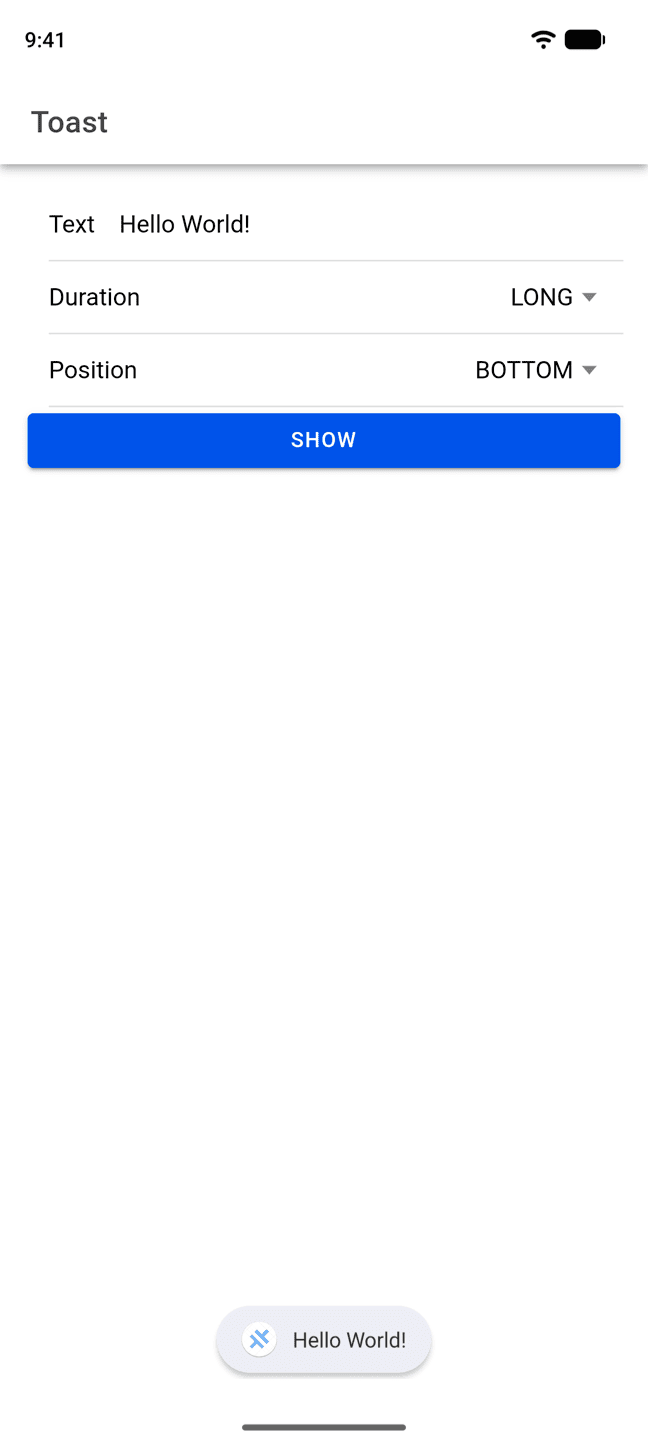
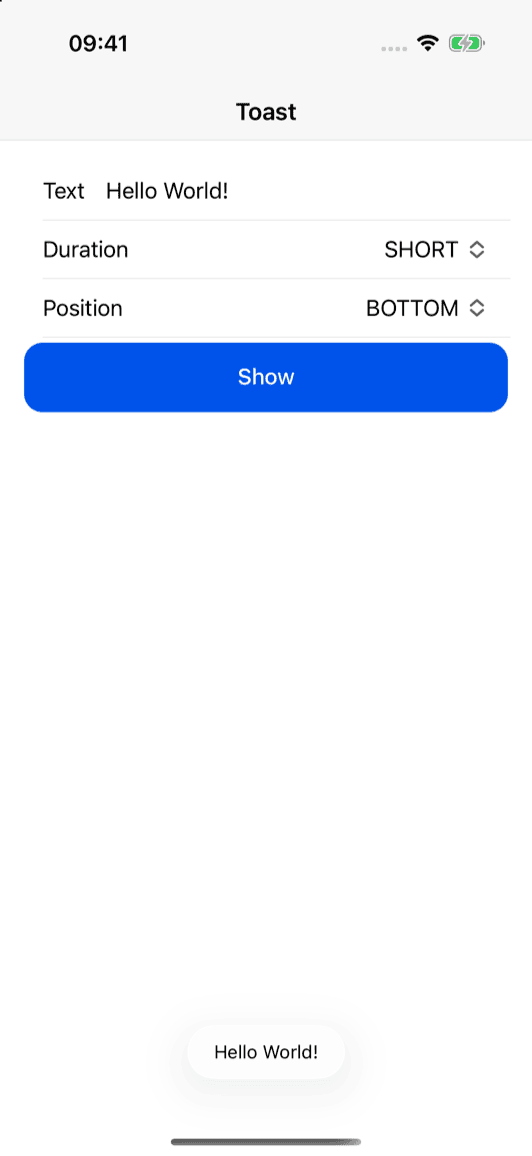
Capacitor plugin to show native toast notifications.

[ ![Deliver Live Updates to your Capacitor app with Capawesome Cloud](../../../assets/external/cloud.capawesome.io/assets/banners/cloud-build-and-deploy-capacitor-apps.69628c3f.png) ](https://cloud.capawesome.io/) 

## Features[¶](#features "Permanent link")

* 🍞 **Native toasts**: Show short, non-blocking text notifications on Android and iOS.
* 🌐 **Zero-dependency web**: A self-contained web implementation with no additional peer dependencies.
* 🧭 **Positioning**: Show toasts at the top, center or bottom of the screen.
* ⏱️ **Durations**: Choose between a short and a long display duration.
* 📦 **CocoaPods & SPM**: Supports CocoaPods and Swift Package Manager for iOS.
* 🔁 **Up-to-date**: Always supports the latest Capacitor version.

Missing a feature? Just [open an issue](https://github.com/capawesome-team/capacitor-plugins/issues) and we'll take a look!

## Use Cases[¶](#use-cases "Permanent link")

The Toast plugin is typically used to give users brief, non-blocking feedback, for example:

* **Success confirmations**: Confirm that an action such as saving or sending was completed.
* **Error notices**: Inform users about a failed action without interrupting their flow.
* **Clipboard feedback**: Confirm that a value was copied to the clipboard.
* **Status updates**: Show short status messages such as a lost network connection.

## Compatibility[¶](#compatibility "Permanent link")

| Plugin Version | Capacitor Version | Status         |
| -------------- | ----------------- | -------------- |
| 0.x.x          | \>=8.x.x          | Active support |

## Installation[¶](#installation "Permanent link")

You can use our **AI-Assisted Setup** to install the plugin. Add the [Capawesome Skills](https://github.com/capawesome-team/skills) to your AI tool using the following command:

`[](#%5F%5Fcodelineno-0-1)npx skills add capawesome-team/skills --skill capacitor-plugins
`

Then use the following prompt:

`` [](#%5F%5Fcodelineno-1-1) Use the `capacitor-plugins` skill from `capawesome-team/skills` to install the `@capawesome/capacitor-toast` plugin in my project.
 ``

If you prefer **Manual Setup**, install the plugin by running the following commands and follow the platform-specific instructions below:

`[](#%5F%5Fcodelineno-2-1)npm install @capawesome/capacitor-toast
[](#%5F%5Fcodelineno-2-2)npx cap sync
`

### Android[¶](#android "Permanent link")

No additional configuration is required for this plugin.

On Android 12 and newer, the operating system ignores the requested position and always shows toasts at the bottom of the screen. This is a system restriction and not a bug of this plugin.

### iOS[¶](#ios "Permanent link")

No additional configuration is required for this plugin.

## Configuration[¶](#configuration "Permanent link")

No configuration required for this plugin.

## Usage[¶](#usage "Permanent link")

The following example shows how to show a toast.

### Show a toast[¶](#show-a-toast "Permanent link")

Show a short, non-blocking text notification. Use the `duration` option to choose between a short (about 2000 ms) and a long (about 3500 ms) display duration, and the `position` option to show the toast at the top, center or bottom of the screen:

`[](#%5F%5Fcodelineno-3-1)import { Toast, ToastDuration, ToastPosition } from '@capawesome/capacitor-toast';
[](#%5F%5Fcodelineno-3-2)
[](#%5F%5Fcodelineno-3-3)const show = async () => {
[](#%5F%5Fcodelineno-3-4)  await Toast.show({
[](#%5F%5Fcodelineno-3-5)    text: 'Hello World!',
[](#%5F%5Fcodelineno-3-6)    duration: ToastDuration.Short,
[](#%5F%5Fcodelineno-3-7)    position: ToastPosition.Bottom,
[](#%5F%5Fcodelineno-3-8)  });
[](#%5F%5Fcodelineno-3-9)};
`

## API[¶](#api "Permanent link")

* [show(...)](#show)
* [Interfaces](#interfaces)
* [Enums](#enums)

### show(...)[¶](#show "Permanent link")

`[](#%5F%5Fcodelineno-4-1)show(options: ShowOptions) => Promise<void>
`

Show a toast with a short text message.

| Param       | Type                        |
| ----------- | --------------------------- |
| **options** | [ShowOptions](#showoptions) |

**Since:** 0.1.0

---

### Interfaces[¶](#interfaces "Permanent link")

#### ShowOptions[¶](#showoptions "Permanent link")

| Prop         | Type                            | Description                                                                                                                                                                 | Default              | Since |
| ------------ | ------------------------------- | --------------------------------------------------------------------------------------------------------------------------------------------------------------------------- | -------------------- | ----- |
| **duration** | [ToastDuration](#toastduration) | The duration of the toast.                                                                                                                                                  | ToastDuration.Short  | 0.1.0 |
| **position** | [ToastPosition](#toastposition) | The position of the toast on the screen. On Android 12 and newer, the position is ignored and the toast is always shown at the bottom of the screen (a system restriction). | ToastPosition.Bottom | 0.1.0 |
| **text**     | string                          | The text to show in the toast.                                                                                                                                              |                      | 0.1.0 |

### Enums[¶](#enums "Permanent link")

#### ToastDuration[¶](#toastduration "Permanent link")

| Members   | Value   | Description                                                  | Since |
| --------- | ------- | ------------------------------------------------------------ | ----- |
| **Long**  | 'LONG'  | Show the toast for a longer period of time (about 3500 ms).  | 0.1.0 |
| **Short** | 'SHORT' | Show the toast for a shorter period of time (about 2000 ms). | 0.1.0 |

#### ToastPosition[¶](#toastposition "Permanent link")

| Members    | Value    | Description                                 | Since |
| ---------- | -------- | ------------------------------------------- | ----- |
| **Bottom** | 'BOTTOM' | Show the toast at the bottom of the screen. | 0.1.0 |
| **Center** | 'CENTER' | Show the toast in the center of the screen. | 0.1.0 |
| **Top**    | 'TOP'    | Show the toast at the top of the screen.    | 0.1.0 |

## Migrating from `@capacitor/toast`[¶](#migrating-from-capacitortoast "Permanent link")

This plugin offers an API very similar to the official [@capacitor/toast](https://github.com/ionic-team/capacitor-plugins/tree/main/toast) plugin, so migrating is straightforward:

* Replace the dependency `@capacitor/toast` with `@capawesome/capacitor-toast`.
* The web implementation is self-contained, so the [@ionic/pwa-elements](https://github.com/ionic-team/pwa-elements) package is no longer required for toasts.
* The `duration` and `position` options are now typed enums with uppercase string values (e.g. `ToastDuration.Short` → `'SHORT'`, `ToastPosition.Bottom` → `'BOTTOM'`) instead of lowercase string literals.

## FAQ[¶](#faq "Permanent link")

### How is this plugin different from other similar plugins?[¶](#how-is-this-plugin-different-from-other-similar-plugins "Permanent link")

It shows native toast notifications on Android and iOS and ships a self-contained web implementation with no additional peer dependencies, so toasts work out of the box on every platform. You get typed enums for choosing a short or long duration and a top, center, or bottom position, all through a fully typed API that supports both CocoaPods and Swift Package Manager on iOS and is actively maintained against the latest Capacitor version. If you just need brief, non-blocking feedback anywhere your app runs, a single dependency covers the whole story.

### Why is my toast always shown at the bottom of the screen on Android?[¶](#why-is-my-toast-always-shown-at-the-bottom-of-the-screen-on-android "Permanent link")

On Android 12 and newer, the operating system ignores the requested position and always shows toasts at the bottom of the screen. This is a system restriction and not a bug of this plugin.

### How long is a toast displayed?[¶](#how-long-is-a-toast-displayed "Permanent link")

You can choose between two durations with the `duration` option: `ToastDuration.Short` shows the toast for about 2000 ms and `ToastDuration.Long` for about 3500 ms. If you don't set the option, the short duration is used by default.

### How is this plugin different from the official `@capacitor/toast` plugin?[¶](#how-is-this-plugin-different-from-the-official-capacitortoast-plugin "Permanent link")

The API is very similar, so migrating is straightforward. The main differences are that the web implementation is self-contained (so the `@ionic/pwa-elements` package is no longer required for toasts) and that the `duration` and `position` options are typed enums with uppercase string values. See [Migrating from @capacitor/toast](#migrating-from-capacitortoast) for details.

### Do I need to install `@ionic/pwa-elements` for the web?[¶](#do-i-need-to-install-ionicpwa-elements-for-the-web "Permanent link")

No, the plugin ships with a self-contained web implementation that has no additional peer dependencies. Toasts work on the web out of the box after [installing](#installation) the plugin.

### Do I need any permissions or configuration to use this plugin?[¶](#do-i-need-any-permissions-or-configuration-to-use-this-plugin "Permanent link")

No, the plugin does not require any permissions or configuration on Android, iOS, or Web. Simply [install](#installation) it and call the `show(...)` method.

### Can I use this plugin with Ionic, React, Vue or Angular?[¶](#can-i-use-this-plugin-with-ionic-react-vue-or-angular "Permanent link")

Yes, the plugin is framework-agnostic. It works in any Capacitor app regardless of the web framework, including Ionic with Angular, React, or Vue, as well as plain JavaScript projects.

## Related Plugins[¶](#related-plugins "Permanent link")

* [Dialog](https://capawesome.io/docs/sdks/capacitor/dialog/): Show native alert, confirm, and prompt dialogs.
* [Action Sheet](https://capawesome.io/docs/sdks/capacitor/action-sheet/): Show native action sheets.
* [Badge](https://capawesome.io/docs/sdks/capacitor/badge/): Access and update the badge number of the app icon.
* [Haptics](https://capawesome.io/docs/sdks/capacitor/haptics/): Provide haptic feedback such as impacts, notifications, and vibrations.

## Newsletter[¶](#newsletter "Permanent link")

Stay up to date with the latest news and updates about the Capawesome, Capacitor, and Ionic ecosystem by subscribing to our [Capawesome Newsletter](https://cloud.capawesome.io/newsletter/).

## Changelog[¶](#changelog "Permanent link")

See [CHANGELOG.md](https://github.com/capawesome-team/capacitor-plugins/blob/main/packages/toast/CHANGELOG.md).

## License[¶](#license "Permanent link")

See [LICENSE](https://github.com/capawesome-team/capacitor-plugins/blob/main/packages/toast/LICENSE).

July 8, 2026 

Back to top

```json
{"@context": "https://schema.org", "@graph": [{"@type": "TechArticle", "@id": "https://capawesome.io/docs/sdks/capacitor/toast/#article", "headline": "Capacitor Toast Plugin for Android, iOS and Web", "name": "Capacitor Toast Plugin for Android, iOS and Web", "description": "Capacitor plugin to show native toast notifications with configurable position and duration. Supports Android, iOS, and the web.", "inLanguage": "en", "url": "https://capawesome.io/docs/sdks/capacitor/toast/", "mainEntityOfPage": "https://capawesome.io/docs/sdks/capacitor/toast/", "author": {"@type": "Organization", "name": "Capawesome", "url": "https://capawesome.io", "logo": {"@type": "ImageObject", "url": "https://capawesome.io/assets/images/logo.svg"}}, "publisher": {"@type": "Organization", "name": "Capawesome", "url": "https://capawesome.io", "logo": {"@type": "ImageObject", "url": "https://capawesome.io/assets/images/logo.svg"}}, "about": {"@id": "https://capawesome.io/docs/sdks/capacitor/toast/#software"}}, {"@type": "SoftwareSourceCode", "@id": "https://capawesome.io/docs/sdks/capacitor/toast/#software", "name": "Capacitor Toast Plugin for Android, iOS and Web", "description": "Capacitor plugin to show native toast notifications with configurable position and duration. Supports Android, iOS, and the web.", "url": "https://capawesome.io/docs/sdks/capacitor/toast/", "programmingLanguage": "TypeScript", "runtimePlatform": "Capacitor", "codeRepository": "https://github.com/capawesome-team", "author": {"@type": "Organization", "name": "Capawesome", "url": "https://capawesome.io", "logo": {"@type": "ImageObject", "url": "https://capawesome.io/assets/images/logo.svg"}}, "publisher": {"@type": "Organization", "name": "Capawesome", "url": "https://capawesome.io", "logo": {"@type": "ImageObject", "url": "https://capawesome.io/assets/images/logo.svg"}}}]}
{"@context": "https://schema.org", "@type": "FAQPage", "mainEntity": [{"@type": "Question", "name": "How is this plugin different from other similar plugins?", "acceptedAnswer": {"@type": "Answer", "text": "It shows native toast notifications on Android and iOS and ships a self-contained web implementation with no additional peer dependencies, so toasts work out of the box on every platform. You get typed enums for choosing a short or long duration and a top, center, or bottom position, all through a fully typed API that supports both CocoaPods and Swift Package Manager on iOS and is actively maintained against the latest Capacitor version. If you just need brief, non-blocking feedback anywhere your app runs, a single dependency covers the whole story."}}, {"@type": "Question", "name": "Why is my toast always shown at the bottom of the screen on Android?", "acceptedAnswer": {"@type": "Answer", "text": "On Android 12 and newer, the operating system ignores the requested position and always shows toasts at the bottom of the screen. This is a system restriction and not a bug of this plugin."}}, {"@type": "Question", "name": "How long is a toast displayed?", "acceptedAnswer": {"@type": "Answer", "text": "You can choose between two durations with the duration option: ToastDuration.Short shows the toast for about 2000 ms and ToastDuration.Long for about 3500 ms. If you don't set the option, the short duration is used by default."}}, {"@type": "Question", "name": "How is this plugin different from the official @capacitor/toast plugin?", "acceptedAnswer": {"@type": "Answer", "text": "The API is very similar, so migrating is straightforward. The main differences are that the web implementation is self-contained (so the @ionic/pwa-elements package is no longer required for toasts) and that the duration and position options are typed enums with uppercase string values. See Migrating from @capacitor/toast for details."}}, {"@type": "Question", "name": "Do I need to install @ionic/pwa-elements for the web?", "acceptedAnswer": {"@type": "Answer", "text": "No, the plugin ships with a self-contained web implementation that has no additional peer dependencies. Toasts work on the web out of the box after installing the plugin."}}, {"@type": "Question", "name": "Do I need any permissions or configuration to use this plugin?", "acceptedAnswer": {"@type": "Answer", "text": "No, the plugin does not require any permissions or configuration on Android, iOS, or Web. Simply install it and call the show(...) method."}}, {"@type": "Question", "name": "Can I use this plugin with Ionic, React, Vue or Angular?", "acceptedAnswer": {"@type": "Answer", "text": "Yes, the plugin is framework-agnostic. It works in any Capacitor app regardless of the web framework, including Ionic with Angular, React, or Vue, as well as plain JavaScript projects."}}], "url": "https://capawesome.io/docs/sdks/capacitor/toast/"}
```