Capawesome March 2026 Update
The Capawesome March update is here! This update includes new features and improvements for Capawesome Cloud and our Plugins. Let's take a look at the most important changes.

Blog
We published several new articles this month. Here are some highlights:
- Announcing Open Source AI Agent Skills for Capacitor — We open sourced 7 AI agent skills that teach coding assistants like Claude and Cursor how to handle common Capacitor tasks, from plugin setup to version upgrades and cloud builds. If you haven't tried using AI agents with your Capacitor projects yet, this is a great place to start.
- How to Use SPM Package Traits in Capacitor 8 — Learn how to use Swift Package Manager package traits to conditionally enable optional plugin dependencies like SQLCipher directly from your Capacitor config.
- How to Use Drizzle ORM with Capacitor and SQLite — A step-by-step guide to building type-safe database layers in your Capacitor app using Drizzle ORM and the SQLite plugin.
- How to Use Better Auth in Ionic and Capacitor Apps — Add mobile authentication to your Capacitor app with Better Auth, including social login with Apple and Google.
Cloud
iOS OTA Distribution
You can now install iOS and Android builds directly on physical devices from the Capawesome Cloud Console. Each build artifact includes an install button and a QR code that you can share with testers and stakeholders — no TestFlight review delays, no Play Store submission, and no extra setup required. Combined with Automations and notification integrations, you can set up a fully hands-off distribution workflow where builds are triggered on push and your QA team gets notified in Slack or Discord when a new build is ready to install.
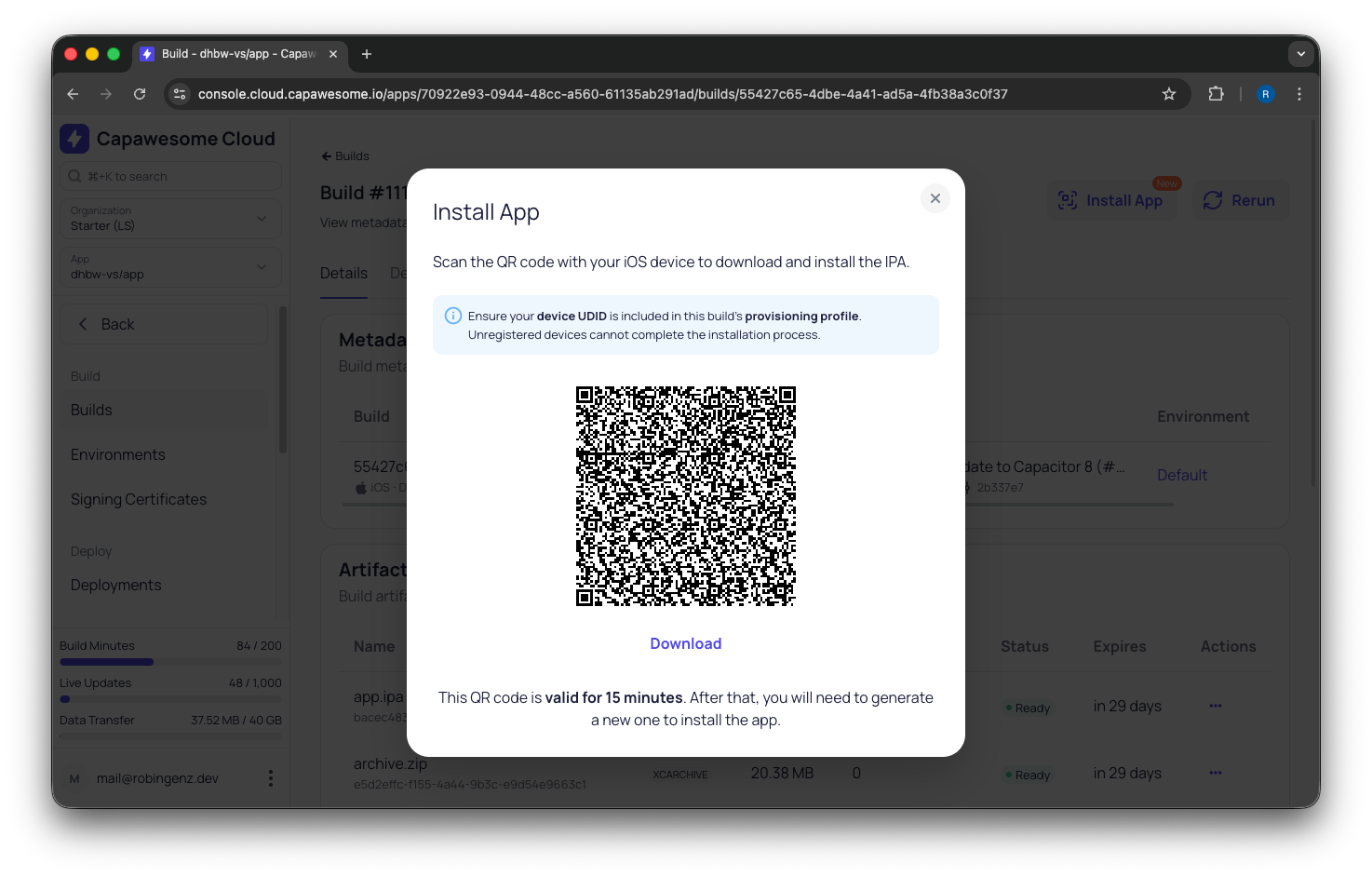
Check out our blog post for a detailed walkthrough of how to distribute test builds to your team.
App Transfer
You can now transfer apps between organizations directly from the Cloud Console. This is useful when you need to move an app to a different team or consolidate projects under a single organization. All associated data — builds, channels, certificates, and destinations — moves with the app.
Default Environments
Apps now support a default environment that is automatically applied to new builds when no environment is explicitly selected. This reduces repetitive configuration when you always build with the same environment and helps prevent accidental builds without the correct environment variables. You can set the default environment in the app settings in the Cloud Console.
Web Certificate Support for Cloud Builds
Web certificates in PEM format were previously only supported for manually uploaded build artifacts. You can now also use them with web builds created by the Capawesome Cloud build runners, so your Live Update bundles are automatically signed during the build process. Check out the Web Signing Certificates documentation to learn more.
Usage Limit Notifications
Usage limit notifications previously only went to the organization owner and only when the limit was fully reached. Now, both owners and admins can receive notifications, and alerts are sent at 90% as well — giving your team a heads-up before limits are actually hit. You can configure the recipients in the organization settings in the Cloud Console.
Plugins
Android Foreground Service
The Android Foreground Service plugin now supports a notificationTapped event listener that fires when a user taps on the foreground service notification:
import { ForegroundService } from '@capawesome-team/capacitor-android-foreground-service';

await ForegroundService.addListener('notificationTapped', (event) => {
  console.log('Notification tapped:', event.notificationId);
});
This listener is available on Android.
Apple Sign-In
We are excited to announce the initial release of the Apple Sign-In plugin! This plugin lets you add Apple Sign-In to your Capacitor app on Android, iOS, and Web:
import { AppleSignIn } from '@capawesome/capacitor-apple-sign-in';

const result = await AppleSignIn.signIn({
  scopes: ['EMAIL', 'FULL_NAME'],
});
console.log('ID Token:', result.idToken);
Check out the documentation to learn more about getting started with the Apple Sign-In plugin.
Audio Player
The Audio Player plugin adds a deactivateAudioSession option to the stop(...) method. Set it to false when you plan to call play() again shortly after stopping, which avoids audio session interruption issues:
import { AudioPlayer } from '@capawesome/capacitor-audio-player';

await AudioPlayer.stop({ deactivateAudioSession: false });
This option is available on Android and iOS and defaults to true.
Firebase
Analytics
The Analytics plugin adds a new logTransaction(...) method for logging StoreKit 2 in-app purchase transactions to Firebase Analytics on iOS:
import { FirebaseAnalytics } from '@capacitor-firebase/analytics';

await FirebaseAnalytics.logTransaction({
  transactionId: '123456789',
});
Pass the Transaction.id from StoreKit 2 as a string — if you're using the Purchases plugin, this is available on the transaction object. This method requires iOS 15.0 or later. On Android, in-app purchase tracking is handled automatically by Firebase.
Additionally, a new SPM package trait lets you disable IDFA collection on iOS by switching from FirebaseAnalytics to FirebaseAnalyticsCore. Check out our blog post on SPM Package Traits in Capacitor for details on how to configure this.
Cloud Firestore
The Cloud Firestore plugin received three new features.
Timestamp, GeoPoint, and FieldValue Support
You can now use Firestore's native data types directly. The plugin automatically serializes and deserializes Timestamp, GeoPoint, and FieldValue across all methods:
import { FirebaseFirestore, Timestamp, GeoPoint, FieldValue } from '@capacitor-firebase/firestore';

await FirebaseFirestore.setDocument({
  reference: 'posts/abc',
  data: {
    createdAt: Timestamp.now(),
    location: new GeoPoint(48.1351, 11.5820),
    views: FieldValue.increment(1),
  },
});
Offline Persistence
New enablePersistence(...) and disablePersistence(...) methods give you explicit control over Firestore's offline cache. Both must be called before any other Firestore method:
import { FirebaseFirestore } from '@capacitor-firebase/firestore';

await FirebaseFirestore.enablePersistence({
  cacheSizeBytes: 50 * 1024 * 1024,
});
Named Database Support
A new databaseId configuration option lets you connect to a specific Firestore database instead of the default one. This is available on Android and iOS.
Cloud Messaging
The Cloud Messaging plugin adds the apnsTokenReceived event listener that fires on iOS when the native APNs device token is received:
import { FirebaseMessaging } from '@capacitor-firebase/messaging';

await FirebaseMessaging.addListener('apnsTokenReceived', (event) => {
  console.log('APNs token:', event.token);
});
This is useful when you need the raw APNs token for third-party push services. The event is buffered and delivered as soon as a listener is registered.
Cloud Storage
The Cloud Storage plugin adds a downloadFile(...) method for downloading files directly to the device filesystem with progress tracking:
import { FirebaseStorage } from '@capacitor-firebase/storage';

await FirebaseStorage.downloadFile(
  { path: 'images/mountains.png', uri: 'file:///path/to/local/mountains.png' },
  (event, error) => {
    if (event?.completed) {
      console.log('Download complete!');
    }
  },
);
This method is available on Android, iOS, and Web.
Live Update
The Live Update plugin now supports native channel configuration, allowing you to set a default channel directly in your native project. This is especially useful for versioned channels where the channel is tied to the native build version:
// Android: build.gradle
android {
    defaultConfig {
        resValue "string", "capawesome_live_update_default_channel", "production-" + defaultConfig.versionCode
    }
}
<!-- iOS: Info.plist -->
<key>CapawesomeLiveUpdateDefaultChannel</key>
<string>production-$(CURRENT_PROJECT_VERSION)</string>
Additionally, a new fetchChannels(...) method lets you retrieve available public channels from Capawesome Cloud, which is useful for building channel selectors in development or QA builds.
NFC
The NFC plugin now implements the isEnabled(...) method on iOS and Web. On iOS, this reflects whether NFC reading is available on the device. On Web, it checks for Web NFC API support:
import { Nfc } from '@capawesome/capacitor-nfc';

const { isEnabled } = await Nfc.isEnabled();
console.log('NFC available:', isEnabled);
This method is now available on Android, iOS, and Web.
PostHog
The PostHog plugin adds new configuration options. You can now set apiHost and uiHost to point to your own PostHog instance or reverse proxy, and captureApplicationLifecycleEvents to control whether lifecycle events are tracked:
import { Posthog } from '@capawesome/capacitor-posthog';

await Posthog.setup({
  apiKey: 'phc_YOUR_KEY',
  apiHost: 'https://eu.i.posthog.com',
  captureApplicationLifecycleEvents: false,
});
The apiHost and uiHost options are available on Android, iOS, and Web. The captureApplicationLifecycleEvents option is available on Android and iOS.
SQLite
The SQLite plugin now supports enabling SQLCipher encryption via SPM package traits on iOS. Instead of manually linking SQLCipher, you can enable it directly in your Capacitor config:
{
  "experimental": {
    "ios": {
      "spm": {
        "swiftToolsVersion": "6.1",
        "packageTraits": {
          "@capawesome-team/capacitor-sqlite": ["SQLCipher"]
        }
      }
    }
  }
}
This requires Xcode 16.3 or later. Check out our blog post on SPM Package Traits in Capacitor for more details.
Try Capawesome Cloud
If you're looking for a powerful cloud platform to build, deploy, and manage your Capacitor apps, check out Capawesome Cloud. It provides native builds, live updates, app store publishing, and more — all in one place.
Conclusion
March was a big month for Capawesome. On the Cloud side, iOS OTA distribution and app transfers make it easier to test and manage your apps, while the Plugin updates bring native Firestore data types, a new Apple Sign-In plugin, and several quality-of-life improvements across the board.
If you have any questions or need help, feel free to join the Capawesome Discord server. And don't forget to subscribe to the Capawesome newsletter to stay updated on the latest news and updates.