---
title: Capacitor Wifi Plugin for Android & iOS
description: Capacitor plugin to manage Wi-Fi connectivity, including adding, connecting, and disconnecting networks. Supports both Android and iOS.
tags:
- Insiders
- Android
- iOS
search:
boost: 2
faq: true
github_repo: capawesome-team/capacitor-plugins
---
# Capacitor Wifi Plugin
Capacitor plugin to manage Wi-Fi connectivity, including adding, connecting, and disconnecting networks. Supports both Android and iOS.[^1][^2]

## Features
The Capacitor Wifi plugin is one of the most complete Wi-Fi management solutions for Capacitor apps. Here are some of the key features:
- 🖥️ **Cross-platform**: Supports Android and iOS.
- 🌐 **Network Management**: Add, connect and disconnect networks.
- 🔍 **Network Scan**: Perform scans for available networks.
- 📟 **Device Info**: Retrieve essential device information like IP address.
- 🤝 **Compatibility**: Works alongside the [Bluetooth Low Energy](https://capawesome.io/docs/sdks/capacitor/bluetooth-low-energy/), [Network](https://capawesome.io/docs/sdks/capacitor/network/) and [NFC](https://capawesome.io/docs/sdks/capacitor/nfc/) plugins.
- 🔁 **Up-to-date**: Always supports the latest Capacitor version.
- ⭐️ **Support**: Priority support from the Capawesome Team.
- ✨ **Handcrafted**: Built from the ground up with care and expertise, not forked or AI-generated.
Missing a feature? Just [open an issue](https://github.com/capawesome-team/capacitor-plugins/issues) and we'll take a look!
## Use Cases
The Wifi plugin is typically used whenever an app needs to interact with Wi-Fi networks, for example:
- **IoT device onboarding**: Connect to the access point of a smart home device, camera, or other IoT hardware to configure it.
- **Guest Wi-Fi access**: Add a Wi-Fi network to the device's list of known networks via a system dialog, for example in hotel or event apps.
- **Network diagnostics**: Display the SSID, IP address, and signal strength (RSSI) of the current network.
- **Network discovery**: Scan for nearby Wi-Fi networks and present them to the user, for example in a setup wizard.
## Compatibility
| Plugin Version | Capacitor Version | Status |
| -------------- | ----------------- | -------------- |
| 8.x.x | >=8.x.x | Active support |
| 7.x.x | 7.x.x | Deprecated |
## Demo
| Android | iOS |
| ---------------------------------------------------------------------------------------------------------------- | -------------------------------------------------------------------------------------------------------- |
| 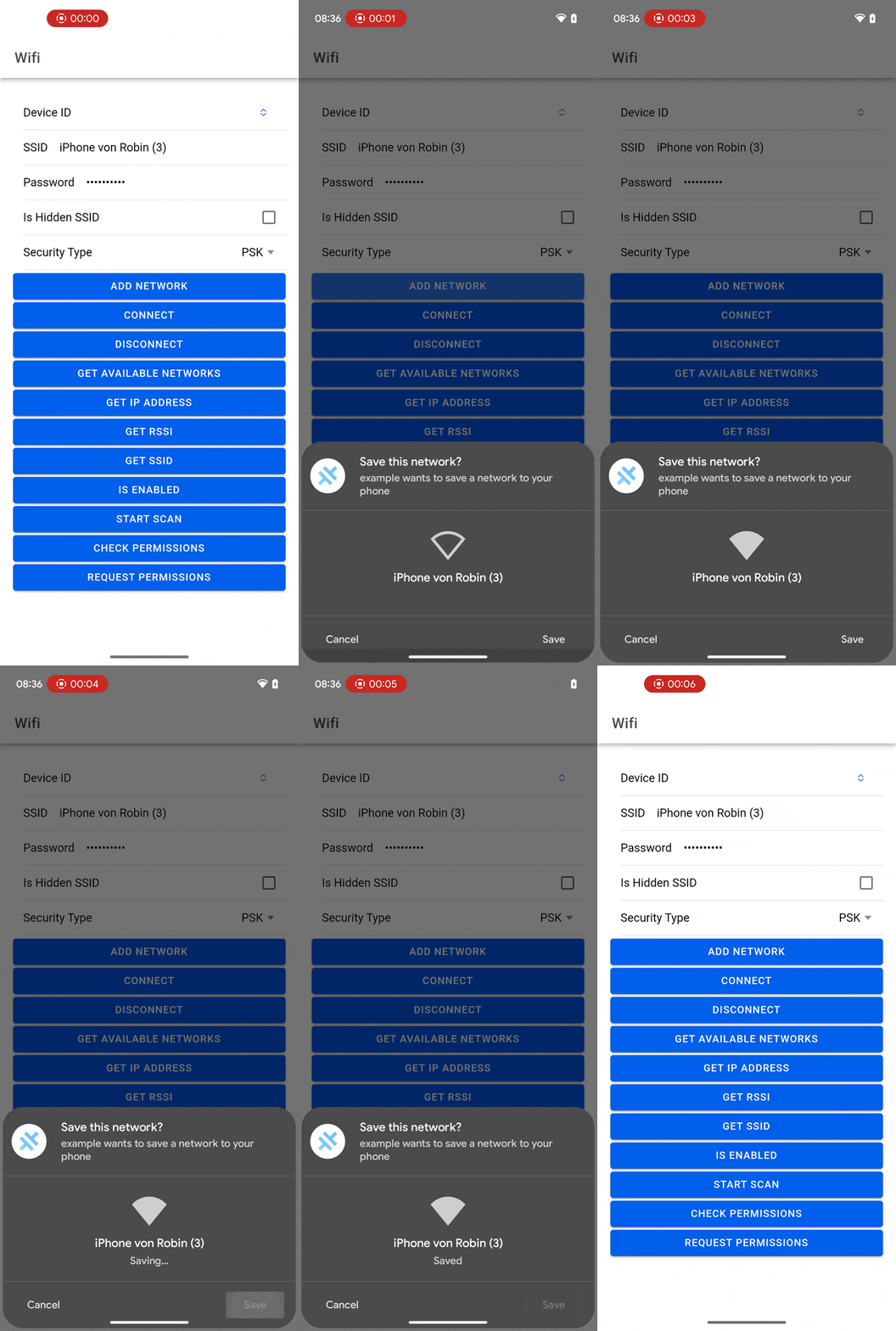 |
| 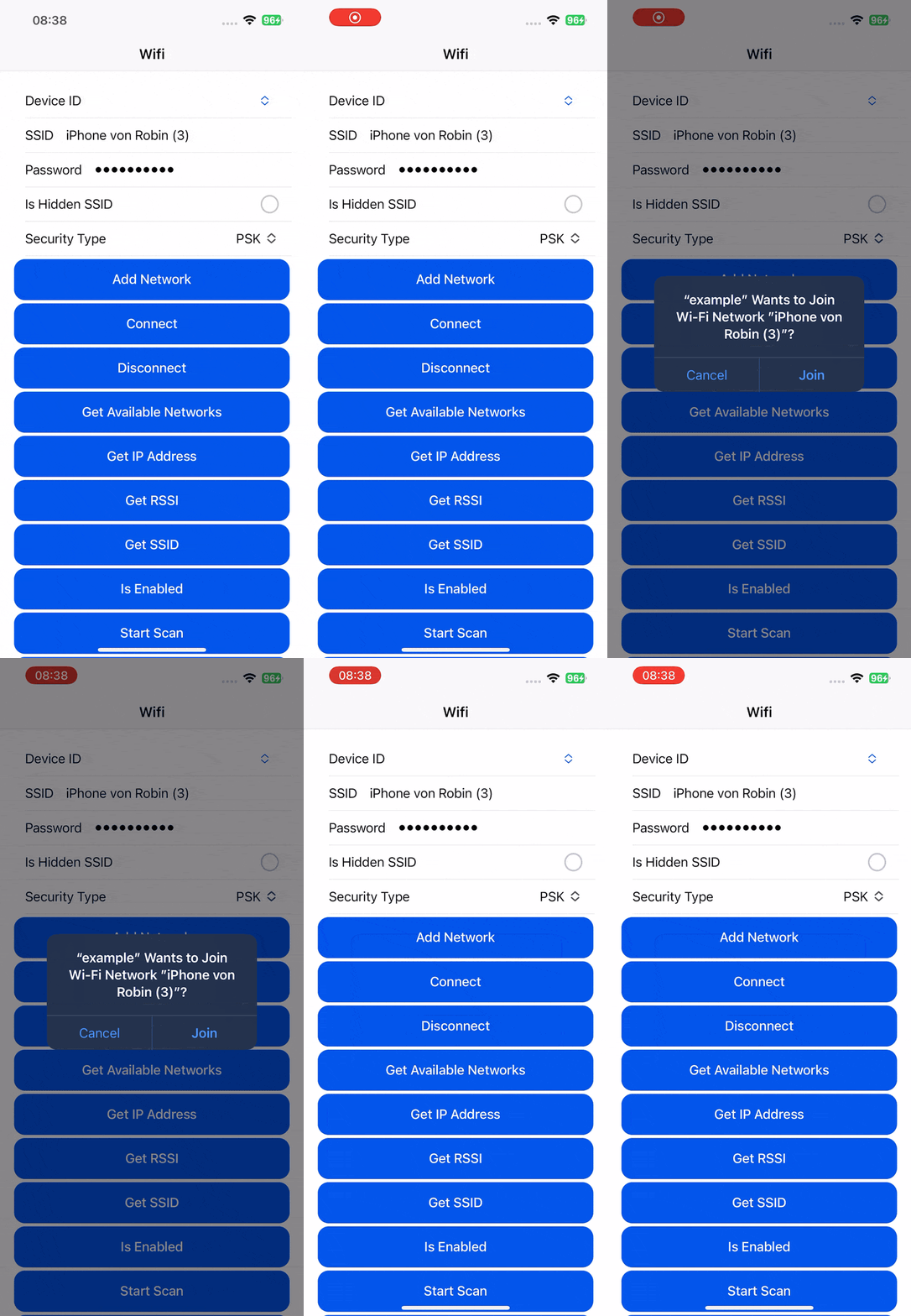 |
## Installation
This plugin is only available to [Capawesome Insiders](https://capawesome.io/insiders/).
First, make sure you have the Capawesome npm registry set up.
You can do this by running the following commands:
```
npm config set @capawesome-team:registry https://npm.registry.capawesome.io
npm config set //npm.registry.capawesome.io/:_authToken
```
**Attention**: Replace `` with the license key you received from Polar. If you don't have a license key yet, you can get one by becoming a [Capawesome Insider](https://capawesome.io/insiders/).
Next, you can use our **AI-Assisted Setup** to install the plugin.
Add the [Capawesome Skills](https://github.com/capawesome-team/skills) to your AI tool using the following command:
```bash
npx skills add capawesome-team/skills --skill capacitor-plugins
```
Then use the following prompt:
```
Use the `capacitor-plugins` skill from `capawesome-team/skills` to install the `@capawesome-team/capacitor-wifi` plugin in my project.
```
If you prefer **Manual Setup**, install the plugin by running the following commands and follow the platform-specific instructions below:
```bash
npm install @capawesome-team/capacitor-wifi
npx cap sync
```
### Android
#### Permissions
This API requires the following elements be added to your `AndroidManifest.xml` before or after the `application` tag:
```xml
```
#### Proguard
If you are using Proguard, you need to add the following rules to your `proguard-rules.pro` file:
```
-keep class io.capawesome.capacitorjs.plugins.** { *; }
```
### iOS
#### Entitlements
Ensure `Access Wi-Fi Information` and `Hotspot` capabilities have been enabled in your application in Xcode.
See [Add a capability to a target](https://help.apple.com/xcode/mac/current/#/dev88ff319e7) for more information.
#### Privacy Descriptions
Add the `NSLocationWhenInUseUsageDescription` and `NSLocationAlwaysAndWhenInUseUsageDescription` keys to the `ios/App/App/Info.plist` file, which tells the user why your app is requesting location information:
```xml
NSLocationWhenInUseUsageDescription
We need your location to request Wi-Fi information.
NSLocationAlwaysAndWhenInUseUsageDescription
We need your location to request Wi-Fi information.
```
## Configuration
| Prop | Type | Description | Default | Since |
| -------------------- | -------------------- | ------------------------------------------------------------------------------------------------------------------------------------------------------- | ------------------ | ----- |
| **`useWifiManager`** |
|
## Installation
This plugin is only available to [Capawesome Insiders](https://capawesome.io/insiders/).
First, make sure you have the Capawesome npm registry set up.
You can do this by running the following commands:
```
npm config set @capawesome-team:registry https://npm.registry.capawesome.io
npm config set //npm.registry.capawesome.io/:_authToken
```
**Attention**: Replace `` with the license key you received from Polar. If you don't have a license key yet, you can get one by becoming a [Capawesome Insider](https://capawesome.io/insiders/).
Next, you can use our **AI-Assisted Setup** to install the plugin.
Add the [Capawesome Skills](https://github.com/capawesome-team/skills) to your AI tool using the following command:
```bash
npx skills add capawesome-team/skills --skill capacitor-plugins
```
Then use the following prompt:
```
Use the `capacitor-plugins` skill from `capawesome-team/skills` to install the `@capawesome-team/capacitor-wifi` plugin in my project.
```
If you prefer **Manual Setup**, install the plugin by running the following commands and follow the platform-specific instructions below:
```bash
npm install @capawesome-team/capacitor-wifi
npx cap sync
```
### Android
#### Permissions
This API requires the following elements be added to your `AndroidManifest.xml` before or after the `application` tag:
```xml
```
#### Proguard
If you are using Proguard, you need to add the following rules to your `proguard-rules.pro` file:
```
-keep class io.capawesome.capacitorjs.plugins.** { *; }
```
### iOS
#### Entitlements
Ensure `Access Wi-Fi Information` and `Hotspot` capabilities have been enabled in your application in Xcode.
See [Add a capability to a target](https://help.apple.com/xcode/mac/current/#/dev88ff319e7) for more information.
#### Privacy Descriptions
Add the `NSLocationWhenInUseUsageDescription` and `NSLocationAlwaysAndWhenInUseUsageDescription` keys to the `ios/App/App/Info.plist` file, which tells the user why your app is requesting location information:
```xml
NSLocationWhenInUseUsageDescription
We need your location to request Wi-Fi information.
NSLocationAlwaysAndWhenInUseUsageDescription
We need your location to request Wi-Fi information.
```
## Configuration
| Prop | Type | Description | Default | Since |
| -------------------- | -------------------- | ------------------------------------------------------------------------------------------------------------------------------------------------------- | ------------------ | ----- |
| **`useWifiManager`** | boolean | Whether or not to use the **deprecated** `WifiManager` API for connecting to Wi-Fi networks using the `connect(...)` method. Only available on Android. | false | 6.3.0 |
### Examples
In `capacitor.config.json`:
```json
{
"plugins": {
"Wifi": {
"useWifiManager": undefined
}
}
}
```
In `capacitor.config.ts`:
```ts
///
import { CapacitorConfig } from '@capacitor/cli';
const config: CapacitorConfig = {
plugins: {
Wifi: {
useWifiManager: undefined,
},
},
};
export default config;
```
## Usage
The following examples show how to connect to and disconnect from a Wi-Fi network, scan for available networks, read information about the current network, and check whether Wi-Fi is enabled.
### Connect to a Wi-Fi network
Connect to a network by providing its SSID and password. On Android, the network will not be added to the device's list of known networks and no traffic will be routed through it; use `addNetwork(...)` instead if you want that. On iOS, `connect(...)` behaves the same as `addNetwork(...)`. Only available on Android and iOS:
```typescript
import { Wifi } from '@capawesome-team/capacitor-wifi';
const connect = async () => {
await Wifi.connect({
ssid: 'MyNetwork',
password: 'MyPassword',
isHiddenSsid: false
});
}
```
### Disconnect from a Wi-Fi network
On iOS, you can only disconnect from networks that you connected to using the plugin. This also removes the network from the list of known networks. Only available on Android and iOS:
```typescript
import { Wifi } from '@capawesome-team/capacitor-wifi';
const disconnect = async () => {
await Wifi.disconnect();
}
```
### Scan for available Wi-Fi networks
Start a scan with `startScan()` and retrieve the results with `getAvailableNetworks()`. You can also listen for the `networksScanned` event to be notified when the scan results are available. Note that scan requests may be throttled if you scan too often. Only available on Android:
```typescript
import { Wifi } from '@capawesome-team/capacitor-wifi';
const startScan = async () => {
await Wifi.startScan();
}
const getAvailableNetworks = async () => {
const result = await Wifi.getAvailableNetworks();
return result.networks;
}
```
### Get information about the current network
Retrieve the SSID and IP address of the current network on Android and iOS. The signal strength (RSSI) is only available on Android:
```typescript
import { Wifi } from '@capawesome-team/capacitor-wifi';
const getSsid = async () => {
const result = await Wifi.getSsid();
return result.ssid;
}
const getIpAddress = async () => {
const result = await Wifi.getIpAddress();
return result.address;
}
const getRssi = async () => {
const result = await Wifi.getRssi();
return result.rssi;
}
```
### Check if Wi-Fi is enabled
Check whether Wi-Fi is turned on. Only available on Android:
```typescript
import { Wifi } from '@capawesome-team/capacitor-wifi';
const isEnabled = async () => {
const result = await Wifi.isEnabled();
return result.enabled;
}
```
## API
* [`addNetwork(...)`](#addnetwork)
* [`connect(...)`](#connect)
* [`disconnect(...)`](#disconnect)
* [`getAvailableNetworks()`](#getavailablenetworks)
* [`getIpAddress()`](#getipaddress)
* [`getRssi()`](#getrssi)
* [`getSsid()`](#getssid)
* [`isEnabled()`](#isenabled)
* [`startScan()`](#startscan)
* [`checkPermissions()`](#checkpermissions)
* [`requestPermissions(...)`](#requestpermissions)
* [`addListener('networksScanned', ...)`](#addlistenernetworksscanned-)
* [`removeAllListeners()`](#removealllisteners)
* [Interfaces](#interfaces)
* [Type Aliases](#type-aliases)
* [Enums](#enums)
### addNetwork(...)
```typescript
addNetwork(options: AddNetworkOptions) => Promise
```
Show a system dialog to add a Wi-Fi network to the device.
If the user accepts, the network will be added to the device's list of known networks
and the traffic will be routed through it.
Only available on Android (SDK 30+) and iOS.
| Param | Type |
| ------------- | --------------------------------------------------------------- |
| **`options`** | AddNetworkOptions |
**Since:** 7.1.0
--------------------
### connect(...)
```typescript
connect(options: ConnectOptions) => Promise
```
Connect to a Wi-Fi network.
On **Android**, the network will NOT be added to the device's list of known networks
and NO traffic will be routed through it.
If you want to route traffic through the network, use `addNetwork(...)` instead.
On **iOS**, this is the same as `addNetwork()`.
Only available on Android and iOS.
| Param | Type |
| ------------- | --------------------------------------------------------- |
| **`options`** | ConnectOptions |
**Since:** 6.0.0
--------------------
### disconnect(...)
```typescript
disconnect(options?: DisconnectOptions | undefined) => Promise
```
Disconnect from a Wi-Fi network.
On **iOS**, you can only disconnect from networks that you connected to using the plugin.
This also removes the Wi-Fi network from the list of known networks.
Only available on Android and iOS.
| Param | Type |
| ------------- | --------------------------------------------------------------- |
| **`options`** | DisconnectOptions |
**Since:** 6.0.0
--------------------
### getAvailableNetworks()
```typescript
getAvailableNetworks() => Promise
```
Get a list of Wi-Fi networks found during the last scan.
The returned networks are the most recently updated results, which may be from a previous scan
if your current scan has not completed or succeeded.
Only available on Android.
**Returns:** Promise<GetAvailableNetworksResult>
**Since:** 6.0.0
--------------------
### getIpAddress()
```typescript
getIpAddress() => Promise
```
Get the current IP address of the device.
Only available on Android and iOS.
**Returns:** Promise<GetIpAddressResult>
**Since:** 6.0.0
--------------------
### getRssi()
```typescript
getRssi() => Promise
```
Get the received signal strength indicator (RSSI) of the current network in dBm.
Only available on Android.
**Returns:** Promise<GetRssiResult>
**Since:** 6.0.0
--------------------
### getSsid()
```typescript
getSsid() => Promise
```
Get the service set identifier (SSID) of the current network.
Only available on Android and iOS.
**Returns:** Promise<GetSsidResult>
**Since:** 6.0.0
--------------------
### isEnabled()
```typescript
isEnabled() => Promise
```
Check if Wi-Fi is enabled.
Only available on Android.
**Returns:** Promise<IsEnabledResult>
**Since:** 6.0.0
--------------------
### startScan()
```typescript
startScan() => Promise
```
Start a scan for Wi-Fi networks.
This call may fail for any of the following reasons:
- Scan requests may be throttled because of too many scans in a short time.
- The device is idle and scanning is disabled.
- Wi-Fi hardware reports a scan failure.
Only available on Android.
**Since:** 6.0.0
--------------------
### checkPermissions()
```typescript
checkPermissions() => Promise
```
Check permissions for the plugin.
Only available on Android and iOS.
**Returns:** Promise<PermissionStatus>
**Since:** 6.0.0
--------------------
### requestPermissions(...)
```typescript
requestPermissions(options?: RequestPermissionsOptions | undefined) => Promise
```
Request permissions for the plugin.
Only available on Android and iOS.
| Param | Type |
| ------------- | ------------------------------------------------------------------------------- |
| **`options`** | RequestPermissionsOptions |
**Returns:** Promise<PermissionStatus>
**Since:** 6.0.0
--------------------
### addListener('networksScanned', ...)
```typescript
addListener(eventName: 'networksScanned', listenerFunc: (event: NetworksScannedEvent) => void) => Promise
```
Called when the scan results are available.
Only available on Android.
| Param | Type |
| ------------------ | ----------------------------------------------------------------------------------------- |
| **`eventName`** | 'networksScanned' |
| **`listenerFunc`** | (event: NetworksScannedEvent) => void |
**Returns:** Promise<PluginListenerHandle>
**Since:** 6.0.0
--------------------
### removeAllListeners()
```typescript
removeAllListeners() => Promise
```
Remove all listeners for this plugin.
**Since:** 6.0.0
--------------------
### Interfaces
#### AddNetworkOptions
| Prop | Type | Description | Default | Since |
| ------------------ | ------------------------------------------------------------------------------------------------------------------------------------- | ----------------------------------------------------------------------------------------------------------------------------------------------------------------------------------------------------------------------------------------------- | ------------------------------------ | ----- |
| **`ssid`** | string | The SSID of the network to add. | | 7.1.0 |
| **`isHiddenSsid`** | boolean | Whether or not the SSID is hidden. Only available on Android. | false | 6.0.0 |
| **`password`** | string | The password of the network to add. | | 7.1.0 |
| **`securityType`** | NetworkSecurityType.PSK \| NetworkSecurityType.SAE | The security type of the network to add. Use `NetworkSecurityType.PSK` for WPA/WPA2 networks. Use `NetworkSecurityType.SAE` for WPA3 networks. Only available on Android. | NetworkSecurityType.PSK | 7.1.0 |
#### ConnectOptions
| Prop | Type | Description | Default | Since |
| ------------------ | -------------------- | ------------------------------------------------------------- | ------------------ | ----- |
| **`ssid`** | string | The SSID of the network to connect to. | | 6.0.0 |
| **`isHiddenSsid`** | boolean | Whether or not the SSID is hidden. Only available on Android. | false | 6.0.0 |
| **`password`** | string | The password of the network to connect to. | | 6.0.0 |
#### DisconnectOptions
| Prop | Type | Description | Since |
| ---------- | ------------------- | ---------------------------------------------------------------------------------------------------------------------------------------- | ----- |
| **`ssid`** | string | The SSID of the network to disconnect from. If not provided, the device will disconnect from the current network. Only available on iOS. | 6.0.0 |
#### GetAvailableNetworksResult
| Prop | Type | Description | Since |
| -------------- | ---------------------- | ------------------------------------------------------ | ----- |
| **`networks`** | Network[] | The list of Wi-Fi networks found during the last scan. | 6.0.0 |
#### Network
| Prop | Type | Description | Since |
| ------------------- | ---------------------------------- | -------------------------------------------------------------------------------------- | ----- |
| **`rssi`** | number | The received signal strength indicator (RSSI) of the network in dBm. | 6.1.0 |
| **`securityTypes`** | NetworkSecurityType[] | The service set identifier (SSID) of the network. Only available on Android (SDK 33+). | 6.1.0 |
| **`ssid`** | string | The service set identifier (SSID) of the network. | 6.0.0 |
#### GetIpAddressResult
| Prop | Type | Description | Since |
| ------------- | ------------------- | ----------------------------- | ----- |
| **`address`** | string | The IP address of the device. | 6.0.0 |
#### GetRssiResult
| Prop | Type | Description | Since |
| ---------- | ------------------- | ---------------------------------------------------------------------------- | ----- |
| **`rssi`** | number | The received signal strength indicator (RSSI) of the current network in dBm. | 6.0.0 |
#### GetSsidResult
| Prop | Type | Description | Since |
| ---------- | ------------------- | ------------------------------------------------------------------------------------------------------------------------------------------------------------------------------------------------------------------ | ----- |
| **`ssid`** | string | The service set identifier (SSID) of the current network. On **iOS 14+**, the SSID can only be retrieved if the network was connected to using the plugin or if the app has permission to access precise location. | 6.0.0 |
#### IsEnabledResult
| Prop | Type | Description | Since |
| ------------- | -------------------- | -------------------------------- | ----- |
| **`enabled`** | boolean | Whether or not Wi-Fi is enabled. | 6.0.0 |
#### PermissionStatus
| Prop | Type | Since |
| -------------- | ----------------------------------------------------------- | ----- |
| **`location`** | PermissionState | 6.0.0 |
#### RequestPermissionsOptions
| Prop | Type | Description | Default | Since |
| ----------------- | ------------------------- | --------------------------- | ------------------------- | ----- |
| **`permissions`** | 'location'[] | The permissions to request. | ["location"] | 6.0.0 |
#### PluginListenerHandle
| Prop | Type |
| ------------ | ----------------------------------------- |
| **`remove`** | () => Promise<void> |
#### NetworksScannedEvent
| Prop | Type | Description | Since |
| -------------- | ---------------------- | ------------------------------------------------- | ----- |
| **`networks`** | Network[] | The list of Wi-Fi networks found during the scan. | 6.0.0 |
### Type Aliases
#### PermissionState
'prompt' | 'prompt-with-rationale' | 'granted' | 'denied'
#### PermissionType
'location'
### Enums
#### NetworkSecurityType
| Members | Value | Description | Since |
| --------------------------------- | --------------- | ------------------------------------------------------------------------------------------ | ----- |
| **`UNKNOWN`** | -1 | Unknown security type. | 6.1.0 |
| **`OPEN`** | 0 | Open network. | 6.1.0 |
| **`WEP`** | 1 | WEP network. | 6.1.0 |
| **`PSK`** | 2 | PSK (Pre-Shared Key) network. This includes WPA/WPA2/WPA3-Personal networks. | 6.1.0 |
| **`EAP`** | 3 | EAP (Extensible Authentication Protocol) network. | 6.1.0 |
| **`SAE`** | 4 | SAE (Simultaneous Authentication of Equals) network. | 6.1.0 |
| **`EAP_WPA3_ENTERPRISE_192_BIT`** | 5 | WPA3-Enterprise in 192-bit security network. | 6.1.0 |
| **`OWE`** | 6 | OWE network. | 6.1.0 |
| **`WAPI_PSK`** | 7 | WAPI PSK network. | 6.1.0 |
| **`WAPI_CERT`** | 8 | WAPI Certificate network. | 6.1.0 |
| **`WPA3_ENTERPRISE`** | 9 | WPA3-Enterprise network. | 6.1.0 |
| **`OSEN`** | 10 | OSEN network. | 6.1.0 |
| **`PASSPOINT_R1_R2`** | 11 | Passpoint R1/R2 network, where TKIP and WEP are not allowed. | 6.1.0 |
| **`PASSPOINT_R3`** | 12 | Passpoint R3 network, where TKIP and WEP are not allowed, and PMF must be set to Required. | 6.1.0 |
| **`DPP`** | 13 | Easy Connect (DPP) network. | 6.1.0 |
## FAQ
### Why is the SSID not returned on iOS?
On iOS 14 and later, the SSID can only be retrieved if the network was connected to using the plugin or if the app has permission to access precise location. Make sure the `Access Wi-Fi Information` capability and the location privacy descriptions are set up as described in the [Installation](#installation) section, and request the location permission at runtime using `requestPermissions(...)`.
### What is the difference between `connect` and `addNetwork`?
On Android, `connect(...)` establishes a connection without adding the network to the device's list of known networks and without routing traffic through it. `addNetwork(...)` shows a system dialog and, if the user accepts, adds the network to the list of known networks and routes traffic through it. On iOS, both methods behave identically. Note that `addNetwork(...)` requires Android SDK 30 or later.
### Why does `startScan` fail on Android?
The call may fail because scan requests are throttled after too many scans in a short time, because the device is idle and scanning is disabled, or because the Wi-Fi hardware reports a scan failure. In that case, you can still call `getAvailableNetworks()` to get the most recently updated results from a previous scan.
### What permissions does this plugin require?
On Android, the `ACCESS_FINE_LOCATION` permission is required if you want to retrieve information about nearby Wi-Fi networks. On iOS, the `Access Wi-Fi Information` and `Hotspot` capabilities must be enabled and the location privacy descriptions must be added to your `Info.plist` file. You can check and request the location permission at runtime using `checkPermissions()` and `requestPermissions(...)`. See [Installation](#installation) for details.
### Does this plugin work on the Web?
No, the plugin only supports Android and iOS, since web browsers do not expose APIs for managing Wi-Fi connectivity. The supported platforms for each method are documented in the [API](#api) section.
### Can I use this plugin with Ionic, React, Vue or Angular?
Yes, the plugin is framework-agnostic. It works in any Capacitor app regardless of the web framework, including Ionic with Angular, React, or Vue, as well as plain JavaScript projects.
## Related Plugins
- [Bluetooth Low Energy](https://capawesome.io/docs/sdks/capacitor/bluetooth-low-energy/): Communicate with Bluetooth Low Energy devices in the central and peripheral role.
- [Network](https://capawesome.io/docs/sdks/capacitor/network/): Access network information such as the connection type and status.
- [NFC](https://capawesome.io/docs/sdks/capacitor/nfc/): Read, write, and emulate NFC tags.
- [SIM](https://capawesome.io/docs/sdks/capacitor/sim/): Read SIM card and carrier information.
## Newsletter
Stay up to date with the latest news and updates about the Capawesome, Capacitor, and Ionic ecosystem by subscribing to our [Capawesome Newsletter](https://cloud.capawesome.io/newsletter/).
## Changelog
See [CHANGELOG.md](https://github.com/capawesome-team/capacitor-plugins/blob/main/packages/wifi/CHANGELOG.md).
## Breaking Changes
See [BREAKING.md](https://github.com/capawesome-team/capacitor-plugins/blob/main/packages/wifi/BREAKING.md).
## License
See [LICENSE](https://github.com/capawesome-team/capacitor-plugins/blob/main/packages/wifi/LICENSE).
[^1]: This project is not affiliated with, endorsed by, sponsored by, or approved by Wi-Fi Alliance or any of their affiliates or subsidiaries.
[^2]: `Wi-Fi` is a registered trademark of Wi-Fi Alliance.