Announcing Capawesome Cloud Web Builds
We're excited to announce Capawesome Cloud Web Builds, a powerful new feature that brings web bundle creation directly to the cloud. Previously, creating bundles for Live Updates required setting up a local development environment and using the Capawesome CLI. Now, you can build and deploy Live Updates directly from the Capawesome Cloud Console—from any device, without any local tools. We've fully integrated bundles into our native build and deployment system, making it faster and easier than ever to get your updates live. From Git commit to live update in seconds, no local setup required.
From Local Bundles to Cloud Builds
Until now, creating bundles for Live Updates meant maintaining a local development environment—installing dependencies, configuring environment variables, and running CLI commands. While this worked, it created friction: only developers with properly configured environments could create bundles, local misconfigurations could lead to invalid builds, and every bundle had to be uploaded manually.
With Web Builds, we've changed all that. We've integrated the entire bundle creation process into the same build and deployment system that powers our Native Builds. This means you can now trigger web builds directly from the Capawesome Cloud Console, using the same Git integration, environment variables, and team collaboration features you already use for native app builds.
How It Works
Creating web builds in the cloud is straightforward:
- Select Your Git Commit: Choose any commit from your connected repository
- Configure Build Settings: Use stored environment variables and secrets from your Capawesome Cloud project
- Trigger the Build: Start the web build with a single click
- Deploy to Channels: Deploy the same build to one or multiple channels instantly
- Monitor and Rollback: View deployment history and roll back to previous builds if needed
The entire process happens in the cloud, so any team member can create and deploy web builds from any device—including mobile devices.
Key Benefits
Build from Anywhere
Create web builds directly from the Capawesome Cloud Console without local development environments. No need to install Node.js, configure package managers, or set up build scripts locally. Just select a Git commit and click build—whether you're at your desk or on the go.
Consistent Builds
Use environment variables and secrets already stored in Capawesome Cloud for reliable, consistent builds every time. No more failed builds caused by missing or misconfigured local environment variables. The same configuration that powers your native builds now powers your web builds.
Team Collaboration
Enable all team members—QA engineers, project managers, designers—to create and deploy web builds without needing developer setups or command-line knowledge. Democratize the deployment process and empower your entire team to ship updates faster.
Multiple Deployments per Build
Deploy the same build artifact to multiple channels without rebuilding or reuploading. Want to test a build in staging before promoting it to production? Just deploy the same build to both channels. This saves build time and ensures you're deploying exactly what you tested.
Deployment History
View complete deployment history for each channel and easily roll back to previous builds if an issue arises. No more scrambling to figure out which bundle was deployed last or manually reverting to an older version. Just select a previous build and redeploy with one click.
Important Changes
As part of this release, we've made several important changes to how bundles and channels work in Capawesome Cloud. These changes ensure a seamless transition to the new build and deployment system while improving management and removing previous limitations.
Bundles Are Now Build Artifacts
All existing bundles have been migrated to the new build and deployment system. For each bundle in your project, we've automatically created a corresponding build and deployment entry. This ensures complete backward compatibility—your Live Update SDK will continue working exactly as before.
The term "bundles" will continue to be used in the Live Update SDK to refer to build artifacts, maintaining consistency with your existing code and documentation.
Build Minutes Required
Creating web builds in the cloud requires build minutes included in your plan. If your current plan doesn't include build minutes, you'll need to upgrade or continue using the Capawesome CLI to create bundles locally. For teams already using Native Builds, web builds are included—no changes needed.
Channels Are Mandatory
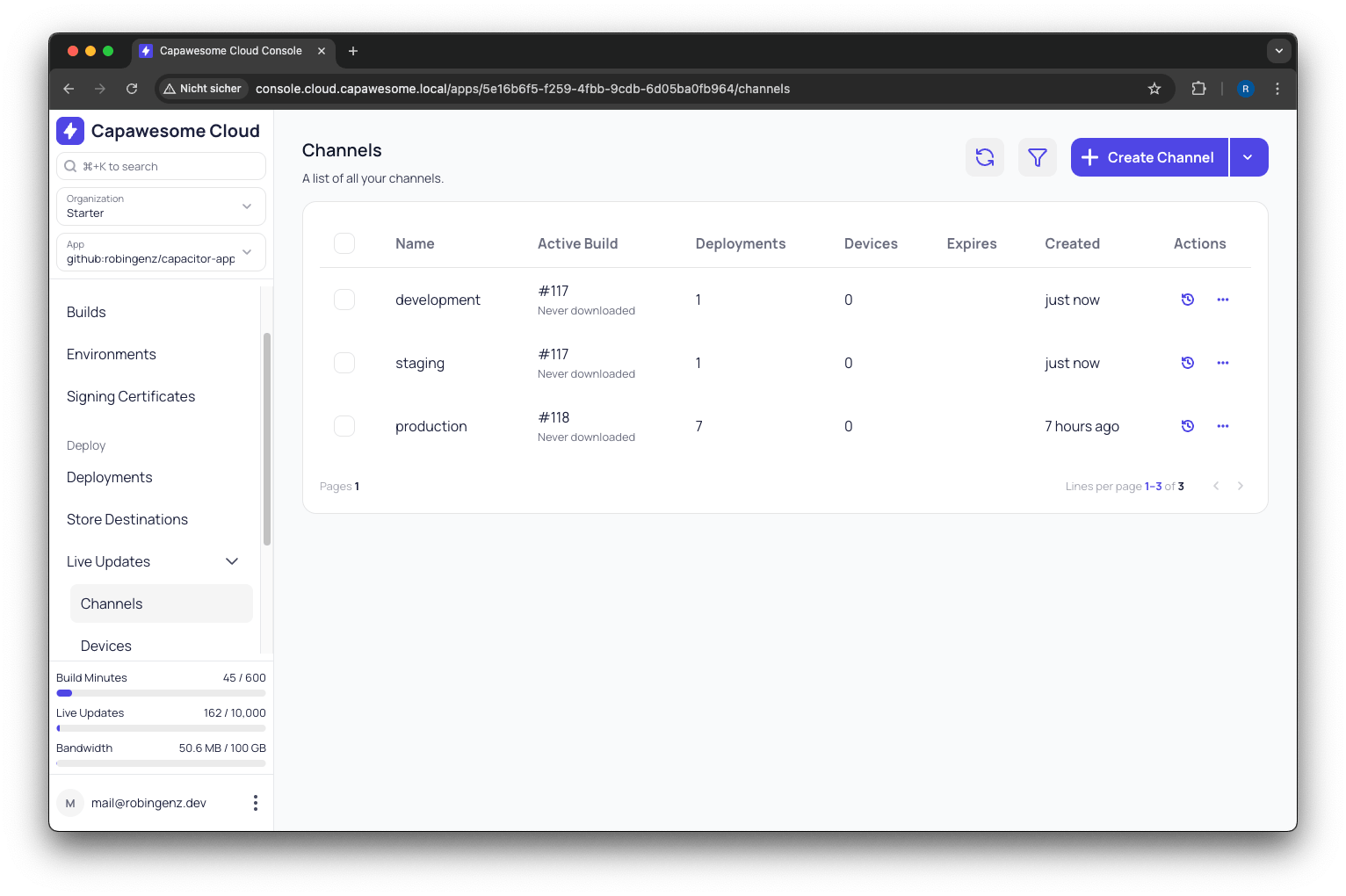
Channels are now required to deploy Live Updates. Previously, you could create bundles without assigning them to a channel. To ensure backward compatibility, we've automatically assigned all bundles without channels to a default channel called "default-20250118".
If your Live Update SDK requests a bundle without specifying a channel, it will automatically receive updates from this default channel. You can rename or delete this channel as needed—just make sure to update your SDK configuration if you make changes.
One Active Build per Channel
Each channel now has one active web build. This simplifies management significantly—no more juggling bundle limits, no more deciding which bundles to keep or delete. When you deploy a new build to a channel, it becomes the active build for that channel.
No More Storage Limits
Inactive build artifacts are automatically deleted after your plan's data retention period. This means you no longer need to manually set expiration dates or channels to clean up old bundles. The system handles cleanup for you, and you only keep what you need.
Current Limitations
While we're excited to launch Web Builds, there are a few limitations to be aware of:
- Manifest Type Support: Currently, our build system only supports creating bundles with manifest type
zip. Support for artifact typemanifestis coming in the next few weeks. In the meantime, you can continue using the Capawesome CLI to create manifest-type bundles locally.
We're actively working on removing these limitations and will announce updates as soon as they're available.
What's Next
Over the next few days, we'll be updating our documentation to reflect all the changes introduced with Web Builds. You'll find updated guides, examples, and best practices for using the new build and deployment system.
We'd love to hear your feedback on this new feature! What do you think? Are there additional features or improvements that would make Web Builds even better for your workflow? Join our Discord community to share your thoughts, ask questions, and help us shape the future of Capawesome Cloud.
Ready to build and deploy Live Updates faster than ever? Get started with Capawesome Cloud Web Builds today and experience the simplicity of cloud-based deployment.